Empowering Over 6,000+ Teams
to Optimize Their Workflows

Logo 1
Logo 2
Logo 3
Logo 4
Logo 5
Logo 6
Logo 1
Logo 2
Logo 3
Logo 4
Logo 5
Logo 6
Logo 1
Logo 2
Logo 3
Logo 4
Logo 5
Logo 6

Why Time In Status Reports Matters

 Knowing where your team’s time is spent can drastically improve your project management, and Time in Status enables teams to measure time and optimize processes.

Immediate Bottleneck Detection

With Jira Time in Status Reports, you’ll never be caught off guard by project delays. Quickly identify where tasks are getting stuck, allowing you to take swift action and keep your team moving forward, even when challenges arise.

Transparency into Task Statuses

Get a real-time view of every task in your project, from start to finish. Such transparency empowers you to optimize processes, prevent mistakes, and deliver results more efficiently, keeping your team focused and your clients satisfied.

Simplified, Centralized Data

With Time In Status Reports, you’ll have accurate, up-to-date data at your fingertips. This ensures every decision you make is based on the latest information, giving you the confidence to drive your projects to success.

Time-Efficient Reporting

No more searching through multiple platforms or tools. Time In Status Reports consolidates all your project data into one easy-to-read report, so you can access the insights you need in seconds, enabling smarter, faster decision-making.

How Time In Status Reports Works

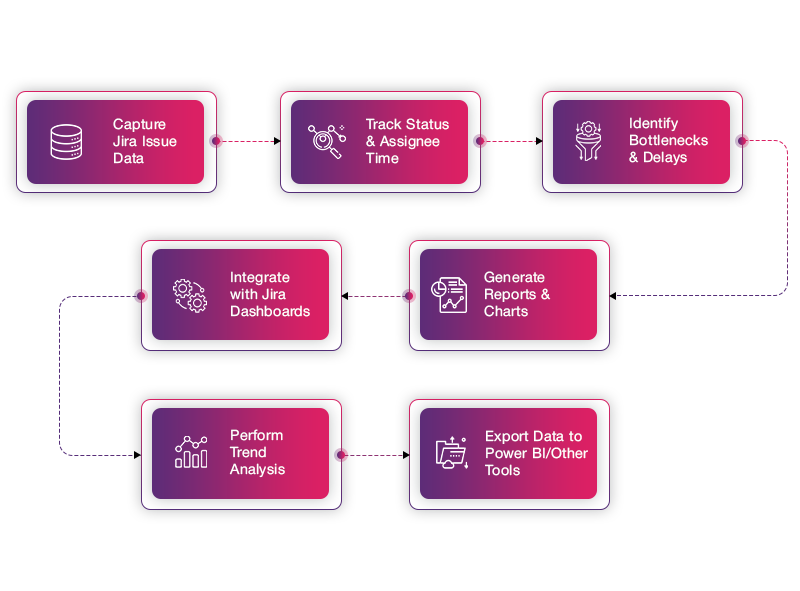
From setup to optimization, understand how to integrate, track, visualize, and optimize your Jira Workflow with Time in Status.

Step 01

Seamlessly Integrate with Jira

Start by linking Time in Status Jira to your Jira account. The integration is quick and simple, requiring no complicated configurations.

Once connected, you're ready to begin tracking the status of your Jira issues automatically.

Step 02

Automatic Time Tracking Starts Immediately

As soon as you’re connected, Jira Time in Status Reports automatically starts tracking how long each Jira issue spends in each status (e.g., ‘To Do’, ‘In Progress’, ‘Done’).

No manual logging needed—everything is captured in real-time, right from your existing Jira workflow.

Step 03

Visualize Task Bottlenecks in Real-Time

After the data is captured, Time in Status Jira generates visually intuitive reports inside Jira.

Immediately see where bottlenecks are happening. With color-coded charts and visuals, you can pinpoint where tasks are getting stuck in the workflow and take swift action to remove barriers.

Step 04

Get Actionable Insights to Improve Workflow

With actionable insights generated directly from Jira data, you can now make quick decisions.

Leverage the detailed reports to identify inefficiencies in your Jira workflow. Make data-driven decisions to optimize resources, improve task prioritization, and eliminate process bottlenecks.

Step 05

Continuously Optimize Your Jira Workflow

As you generate more reports, you’ll gain deeper insights into your Jira workflows. The more data you collect, the better your understanding of where efficiencies can be made.

Features That Make a Difference

How does it  work?

Testimonials

Quotes

The Time in Status Reports app is a great tool for tracking the time tasks spend in different statuses. The interface is user-friendly, and the reports provide valuable insights into workflow efficiency. The customization options are helpful, allowing us to tailor reports to our team's needs. Overall, a solid app that helps improve visibility into process bottlenecks!” 

Richard Brand

Rating
Quotes

The application provides the expected service and I genuinely value the client-oriented approach and the ability to take our feedback into account and implement it swiftly. It's always a pleasure working with a team that is so responsive and attentive to our needs.

Maor Levinas

Rating
Quotes

A very easy to use application that provides different views on how and where process bottlenecks are. Especially the dashboard view is very helpful. And a very proactive support team to back it up!

Khushi Shah

Rating
Quotes

This is a very useful app for us to identify the waiting time of tickets in each status and also helps the number of times the transitions happened for each ticket. Getting quick responses from helpdesk for the queries about the application. Good job Team !!!

Giju V

Rating
Quotes

This app is very useful, my compliments to the dev team. Also, they have been very helpful explaining how the app having a call with me. Reccomended!

Giuseppe Basciu

Rating
Quotes

A great app that provides great insight into Capacity. Love the integration with the sprint dates and team templates to provide accurate planning support. Also, excellent support with any issues, with a fast response.

Paul Howarth

Rating

Frequently Asked Questions

What is the "Time in Status Reports" app for Jira?
The "Time in Status Reports" app for Jira helps you track the amount of time that issues spend in different statuses during their lifecycle. It provides reports and visualizations to help teams understand bottlenecks, workflow efficiency, and individual performance.
How do I install the "Jira Time in Status Reports" app in Jira?
+
To install the Jira Time in Status app in Jira, follow these steps:
  • Go to Jira Settings > Apps.
  • Click on Find new apps in the Atlassian Marketplace.
  • Search for "Time in Status Reports" by RVS and select the appropriate app.
  • Click Install and follow the on-screen instructions.
What kind of reports can I generate with "Time in Status in Jira"?
+
The app allows you to generate 20 + various reports, including:
  • Jira Time in Status: Shows the time spent by each user in each status.
  • Time with Assignee: Tracks time spent with each assignee.
  • Status Count : Displays how many times each issue went into each status.
  • Average Time in Status: Helps measure the average time spent in each status across different issues. and many more...
Can I customize the time tracking settings in the app?
+
Yes, you can customize several aspects of the time tracking, including:
  • Time Units: You can set time units to display in hours, minutes, or days.
  • Filter Criteria: Adjust filters to specify which issues, projects, or teams you want to include in reports.
  • Date Range: Set date ranges to track time spent in statuses within specific periods.
  • Calendar: Set the working calendar of your team to calulate time in status only for your working days and times.
Is the "Jira Time in Status Reports" app compatible with Jira Cloud and Jira Data Center?
+
Yes, the "Jira Time in Status Reports " app is available for both Jira Cloud and Jira Data Center, although installation steps may differ slightly between the two platforms. Always check the version compatibility for your Jira instance before installing.
Can I get time reports for closed or resolved issues?
+
Yes, you can generate reports for closed or resolved issues, provided the issues were tracked through the workflow statuses. Ensure that the report filters are set to include closed or resolved issues, and the data will reflect the time spent in each status before they were closed.
How can I analyze workflow bottlenecks using "Jira Time in Status"?
+
To analyze bottlenecks:
  • Generate a report of Average Time in Status for your issues.
  • Look for statuses where issues spend significantly more time than others.
  • Investigate those statuses to identify workflow inefficiencies, such as lack of resources or unclear process steps.
Does the app track time spent in custom statuses?
+
Yes, " Jira Time in Status" app tracks time spent in custom statuses as well. As long as the custom statuses are part of your Jira workflow, the app will monitor and report on time spent in each of them.
How can I share Jira Time in Status reports with my team?
+
You can export reports in formats like CSV or Excel and share them with your team. Alternatively, you can generate links to the reports within Jira and share them via email or internal communication channels.
Does the app integrate with other Jira apps or tools?
+
Yes, the "Jira Time in Status" app can integrate with various Jira apps and tools like Jira Software, Jira Service Management, and Jira Cloud. Additionally, it supports integration with third-party apps like Power BI, Google Sheets etc for advanced reporting and dashboards.