
Can Live Swagger Documentation Reduce API Review Delays?
Speed up approvals and reduce rework with Swagger API documentation in Confluence that stays current, clear, and easy for reviewers to access.
Published
Sep 21, 2026
Topic
Confluence
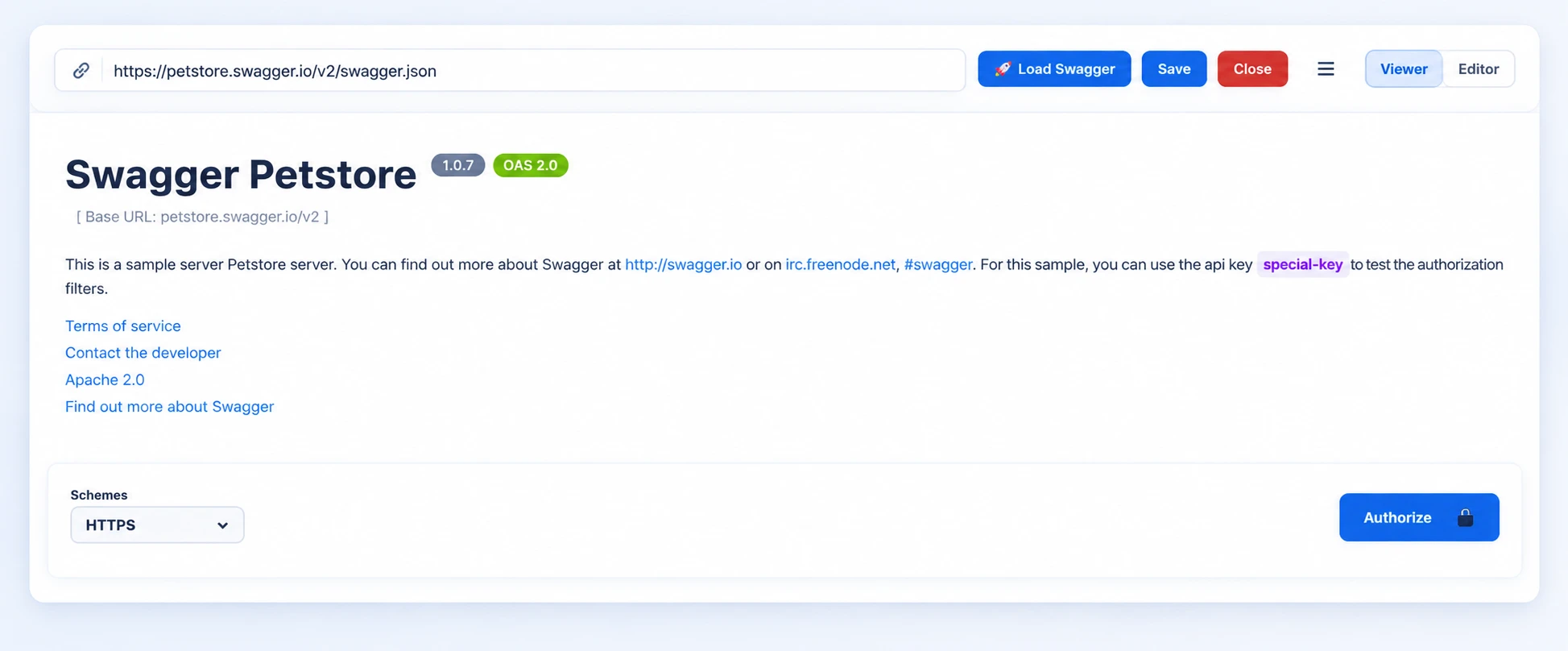
Stop Waiting on Static API Review Packets
Live API documentation can make reviews easier because everyone sees the same API contract at the same time. Instead of passing around exported files, screenshots, copied tables, and old links, we can give your review group one clear place to inspect what the API does and what has changed.
We often see API reviews slow down for reasons that have little to do with the actual design. A product owner may be reading one version of the specification while a developer has already changed an endpoint. A security reviewer may not see authentication details. A technical writer may be missing the request and response examples needed to explain the feature clearly.
Common delay triggers include:
- Unclear endpoint purposes or naming
- Missing request, response, and error examples
- Undocumented authentication and authorization requirements
- Conflicting versions of Swagger or OpenAPI specifications
- Feedback scattered across Jira issues, email threads, and chat messages
September is a smart time to address these problems. As teams prepare Q4 releases, confirm roadmap commitments, and work toward year-end delivery dates, approval bottlenecks become more noticeable. Live Swagger documentation gives reviewers a shared view of endpoints, schemas, parameters, and updates before work moves forward.
Live Specs Create a Single Review Source
A static API document can be accurate the moment it is published and still become unreliable soon after. A PDF, spreadsheet, or copied Confluence table does not automatically follow development changes. When the Swagger or OpenAPI source changes, reviewers may be left wondering whether the attachment in their inbox is still correct.
With Swagger API documentation in Confluence, we can keep the current technical definition close to the work that explains it. Your team can place the live API content alongside business requirements, architecture decisions, user stories, release notes, and support guidance. That creates a more complete review space without forcing people to jump between tools or request the latest file.
This setup helps each reviewer focus on the questions that matter to them:
- Product managers can check whether endpoints support the intended customer workflow.
- QA teams can identify test cases, error conditions, and edge cases earlier.
- Security reviewers can examine authorization methods and data models.
- Technical writers can spot missing details before customer documentation is written.
A live specification does not replace formal approval. It simply removes avoidable delays caused by version confusion, inaccessible details, and feedback that gets lost in separate systems. That gives your team more room to discuss meaningful design, security, and usability concerns.
Swagger API Documentation in Confluence Keeps Reviews Moving
For faster reviews, we recommend starting each API page with plain-language context. Explain the API's purpose, intended users, dependencies, authentication approach, and current release status. Then place the live Swagger or OpenAPI content directly below that context. Nontechnical reviewers can understand the "why," while developers and other technical reviewers can inspect the "how."
Review requests also work better when they are specific. Asking someone to "review the API" can feel too broad, especially when the specification covers many endpoints. Instead, direct each group toward a focused decision. Product teams can confirm expected endpoint behavior. Security teams can validate access controls. QA teams can review error responses, validation rules, and unusual cases.
Confluence comments and page history can also support accountability. When the full review group can access the same page, feedback stays connected to the relevant endpoint, requirement, or release choice. Your team can see who approved a change, what questions came up, and whether the updated specification addressed those concerns.
At RVS Softek, we bring Atlassian expertise to workflows that connect Jira delivery work with Confluence knowledge sharing. The goal is not just to display an API specification. We want to help make it an active, useful part of your team's approval process.
Build a Faster, More Accountable Review Workflow
A repeatable process helps live documentation stay useful rather than becoming another page people forget to check. Developers can update the Swagger or OpenAPI definition as part of normal development work. The related Confluence page can reflect that current specification, while reviewers receive a clear request that explains the deadline, scope, and acceptance criteria.
Jira and Confluence can provide useful traceability when pages and work items are connected. Link the API documentation to relevant epics, stories, bugs, and change requests so reviewers understand why an endpoint changed and what customer or operational need it supports. This is especially helpful when several APIs affect the same release or when development, support, and compliance teams need to review the work together.
Simple governance can keep the process clear without adding unnecessary bureaucracy. Set expectations for who owns specification updates, who approves breaking changes, and how quickly reviewers should respond. Consistent page templates and labels also make API reviews easier to find and easier to understand.
A short checklist at the top of each review page helps too. List the specification version under review, the endpoints that changed since the last approval, the reviewers expected to sign off, and the date feedback is due. When a review closes, record the decision and link the approved version, so the next person who opens the page can see what was agreed and why without searching through old comments or email threads.
As Q4 planning takes shape, we recommend reviewing high-impact integrations, customer-facing APIs, and planned breaking changes early in the fall. A steady workflow can reduce last-minute approval pressure and prevent unresolved questions from carrying into a busy release period.
Make Your Next API Review Easier to Approve
Live Swagger documentation can reduce API review delays by making accurate technical information easier to find, understand, and discuss. Rather than relying on outdated attachments and scattered feedback, your team can work from a shared, traceable review experience that supports better decisions.
Take a close look at your current process. If reviewers regularly ask for the latest specification, struggle to locate endpoint details, or share feedback only after development is nearly complete, it may be time to bring Swagger API documentation into Confluence. Clear ownership, focused review questions, and one current source of truth can help every approval move with fewer surprises.
Make API Reviews Easier To Manage
At RVS Softek, we help teams establish Swagger API documentation in Confluence that supports clearer collaboration and faster decisions. Our approach can help you organize specifications, define review workflows, and keep stakeholders aligned throughout the API lifecycle. Ready to improve your documentation process? Contact us to discuss your needs.
Written by the team building RVS Softek's apps for Jira and Confluence.
Ask us a questionMore from the blog
Admin Rescue Kit: Master JQL to Solve Data Chaos & Restore Structural Integrity
When your Jira instance looks fine on the surface but the data no longer adds up, structural integrity has failed. This admin rescue kit uses JQL as a systemic diagnostic utility — five phases to audit your instance, validate hierarchies, clean up data decay, and move from manual fixes to a self-healing system.
How to Use SLA in Jira: Step-by-Step Guide to Track Performance in 2026
Learn how to use SLA in Jira for better ticket tracking, faster response times, and improved team performance. This 2026 guide covers how to set up, monitor, and automate SLA tracking, avoid common mistakes, and use the right tools to stay compliant.
Jira Query Language: 21 Essential JQL Examples to Boost Your Workflow
JQL lets you filter and find exactly what you need from the complex web of Jira issues. This guide walks through 21 practical JQL examples — 15 for your daily workflow and 6 advanced queries for power users — plus how to plug them into Jira automation to save time and cut errors.
Find the RVS Softek app your team needs
Browse the catalogue for Jira, Confluence and monday.com — or install straight from the Atlassian Marketplace and start a free trial in minutes.
- Free trial on every paid app
- Runs on Atlassian
- Support in one business day
16 apps · 1,873+ installs · Runs on Atlassian