
The Ultimate Guide to Capacity Planning in Jira with Capacity Planner
Struggling to balance workloads and meet project deadlines? This guide explains how to use Capacity Planner in Jira to manage team availability, allocate resources effectively, and keep every project on track. Learn how capacity planning can help you forecast demand, prevent burnout, and ensure smooth project delivery.
Published
Nov 19, 2025
Topic
Guides

Have you ever struggled with ensuring your team has the right resources to meet project demands?
If so, you're not alone!
Managing project capacity can often feel like a balancing act, especially when you're trying to forecast future needs while managing current workloads. Teams are juggling multiple tasks with different deadlines, and without clear visibility into capacity, it's difficult to know if resources are overburdened or underutilized.
The key to efficient project delivery lies in effective capacity planning. But how can you ensure your resources are optimized? The answer is simple: by using Capacity Planner in Jira.
In this blog, we'll dive into capacity planning in Jira, explore its importance, and show you how the Capacity Planner tool helps you allocate resources efficiently, improve project timelines, and boost overall team performance.
When is Jira Capacity Planning even required?
Jira capacity planning is useful and required any time you're trying to ensure that your supply meets demand. This means whether it's a week, month, quarter, year, or more, capacity planning is always a good idea and a rule of thumb to stick to.
For many businesses, leaders and managers have a lot to handle. Among some of their responsibilities are:
- Keeping track of autonomous teams
- Being aware of changing priorities
- Preparing for unpredictable tasks
- Matrix structures
- Handling remote workers
- The space between actual work and planned work (i.e., the reality of the situation)
With so many moving parts, it doesn't make sense to go forward without a plan. Having a Jira capacity planning strategy is a great way to get ahead of the challenges that are sure to arise.
5 Reasons Why Jira Capacity Planning is Important
Here are five key reasons for implementing Jira capacity planning that you can use to make your section more impactful:
1. Optimized Resource Allocation
Jira capacity planning ensures that the right amount of resources—whether human, financial, or technological—are allocated to the right tasks at the right time. This prevents resource shortages or overutilization, allowing for more effective and efficient project execution.
2. Improved Project Timelines
By forecasting available capacity, businesses can set more realistic timelines for projects. This helps avoid delays, ensuring that projects are completed on time and that teams aren't stretched too thin, leading to better overall performance.
3. Proactive Risk Management
Jira capacity planning helps identify potential bottlenecks, resource shortages, or overwork before they impact operations. With this foresight, businesses can address challenges early, minimizing risks and disruptions in the workflow.
4. Better Decision-Making
By having clear insights into resource availability and project demands, capacity planning empowers business leaders to make informed decisions about hiring, shifting priorities, and allocating resources. This leads to more strategic, data-driven decision-making.
5. Sustained Business Growth
As your business scales, capacity planning ensures that resources grow accordingly. Whether it's for increasing team size, upgrading technology, or adjusting processes, capacity planning helps businesses manage growth without compromising performance or quality.
Jira capacity planning is a great way to invest your time because it helps you address possible future issues, take advantage of the benefits that come with planning, improve team performance, and streamline your business tasks for increased efficiency.
How does Jira Capacity Planning Help in Sprint Planning?
To keep things organized, many companies practice Sprint Planning. Sprint planning refers to organizing and assigning all tasks to the right team members within a certain period of time.
In many cases, sprint planning is dependent on each team member doing their part. This means that once a task is done, another team member can start their task, and so on. If one team member falls behind, it could derail the process to some degree, but this is where capacity planning comes in.
With capacity planning, sprint planning is made tighter, more efficient, and achievable. When you prepare for possibilities like missed deadlines, not having enough workers or product, or even bottlenecks in the supply chain, you're better equipped to handle such issues should they come up.
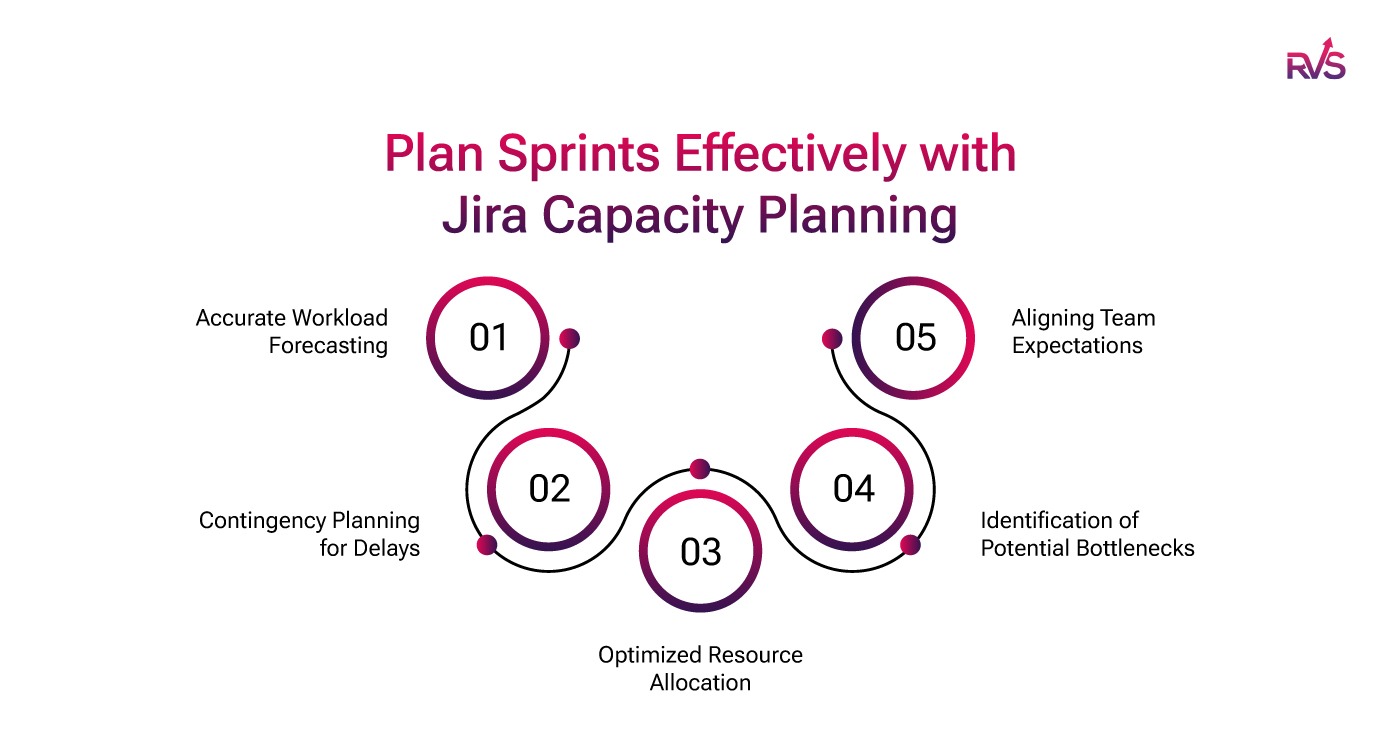
Here's how they work:
1. Accurate Workload Forecasting
Jira capacity planning helps estimate the total amount of work that can be completed during a sprint based on the team's availability and capacity. By considering factors like vacation time, existing workload, and skillsets, teams can avoid overcommitting and ensure a more realistic sprint scope.
2. Contingency Planning for Delays
No matter how well a team plans, unexpected issues—such as team members falling behind or unanticipated bottlenecks—can occur. Jira capacity planning ensures that teams have contingency plans in place, such as backup resources or a buffer period, to mitigate delays without derailing the entire sprint.
3. Optimized Resource Allocation
With capacity planning, you can match tasks to the right team members based on their skills, availability, and workload. This ensures that each team member's workload is balanced and that no one is overwhelmed, helping to maintain team morale and performance throughout the sprint.
4. Identification of Potential Bottlenecks
By analyzing resource constraints early in the sprint planning process, capacity planning helps identify potential bottlenecks before they happen. For example, if certain tasks depend on a specific resource or team member, capacity planning can highlight whether those resources are available and ensure that dependencies are managed effectively.
5. Aligning Team Expectations
With a clear understanding of what can realistically be achieved within a sprint, Jira capacity planning aligns team expectations and reduces the risk of disappointment or stress. Everyone knows what's achievable, and the team can focus on delivering quality work rather than rushing to meet unrealistic deadlines.
In a way, capacity is like having a Plan A and a Plan B in one: you have your main course of action as well as several contingency plans should anything go wrong, become delayed, or need extra attention.
Capacity Planning Benefits
If you're looking for the main benefit of capacity planning, there are actually quite a few! Businesses that adopt a capacity planning methodology to increase efficiency and meet demand may find themselves enjoying some or all of the following benefits:
1. Identify Inefficiencies in Your Processes: Capacity planning helps you spot areas where resources are being wasted or overworked. This allows you to improve your workflow, making everything run more smoothly.
2. Enhanced Project Scheduling: With capacity planning, you can create more accurate schedules, knowing exactly how much work can be done and when. This helps you set realistic deadlines and avoid delays.
3. Increase Delivery Capacity: Capacity planning ensures you have enough resources to handle more work when needed. It helps you scale up your operations without falling behind or compromising quality.
4. Confirm Availability: Capacity planning allows you to check if your team or resources are available before committing to new projects. This helps avoid overloading your team and ensures you can meet deadlines.
Capacity Planner: The Most Effective Jira Capacity Planning Tool
The Capacity Planner by RVS Softek is a powerful Jira capacity planning tool designed to streamline resource management and project planning within Jira. By offering seamless integration with Jira's issues, sprints, and versions, it simplifies capacity planning, ensuring that your teams are always prepared to meet project demands while avoiding overburdening.
Key Features:
1. Team Capacity Management: Easily define your team's working hours and availability within Jira. The Capacity Planner allows you to allocate tasks based on actual capacity, ensuring that workloads are evenly distributed and deadlines are met without overwhelming your team.
2. Jira Integration: The tool integrates seamlessly with Jira, allowing you to track and compare estimated vs. actual efforts automatically. This integration helps you adjust forecasts, manage sprints, and track progress in real-time, making Jira resource capacity planning efficient and accurate.
3. Real-Time Dashboards & Reports: With dynamic dashboards, Capacity Planner gives you a real-time overview of team utilization and workload distribution. You can quickly identify bottlenecks or underutilized resources, enabling data-driven decisions that help keep projects on track and optimize team performance.
4. Leave & Holiday Tracking: Capacity Planner helps you stay on top of team availability by tracking leave and public holidays. This ensures that your capacity planning remains accurate, allowing you to adjust resource allocation when team members are out, ensuring smooth project execution.
By providing a comprehensive, integrated view of your team's capacity, the Capacity Planner by RVS empowers you to plan better, allocate resources effectively, and keep projects moving forward on schedule.
How Jira Capacity Planner by RVS helps you achieve all this:
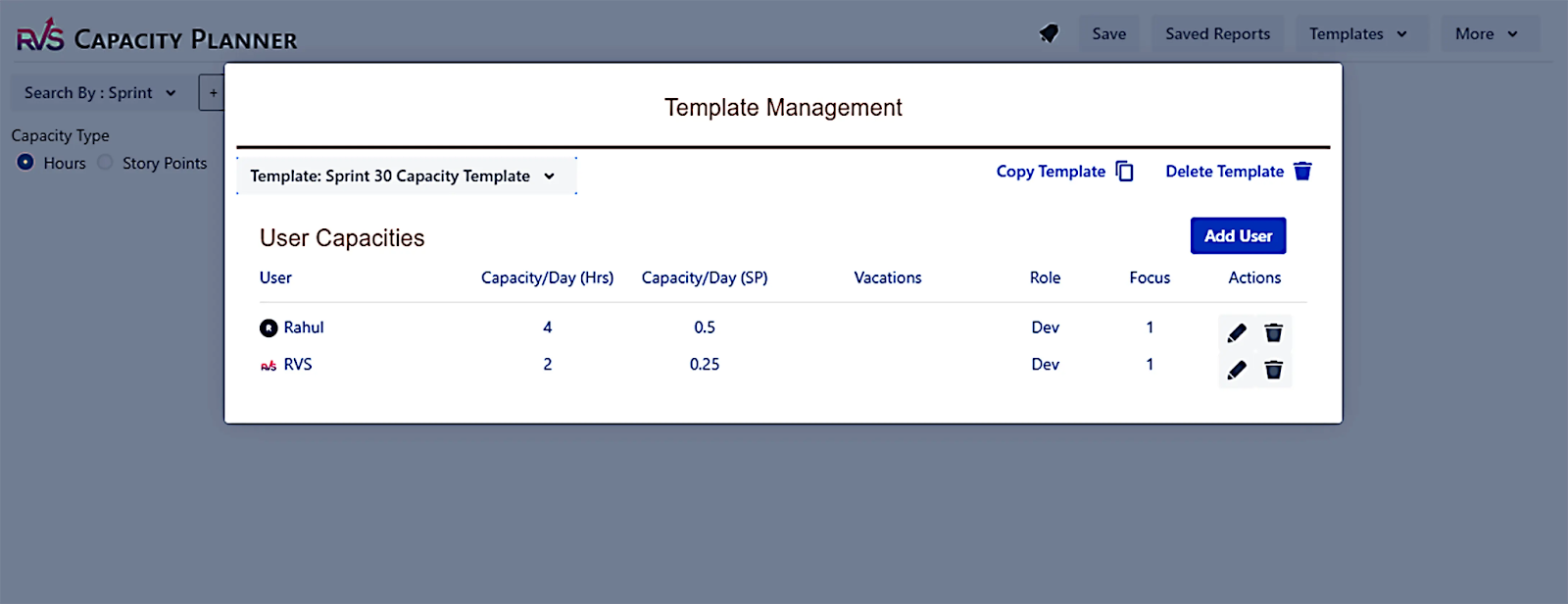
Templates — Define the capacity for your resources and save it for future reuse.

Capacity Tracking — Allows users to view the Capacity Tracking overview and details.
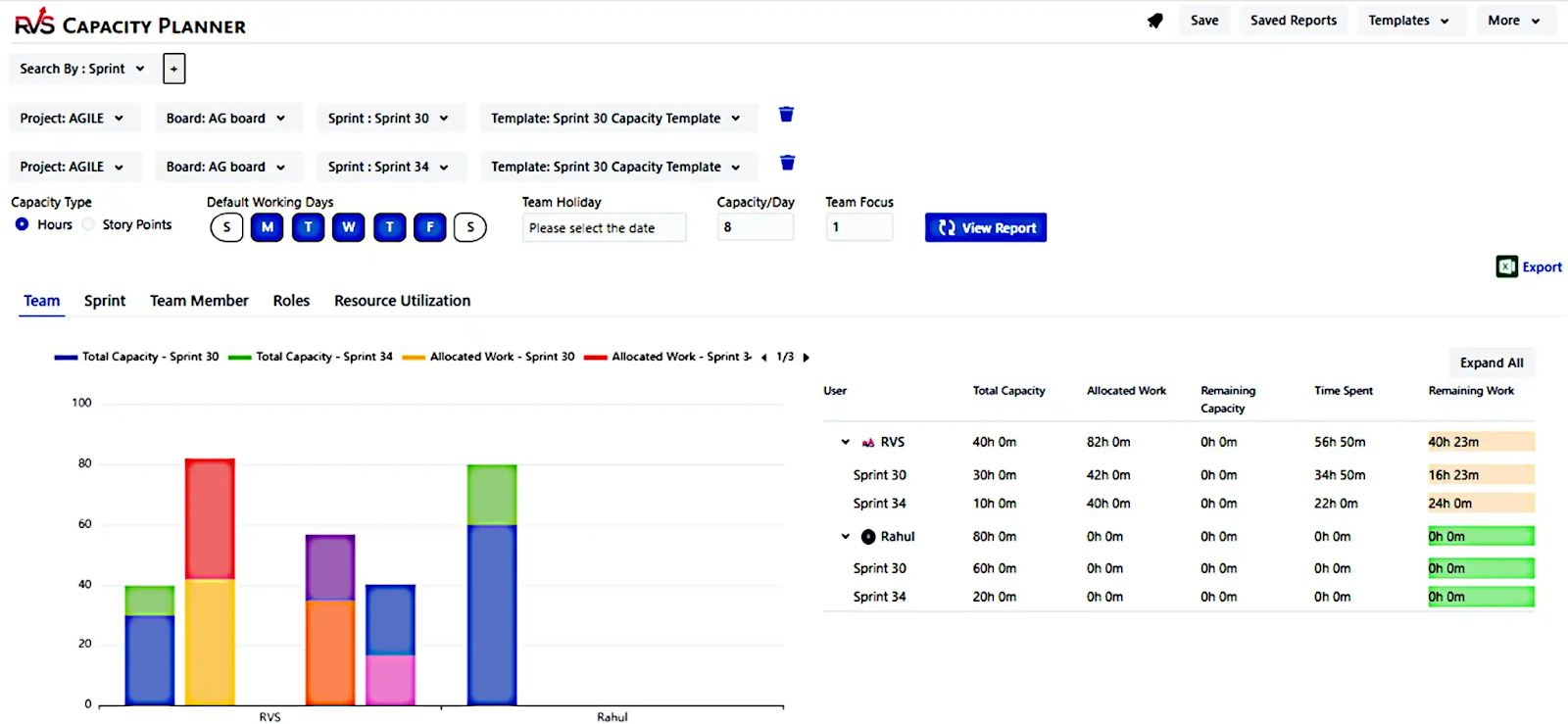
Select "Sprint" or "Project – Fix Version" and "Template" to track the capacity for your team. You can also add:
- Team holidays
- The capacity planned per day for each resource in the sprint.
The app will show the total capacity for the sprint/project, the allocated capacity, and the remaining, as per the screen shown below.
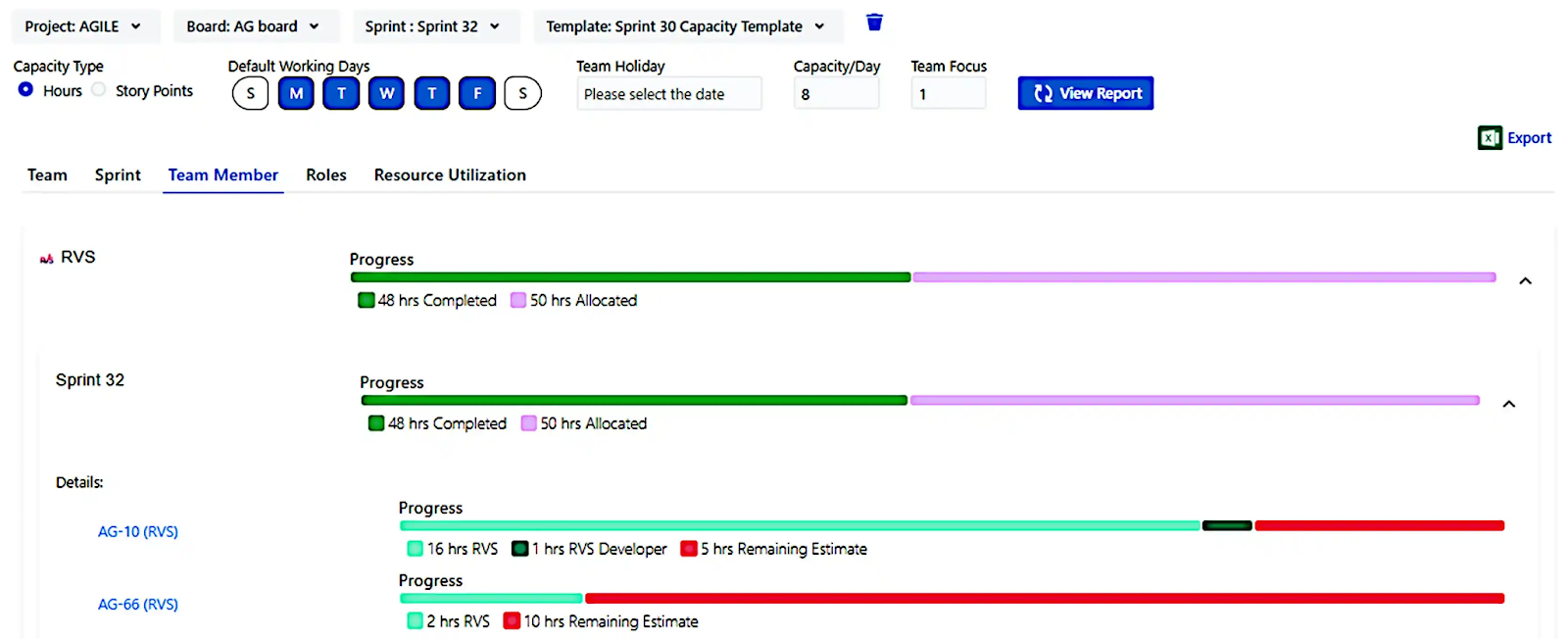
Track detailed tasks per team member — The team member tab displays the detailed tasks assigned to each team member and the time / story points logged against each task.
Capacity Tracking per role — The app allows you to define the roles in your team and subsequently assign the role to the team member.
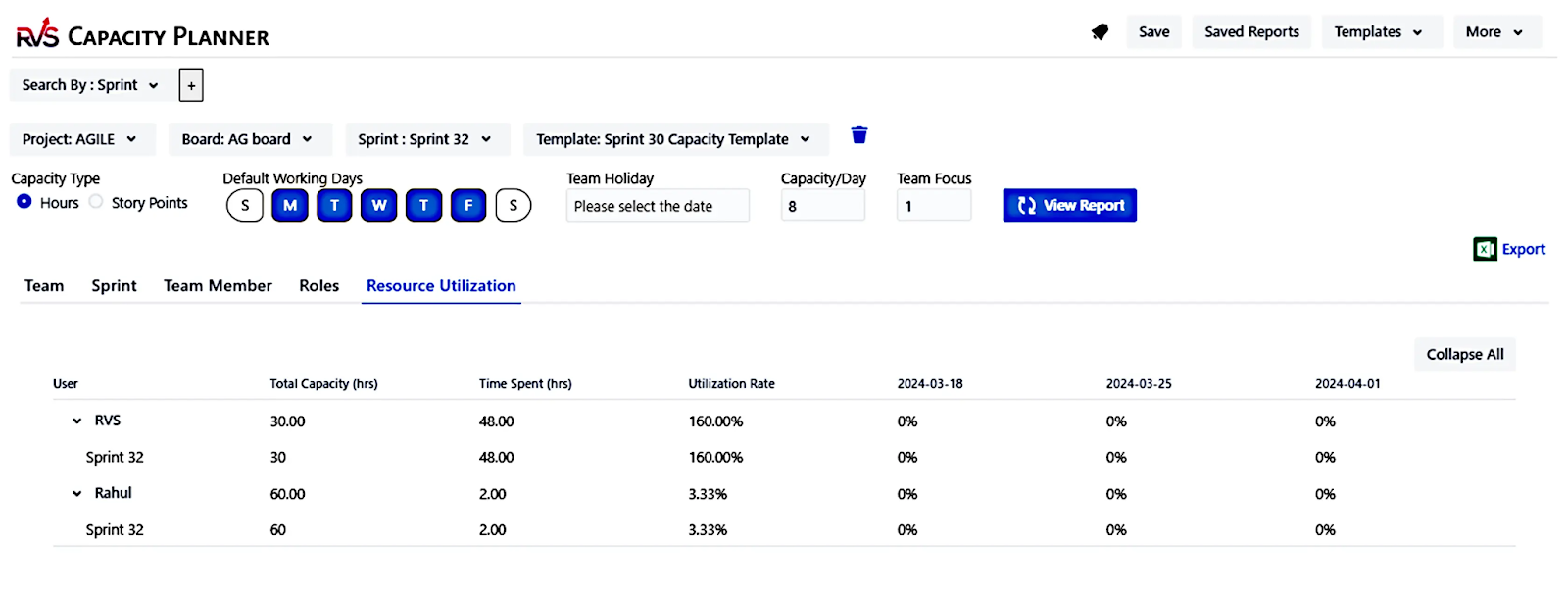
Resource Utilization Report — This report is useful for tracking the over- or underutilization of your team members in a single view.
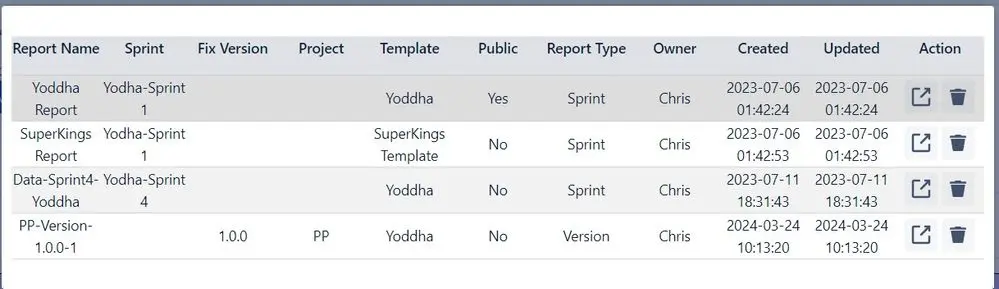
Save your Reports — The reports created can be saved for reuse and can be kept public or for private use.
Conclusion
Jira capacity planning in Jira is essential for efficient resource management, workload balancing, and project success. By leveraging Jira's built-in features, reports, and integrations, teams can optimize their capacity planning processes, improve productivity, and deliver projects on time. Implementing best practices ensures that teams maintain a sustainable workload while achieving organizational goals effectively.
Try the Jira Capacity Planner tool by RVS to allocate resources (people, time, and skills) efficiently across various tasks and projects.
Ready to improve your workflow? Book your RVS demo today.
Frequently asked questions
1. What is Capacity Planning in Jira Advanced Roadmaps?
Capacity planning in Jira Advanced Roadmaps helps you allocate resources effectively by forecasting available team capacity based on work hours, skill sets, and sprint schedules. It ensures you don't overcommit resources and helps teams meet deadlines.
2. How do you perform capacity planning in Jira?
To perform capacity planning in Jira, go to your Advanced Roadmaps, define team members' working hours, set availability, and adjust workload distributions. This helps in aligning your resources with project goals and improving project delivery times.
3. Why is capacity planning important in Jira Advanced Roadmaps?
Capacity planning in Jira Advanced Roadmaps ensures that you can manage resource allocation, balance workloads, and avoid overburdening your team. It helps maintain productivity, meets deadlines, and provides a realistic view of project timelines.
4. How can I visualize capacity planning in Jira Advanced Roadmaps?
In Jira Advanced Roadmaps, you can use the Team Capacity view to visualize available capacity, resource utilization, and workload distribution. This helps identify overcommitment, underuse, or potential bottlenecks in your teams' capacity.
5. How do I adjust capacity planning in Jira for different team members?
To adjust capacity planning in Jira, you can set individual work hours and availability for each team member in Advanced Roadmaps. You can also customize settings to account for specific working hours, holidays, and team member skills, ensuring accurate resource allocation.
6. Can Jira Advanced Roadmaps help with balancing multiple projects?
Yes, Jira Advanced Roadmaps supports capacity planning across multiple projects by allowing you to manage and allocate resources effectively. You can track team capacity, assign tasks, and ensure that resources are evenly distributed to avoid overwork and project delays.
7. What metrics should I track in capacity planning within Jira Advanced Roadmaps?
In Jira Advanced Roadmaps, track team availability, workload distribution, task completion rate, and capacity utilization to ensure your team is not overwhelmed. These metrics help you monitor progress, avoid bottlenecks, and ensure optimal resource usage during project execution.
Written by the team building RVS Softek's apps for Jira and Confluence.
Ask us a questionMore from the blog
How to Choose Atlassian Forge for Growing Teams
Learn when Atlassian Forge app development is the right choice for secure, scalable Jira and Confluence solutions that support your team's goals.

Admin Rescue Kit: Master JQL to Solve Data Chaos & Restore Structural Integrity
When your Jira instance looks fine on the surface but the data no longer adds up, structural integrity has failed. This admin rescue kit uses JQL as a systemic diagnostic utility — five phases to audit your instance, validate hierarchies, clean up data decay, and move from manual fixes to a self-healing system.

How to Use SLA in Jira: Step-by-Step Guide to Track Performance in 2026
Learn how to use SLA in Jira for better ticket tracking, faster response times, and improved team performance. This 2026 guide covers how to set up, monitor, and automate SLA tracking, avoid common mistakes, and use the right tools to stay compliant.
Find the RVS Softek app your team needs
Browse the catalogue for Jira, Confluence and monday.com — or install straight from the Atlassian Marketplace and start a free trial in minutes.
- Free trial on every paid app
- Runs on Atlassian
- Support in one business day

16 apps · 2,010+ installs · Runs on Atlassian