In this blog, we explore how Jira administrators can use JQL (Jira Query Language) to address common issues in their Jira instances. From fixing broken hierarchies and detecting workflow friction to automating audits and creating self-healing systems, this guide provides practical steps to clean up data, improve reporting accuracy, and ensure a reliable Jira environment.
As a Jira administrator, you may manage a system that appears functional on the surface but reveals significant data discrepancies upon closer inspection. Dashboards often report hundreds of active issues that haven't been updated in months, while roadmaps underreport progress due to disconnected issue hierarchies.
These symptoms indicate a failure in Structural Integrity. When your Jira instance is structurally unsound, data loses its reliability and stakeholders lose confidence in your reporting.
Indicators of Structural Instability
Reporting Misalignment: Issues marked as "Done" that still appear in "Unresolved" reports due to missing resolution values.
Hierarchical Fragmentation: "Orphaned" tasks not linked to Epics, causing gaps in high-level portfolio visibility.
Workflow Inconsistency: Parent issues transitioned to terminal statuses while child sub-tasks remain active.
Data Stagnation: A high volume of open issues with no recent updates, inflating the backlog and obscuring team capacity.
The Bottom Line: Reliable decision-making requires a "Single Source of Truth." If your Jira foundation is compromised by inconsistent data, your reporting will provide a distorted view of project health.
In this guide, we move beyond basic searching to use JQL as a systemic diagnostic utility. We will explore how to audit your instance, validate hierarchical integrity, and restore the professional standards required for a trustworthy Jira environment.
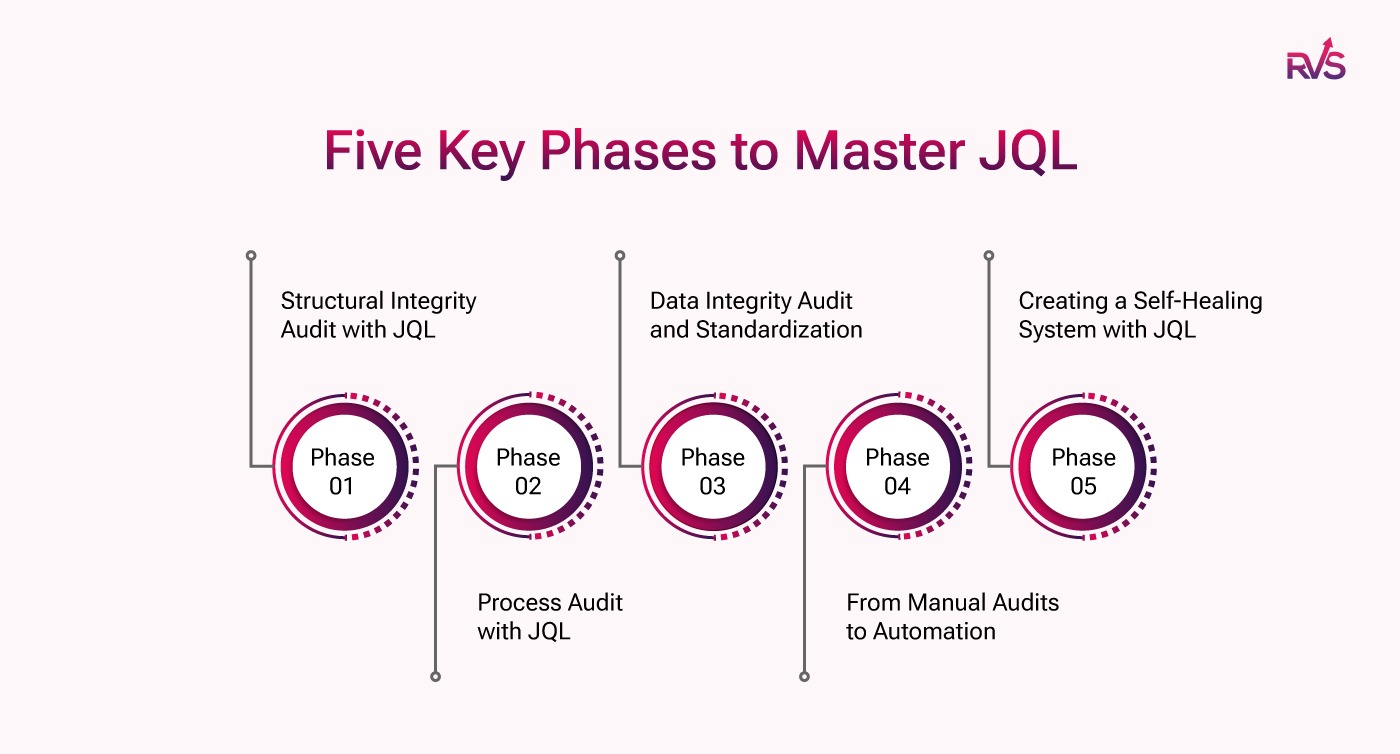
Five Phases of Mastering JQL to Restore Structural Integrity
In this guide, we’ll walk you through five key phases designed to help you master JQL (Jira Query Language) and restore structural integrity to your Jira instance. Each phase tackles a crucial part of the process, helping you identify and fix data chaos in your system:
Phase 1: Structural Integrity Audit with JQL – Using JQL to find and fix broken hierarchies, ensuring every issue is properly linked.
Phase 2: Process Audit with JQL – Detecting workflow friction and inefficiencies in your Jira processes using powerful JQL queries.
Phase 3: Data Integrity Audit and Standardization – Cleaning up redundant or inconsistent data to improve accuracy and reporting reliability.
Phase 4: From Manual Audits to Automation – Automating your JQL audits with subscriptions and alerts for proactive monitoring.
Phase 5: Creating a Self-Healing System with JQL – Transitioning from manual audits to a self-sustaining, automated Jira environment that continuously maintains its integrity.
By following these five phases, you’ll gain the expertise to use JQL to audit, clean, and optimize your Jira instance, making it a reliable and efficient system for your team’s needs.
Broken hierarchies in Jira, like orphaned tasks or mismatched parent-child relationships, can cause major issues in your project visibility and reporting accuracy. In this section, let’s understand how to identify and fix these structural problems, ensuring that every task and sub-task is properly linked, and your project data remains reliable.
The "Orphaned" Issue
One of the most common issues administrators face is orphaned issues. These are tasks or stories that aren’t linked to an epic, and they often disappear from high-level roadmaps, making it difficult to track their progress. To find these issues, you can run the following JQL query:
issuetype in (Story, Task) AND "Epic Link" is EMPTY
This query will help you find all the tasks and stories that lack an Epic Link. Orphaned issues might seem inconsequential, but they can skew your high-level project reporting, leaving your Roadmap looking incomplete and untrustworthy.
The "Incomplete Termination"
Another structural problem is when issues marked as Done or Resolved don’t have a Resolution value. Missing resolutions are the #1 cause of reporting errors in Jira. This can lead to inaccurate reports, such as items incorrectly showing as unresolved.
To fix this, run the following query:
statusCategory = Done AND resolution is EMPTY
This simple check can save hours of confusion, ensuring that all completed issues are properly logged with resolutions. With the right JQL Operators, you can maintain consistent, reliable data that won’t let you down.
The Sub-task Paradox
A perplexing issue for admins is when a parent issue is closed, but its sub-task remains open (or vice versa). This discrepancy can cause inconsistencies in your workflow, leaving you with incomplete tasks that can impact project delivery.
To find these mismatched issues, use the following query:
parent = [PARENT-ISSUE-ID] AND status != Closed
This will highlight cases where a parent issue has been completed, but its sub-task hasn’t been resolved. Regularly running this JQL query will help you maintain consistent workflows and eliminate these paradoxical situations.
Phase 2: Process Audit: Detecting Workflow Friction
Workflow friction occurs when issues move inefficiently through your lifecycle or bypass established protocols. These irregularities often mask deeper process bottlenecks that disrupt team velocity. Using JQL to monitor state transitions allows you to identify where the process is failing.
Repetitive transitions between "In Progress" and "Reopened" often indicate unclear requirements or a failure in the QA handoff. Identifying these "loops" is essential for improving the quality of your development cycle.
Diagnostic Query: status changed TO "In Progress" AFTER -4w AND status WAS "Reopened"
The Goal: Isolate issues that are failing to move forward, signaling a need for intervention or clearer acceptance criteria.
Detecting Stagnation in Final Workflow States
Issues that remain in "QA," "Uat," or "Ready for Deploy" for longer than a standard sprint duration represent "stalled" value. These bottlenecks often occur during the final approval stages and can delay release cycles.
Diagnostic Query: status in ("QA", "Ready for Deploy", "UAT") AND statusCategory != Done AND updated < -10d
The Goal: Highlight tickets that have reached a plateau in the workflow, allowing admins to reallocate resources or clear blockers before the deployment deadline.
Addressing Unassigned Active Work (Ownership Gaps)
Operational gaps frequently occur when team members are reassigned or leave a project, leaving active tickets without an owner. This creates a "data void" where work is technically active but lacks accountability.
Diagnostic Query: assignee is EMPTY AND statusCategory = "In Progress"
The Goal: Ensure every active item has a clear owner. This query identifies work that has been started but is currently unmanaged, preventing it from being overlooked during sprint reviews.
This will help you find tickets that are still active but have lost their assignee, so you can quickly reassign them and get them back on track.
Phase 3: Data Integrity Audit and Standardization
Systemic data decay occurs when manual entry errors—such as inconsistent labeling or incomplete fields—accumulate over time. These inconsistencies degrade the quality of your analytics. A rigorous Data Integrity Audit ensures that your instance remains a reliable source of truth.
Inconsistent labeling (e.g., frontend vs. front-end) fragments your reporting and makes it impossible to pull an accurate cross-project view. Identifying these variations is the first step toward a standardized taxonomy.
Diagnostic Query: labels in (frontend, "front-end", "front_end") AND created > -24w
The Goal: Isolate naming variations to perform a Bulk Change operation, consolidating multiple tags into a single, official label.
Identifying High-Priority Documentation Gaps
Critical or High-priority issues that lack a description create significant operational risk. Without context, these tickets lead to miscommunication and delayed resolution times.
Diagnostic Query: priority in (Highest, High) AND description is EMPTY AND statusCategory != Done
The Goal: Ensure that all high-impact work is properly documented. This query allows Admins to flag incomplete tickets for immediate update by the reporter.
Managing Stale Data and Backlog Decay
Issues that have remained un-updated for more than six months often represent abandoned work or obsolete requirements. Leaving these in the active backlog inflates your data and obscures your team's true capacity.
Diagnostic Query: updated <= -180d AND statusCategory not in (Done)
The Goal: Identify stagnant issues for a "backlog grooming" session. These should either be closed, moved to a dedicated "Archive" project, or updated with current requirements.
This will show you issues that haven’t been updated in the past six months, helping you decide whether to delete them or move them to cold storage.
Phase 5: From Manual Audits to "Self-Healing" Systems
While manual audits are essential for identifying issues in your Jira instance, they can be time-consuming and reactive. In this phase, we’ll explore how to automate the process using JQL and Jira Automation, transforming your instance into a self-healing system. With proactive monitoring and automated alerts, you can catch and fix issues before they become problems, ensuring a healthier, more efficient Jira environment.
JQL Subscriptions as "Health Alerts"
Once you've identified these common issues using JQL Query Examples, you can set up JQL Subscriptions to automatically alert you when any of these problems occur. This acts like a "health alert" for your Jira instance.
Set up a weekly subscription to monitor for issues such as orphaned tasks, stalled workflows, or missing assignees. This proactive monitoring will ensure your instance remains in good health without requiring constant manual checks.
The Admin’s Sanity Dashboard
An essential tool for any Jira admin is the Sanity Dashboard. This dashboard should monitor a few key JQL gadgets that can help you keep an eye on the overall health of your instance. Consider adding the following gadgets:
"Created vs. Resolved" Chart
"Integrity Violations" Report
"Unresolved Issues" List
By keeping track of these metrics, you can catch issues early and address them before they spiral into larger problems.
Proactive Governance
The ultimate goal of using JQL Operators and queries is to move from reactive fixes to proactive governance. For example, you can use Jira Automation to automatically flag issues if they meet certain criteria, such as being closed without a Fix Version.
This proactive approach will ensure your Jira instance remains clean, organized, and efficient, saving you time and frustration in the long run.
Conclusion
Final Thought: A clean Jira instance isn’t just about aesthetics; it’s about building trust. When your data is structurally sound, your stakeholders will trust your reports, leading to better decision-making and smoother project execution.
The Takeaway: Start small—run one Orphan query today and see what’s lurking in your backlog. With JQL, you can perform "system surgery" on your Jira instance and fix problems before they become significant issues.
Frequently asked questions
1. What is JQL, and why is it important for Jira administrators?
JQL (Jira Query Language) is a powerful tool for querying Jira data. It helps administrators run customized searches to find issues, identify workflow inefficiencies, and resolve data integrity problems. Mastering JQL allows admins to diagnose and fix structural issues, improving Jira’s overall reliability.
2. How can JQL help in detecting broken hierarchies in Jira?
JQL can be used to identify orphaned tasks or issues that are not linked to an epic, causing gaps in reporting. By running specific queries, you can pinpoint misaligned parent-child relationships and restore proper hierarchy links, ensuring accurate project visibility.
3. What is the process audit phase in mastering JQL?
The process audit phase focuses on detecting workflow friction. With JQL, you can uncover issues stuck in a status loop, identify stalled tasks, and track unassigned work, helping you optimize Jira workflows and enhance team productivity.
4. How does JQL help in cleaning up redundant or inconsistent data in Jira?
JQL enables you to identify data inconsistencies, such as duplicate labels or missing issue descriptions. By running JQL queries, you can clean up your Jira instance, standardize naming conventions, and ensure that all issues are properly documented for reliable reporting.
5. Can I automate JQL audits to continuously monitor my Jira instance?
Yes, with JQL subscriptions and Jira Automation, you can set up automatic alerts for specific issues, such as orphaned tasks, missing assignees, or stalled workflows. This helps you proactively maintain a healthy Jira instance without needing constant manual checks.
6. What are the benefits of creating a self-healing Jira system with JQL?
A self-healing system uses JQL and automation to monitor your Jira instance continuously and automatically resolve common issues, such as reassigning unassigned work or flagging inconsistent data. This reduces manual intervention, ensuring your Jira environment stays efficient and organized.
7. How do I get started with mastering JQL for Jira audits?
Start by familiarizing yourself with basic JQL queries for finding orphaned issues and workflow bottlenecks. Gradually expand your knowledge by exploring more complex queries for data hygiene and automation. Over time, you’ll be able to use JQL to optimize every aspect of your Jira instance.
Recent Blogs
July 23, 2026
Jira Time in Status Report: Complete Guide for Project Managers







.webp)





