This blog highlights the limitations of Jira’s audit log and introduces RVS’s Issue History for Jira plugin as a solution. The plugin provides clear, customizable reports on issue status changes, helping teams track progress, identify bottlenecks, and optimize workflows for better project outcomes.
Project management isn't just about crossing the finish line. It’s about understanding the path your team took to get there. In Jira, that journey—from first ticket to final resolution—holds the secrets to your team's efficiency.
But let's be real: Jira’s native audit log is where data goes to hide. Instead of clear answers, you get a fragmented, technical mess that raises more questions than it solves. It’s hard to read, impossible to act on, and frankly, a waste of your time.
Why Audit Logs Fail Managers:
Technical Noise: You’re buried in timestamps and system IDs instead of actual progress.
Missing Context: You see a status shift, but have zero clue how long that ticket was gathering dust in "In Review."
No "Big Picture": Try spotting a bottleneck in a raw list of events. Spoilers: You can't.
Bottom Line: Tracking shouldn't be a chore. If you’re spending hours manually piecing together status changes, your workflow is broken.
Fix Your Reporting with Jira Issue History Plugin
You need a tool that turns raw data into an actual strategy. Issue History for Jira plugin was built to bridge this gap. We’ve replaced technical jargon with readable, actionable insights so you can stop guessing and start leading.
Expect more from your data:
Instant Clarity: Turn messy logs into human-readable history.
Spot Bottlenecks: See exactly where work stalls.
Custom Views: Get the data you want, exactly how you want it.
The Blind Spots of Jira’s Native Audit Logs
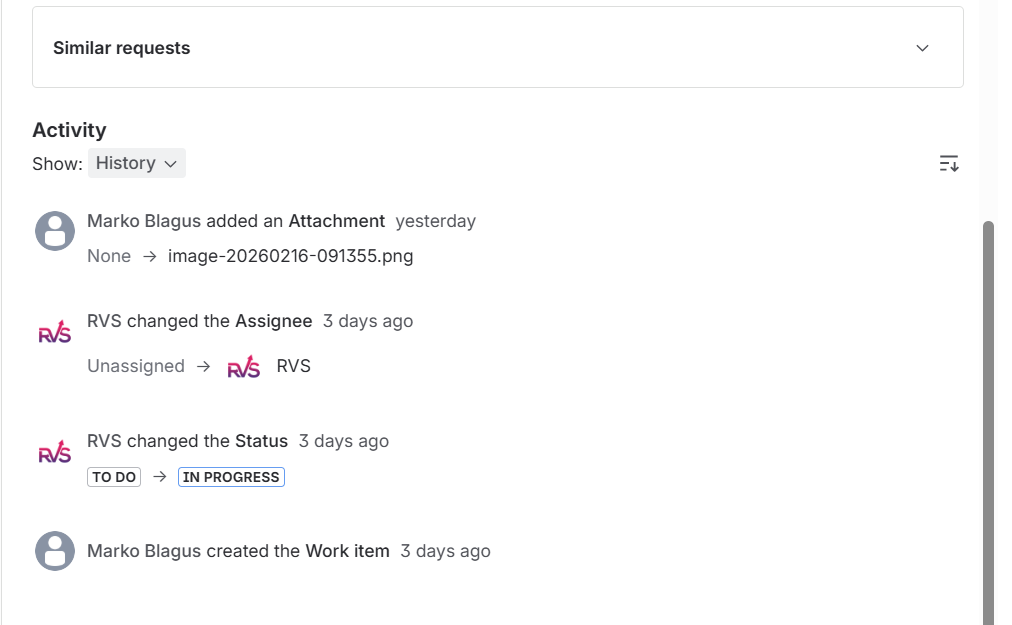
Jira’s native audit log is undoubtedly a powerful tool for tracking changes, such as updates to issue statuses, assignees, and other key details. However, it has a few limitations that can make it challenging for project managers to extract meaningful insights:
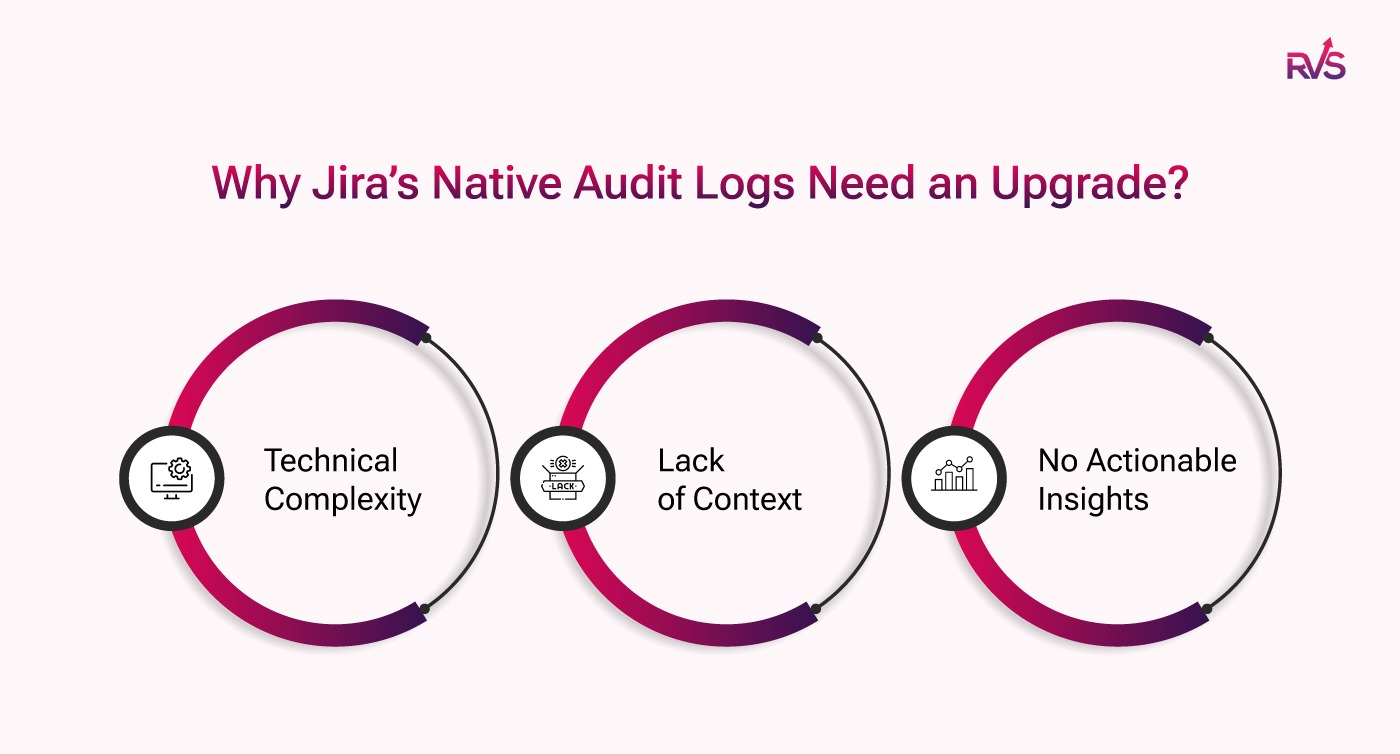
Technical Complexity: The audit log presents data in a raw format with timestamps, user actions, and status changes, which can be overwhelming for users who aren’t familiar with the system’s inner workings. It requires time and effort to interpret and extract actionable information.
Lack of Context: While the audit log records status transitions, it doesn’t offer a clear view of an issue’s entire lifecycle. You can see when an issue moved from one status to another, but you won’t know how long it stayed in each status or how that affects the overall workflow.
Limited Scope: Jira’s audit log only provides issue changes for one particular issue at a time. If you're managing multiple issues across various projects, it becomes difficult to see how all issues are progressing, making it harder to get a holistic view of your team's performance.
No Actionable Insights: The data in Jira’s audit log lacks the depth needed to identify inefficiencies or bottlenecks. Without a deeper understanding of the time spent in each status or the full context of transitions, it’s challenging to make informed decisions that drive project improvement.
The Missing Piece: Why Jira Needs an Upgrade
Jira’s default audit log lacks readability and actionability. While it tracks events, it doesn’t provide a clear, comprehensive view of an issue’s progression. Project managers often spend valuable time sorting through data, missing critical insights that could optimize workflows. What’s needed is a tool that transforms this raw data into clear, actionable reports. That's where the Issue History for Jira plugin comes in: RVS Issue History Reports
Introducing RVS Issue History Report: The Full Picture of Your Project’s Journey
RVS Softek is a leading provider of Jira-enhancing plugins designed to improve project management workflows and provide valuable insights. Their suite of tools aims to address gaps in Jira's default capabilities, offering users a more comprehensive and user-friendly experience.
One of their standout products is the Issue History Report plugin, which significantly enhances Jira’s native features by providing a clear, consolidated view of changes made to issues across their lifecycle.
RVS Issue History Report Plugin
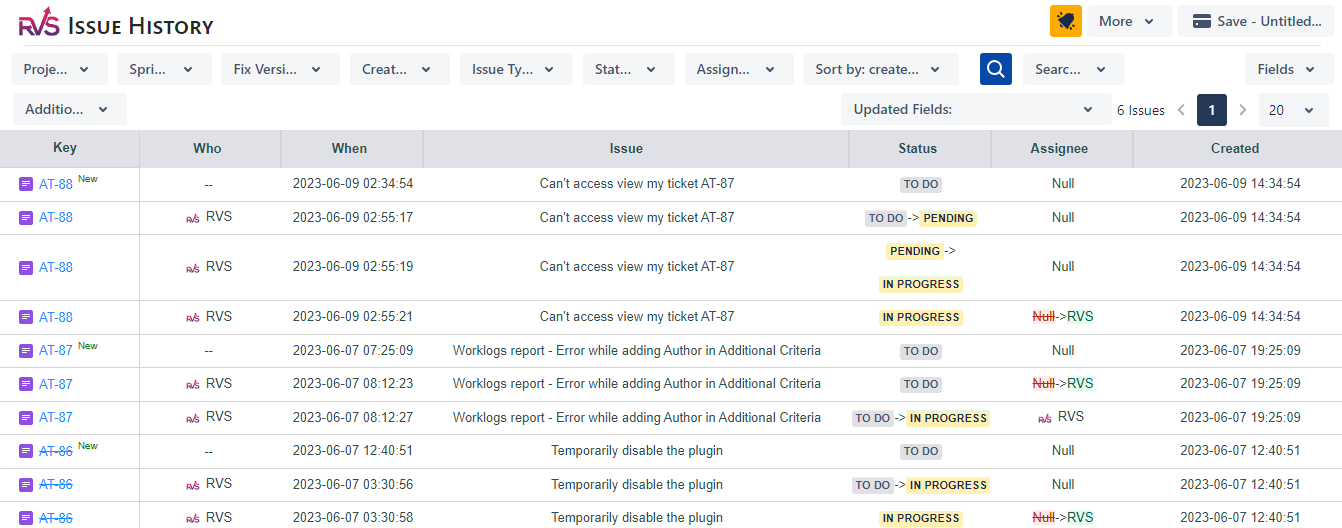
The Issue History Report plugin by RVS allows project managers and team leads to track and review the full history of issue statuses, time estimates, and other key changes, all in one place. Jira’s native interface doesn’t provide this level of consolidated reporting, which is where this plugin adds significant value.
Key Features:
Consolidated Change History:
The plugin provides a comprehensive overview of all changes made to issues, including status transitions, time estimates, and sprint assignments. This is something Jira’s native interface does not offer, making it an invaluable tool for project managers.
Customizable Date Range:
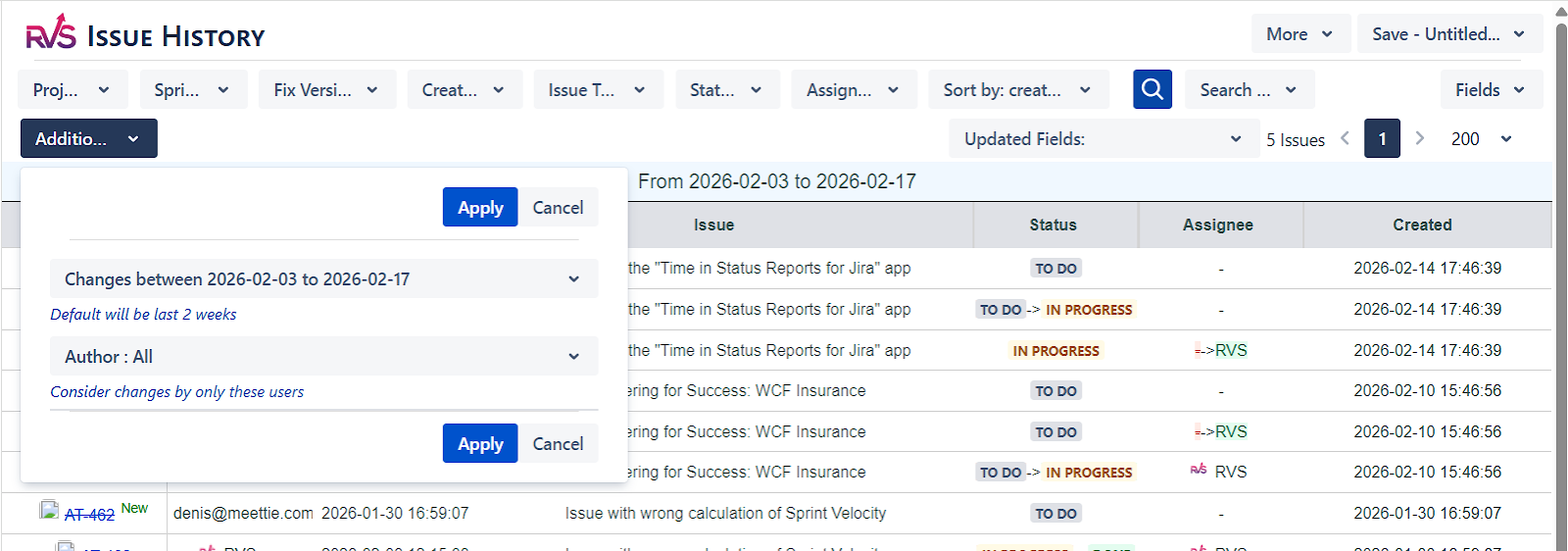
While the plugin defaults to showing the last two weeks of data, users can extend this date range to track changes over longer periods, offering flexibility based on individual project needs.
Customizable Report Fields:
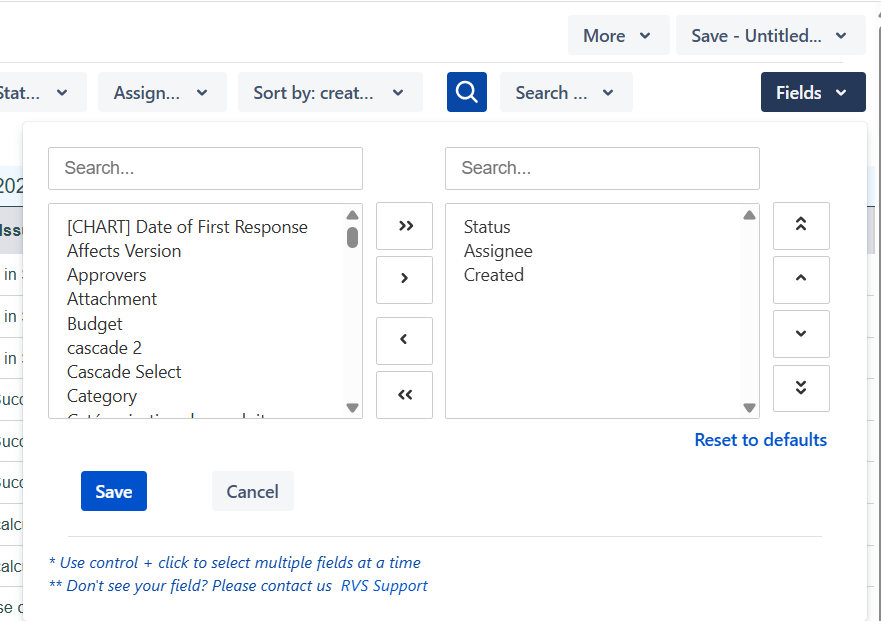
Users can tailor the data displayed in the report by selecting specific fields such as time spent, sprint changes, and estimates, ensuring the report aligns with their needs for improved project tracking and performance analysis.
Export and Share Options:
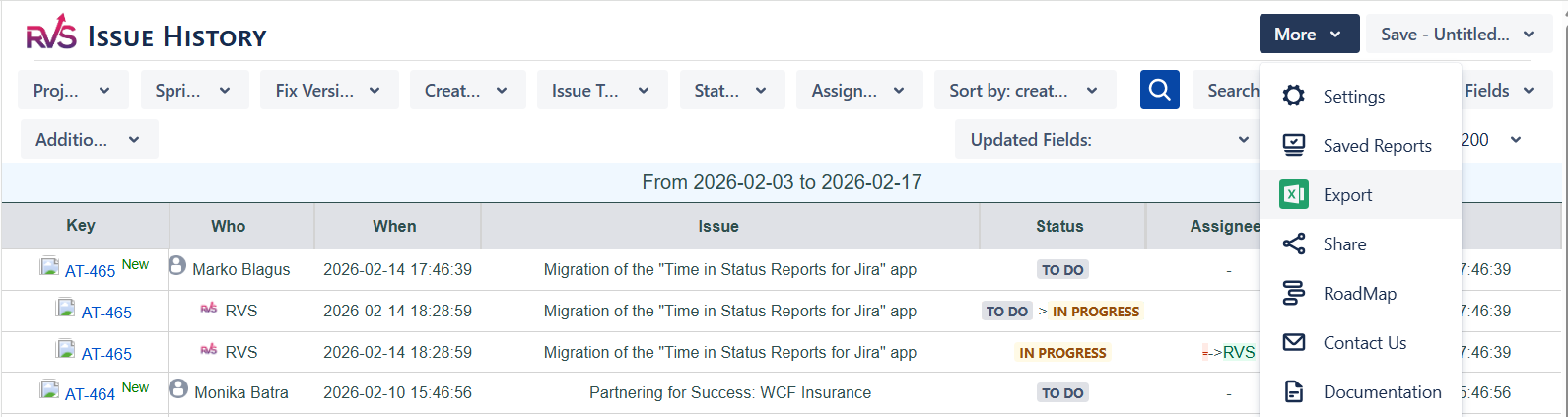
The plugin allows users to export the generated reports or share them with stakeholders, making it easier to disseminate important information across the team or organization.
Simplicity and Performance: The plugin is designed to be straightforward, offering a single report that consolidates all relevant changes. However, for larger datasets, performance may be slightly impacted, especially when viewing extensive historical data.
Use Cases:
Project Managers: Ideal for tracking the history of multiple issues simultaneously, allowing project managers to see status changes, time estimates, and other modifications in a consolidated format.
Team Leads: Useful for analyzing who made changes to issues and when, ensuring accountability, and providing insights into the overall workflow of the team.
How to Generate a Readable Jira Issue Status History Report with RVS
Once you’ve installed RVS’s Issue History Report plugin, you’re ready to start generating reports. Here’s how to use the plugin to create clear, actionable issue status history reports:
Step 1: Install the Plugin
Go to the Atlassian Marketplace and search for RVS Issue History Report
Click "Install" and follow the installation instructions.
Once installed, you’ll see the plugin added to your Jira dashboard.
Step 2: Select Data for Report Generation
Choose the issues you want to generate reports for by filtering by project, issue type, or assignee.
You can also filter by date range, which helps if you want to focus on issues from a specific sprint or time period.
Step 3: Customize Your Report Format
The plugin lets you customize how the report is displayed. You can choose between a tabular format or a graphical format (charts or graphs), depending on what works best for your team.
Filter the report by specific criteria, such as time spent in each status, status transition history, or assignee details.
Step 4: Analyze and Review the Report
Once you generate the report, you’ll get a clear view of how long issues have stayed in each status, which statuses are causing delays, and how efficiently each assignee is moving issues through the workflow.
Use this information to identify bottlenecks, optimize workflows, and improve project management strategies.
Step 5: Export and Share
Export the reports to Excel or CSV format to analyze the data further or share with stakeholders. This gives you the flexibility to manipulate the data and integrate it into other tools if needed.
Conclusion
Jira’s audit log offers a starting point for tracking issue status changes, but it’s not enough to help teams truly optimize workflows and make data-driven decisions. The Issue History Report plugin by RVS fills this gap, providing clear, actionable, and customizable reports that give project managers full visibility into their issues' lifecycle.
By leveraging this plugin, teams can quickly identify where delays are occurring, track assignee performance, and gain the insights they need to keep projects on track. If you’re relying on Jira’s native audit logs, it’s time for an upgrade.
RVS’s Issue History Report plugin is the perfect tool to give you the visibility you need to improve efficiency and drive project success.
1. What is Jira’s issue history, and why is it important?
Jira's issue history tracks status changes, time spent, and other modifications made to issues, providing valuable insights into project workflows and team performance.
2. How can I view Jira issue status history more effectively?
By using RVS’s Issue History for Jira plugin, you can generate readable reports that consolidate all issue status changes and provide actionable insights into your project management process.
3. How do Jira issue status reports help in identifying project bottlenecks?
Jira status history reports highlight where issues spend too much time, helping project managers identify bottlenecks and optimize workflows for smoother project execution.
4. Can I export Jira issue history data for further analysis?
Yes, RVS’s Issue History for Jira plugin allows you to export reports to Excel or CSV for further analysis and sharing with stakeholders.
5. How do I customize issue history reports in Jira?
With the RVS Issue History for Jira plugin, you can customize reports by selecting specific fields (e.g., time spent, assignee, status) and filtering by date range or project.
6. How does the RVS Issue History plugin improve Jira’s default reporting?
The RVS Issue History plugin provides a consolidated, easy-to-read view of Jira’s raw data, making it easier to track changes, identify trends, and improve project management efficiency.
7. Is the RVS Issue History plugin suitable for large Jira projects?
Yes, the RVS Issue History plugin is designed to handle large datasets efficiently, with customizable date ranges and export options, ensuring it works well for both small and large Jira projects.
Recent Blogs
July 23, 2026
Jira Time in Status Report: Complete Guide for Project Managers







.webp)





