Explore how incomplete Jira worklogs can lead to hidden inefficiencies and erode profitability. Learn how turning them into strategic assets can enhance project accuracy, improve forecasting, and optimize resource management, ultimately boosting profitability.
For most teams, Jira is where the work happens, but the Jira Worklog is where the business value is measured. If your worklogs are incomplete or messy, you have a profitability leak. When you can't see exactly where time is going, you face three immediate problems:
You’re losing money: Unlogged hours mean unbilled revenue and inaccurate project costs.
You’re guessing, not planning: Without "Actual vs. Estimated" data, your next project bid is just a shot in the dark.
To fix this, you need to treat worklogs as a core productivity metric. This requires moving beyond basic entry and utilizing a specialized solution like the RVS Worklog Time Tracking & Timesheet plugin.
The goal is simple: make it effortless for the team to log time and instant for leadership to see the data. By upgrading your Jira workflow with the right plugin, you turn "missing hours" into a strategic asset for project oversight and financial clarity.
In this blog, we will discuss how Worklog Time Tracking & Timesheet by RVS Softek can help you bridge the gap between simple task management and sophisticated project governance.
The Capability Barrier: Why do you need a Worklog Plugin?
Despite the potential of Jira worklogs, the native Jira system has some limitations when it comes to comprehensive financial oversight.
Fragmented Reporting: Native Jira’s reporting capabilities are fragmented and cumbersome. To get a full picture of team time, project managers are forced to click through multiple issues. This isn’t just inefficient; it also leads to missed insights and unnecessary delays in reporting.
Limited Time Comparison Features: When comparing estimates vs. actuals, native Jira lacks a simple, direct report. Users must rely on custom reports or manual workarounds, which adds complexity and increases the risk of error.
Visibility Gaps: The inability to quickly spot sandbagging or underestimation in native Jira creates a visibility gap for managers. Managers often have to sift through large amounts of data to identify these issues, which makes it harder to take quick corrective actions when discrepancies arise.
While Jira provides basic functionality, it lacks the specialized features needed for robust financial tracking and labor cost management. For more precise worklog tracking, consider using RVS’s Worklog Time Tracking and Timesheet plugins. These tools allow for manual time entry, offer detailed timesheet reports, and provide managers with the ability to compare estimated versus actual time spent on tasks, helping to better monitor and manage team productivity.
Introducing RVS Softek’s Worklog Time Tracking & Timesheet
The RVS Worklog Time Tracking and Timesheet plugin provides a straightforward and effective way to track and monitor the time spent on tasks in Jira. While it does not offer financial tracking or labor cost management features, it offers detailed worklog tracking that Project Management Offices (PMOs) and teams can use to gain valuable insights into their project progress and team productivity.
Core Features:
Manual Time Entry: The plugin allows users to manually log time spent on tasks, providing a simple, no-frills approach to time tracking. Teams estimate the time required for tasks, and then log the actual time spent once the task is completed. This manual entry helps ensure that time data is accurately captured.
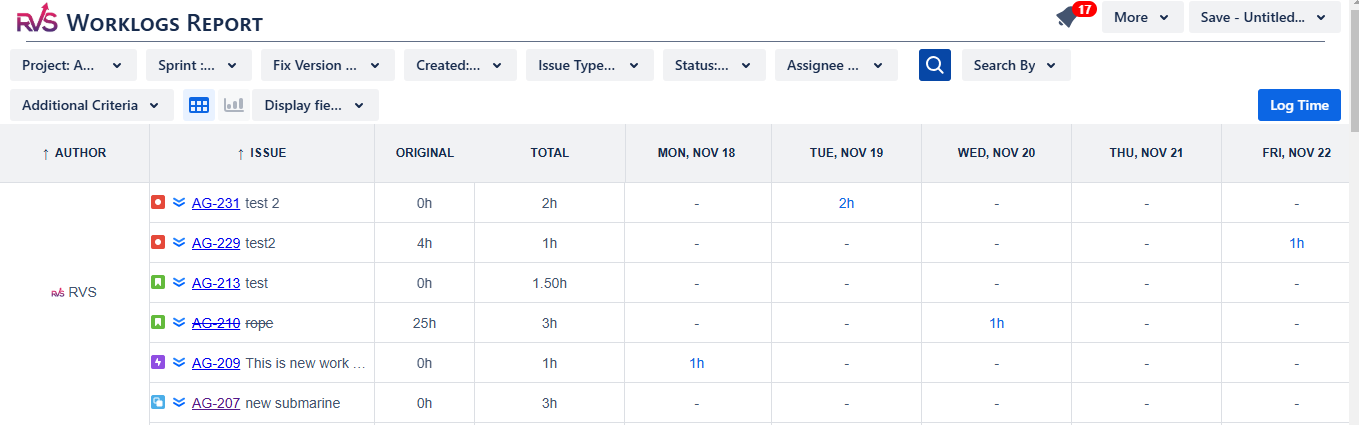
Worklog Reports: The core functionality of the plugin lies in its Worklog Reports. These reports aggregate the logged time, allowing managers to compare estimated time versus actual time spent on tasks. This provides critical insights into whether teams are accurately estimating time and meeting deadlines, and helps identify areas for improvement.
Timesheet Overview: Users can view logged time in different formats, including timesheets. These are helpful for reviewing the total time spent by team members across various tasks, which PMOs can use to track progress and performance.
How to Add Worklog Time Tracking & Timesheet in Jira
Install Worklog Time Tracking & Timesheet
Here are the steps to install the Worklog Time Tracking in Jira & Timesheets app from the Atlassian Marketplace:
Access the Atlassian Marketplace:
Open your browser and go to the Atlassian Marketplace.
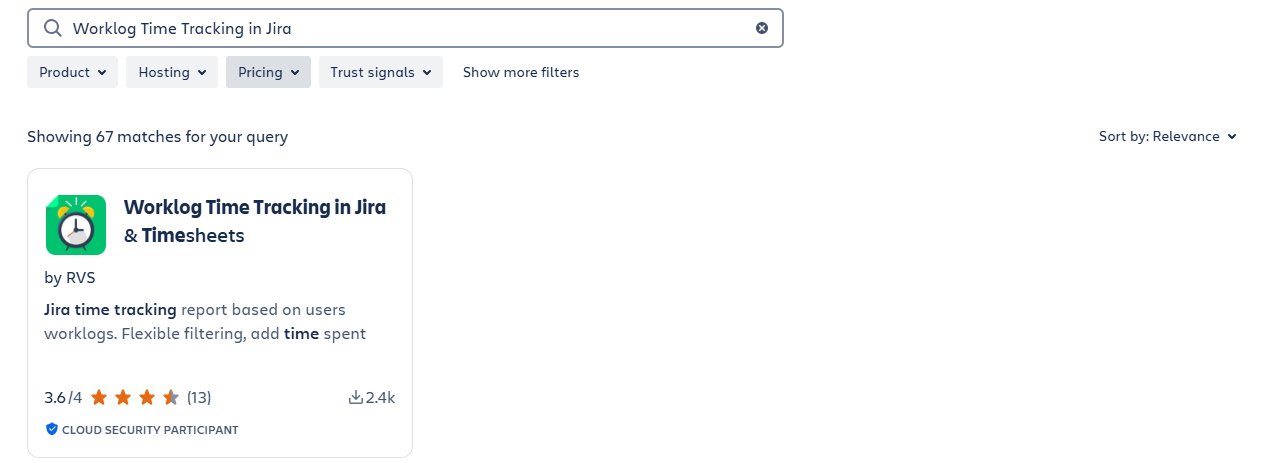
Find the App:
Use the search bar and type “RVS or 'Worklog Time Tracking in Jira & Timesheets by RVS”
Select the app from the search results.
Choose Your Jira Instance
On the app's page, click Try it free or Get it now.
Select the Jira instance you want to install the app on and click Continue.
Log in to Your Jira Instance
Log in to your Jira Cloud instance if you're not already logged in.
Access the App
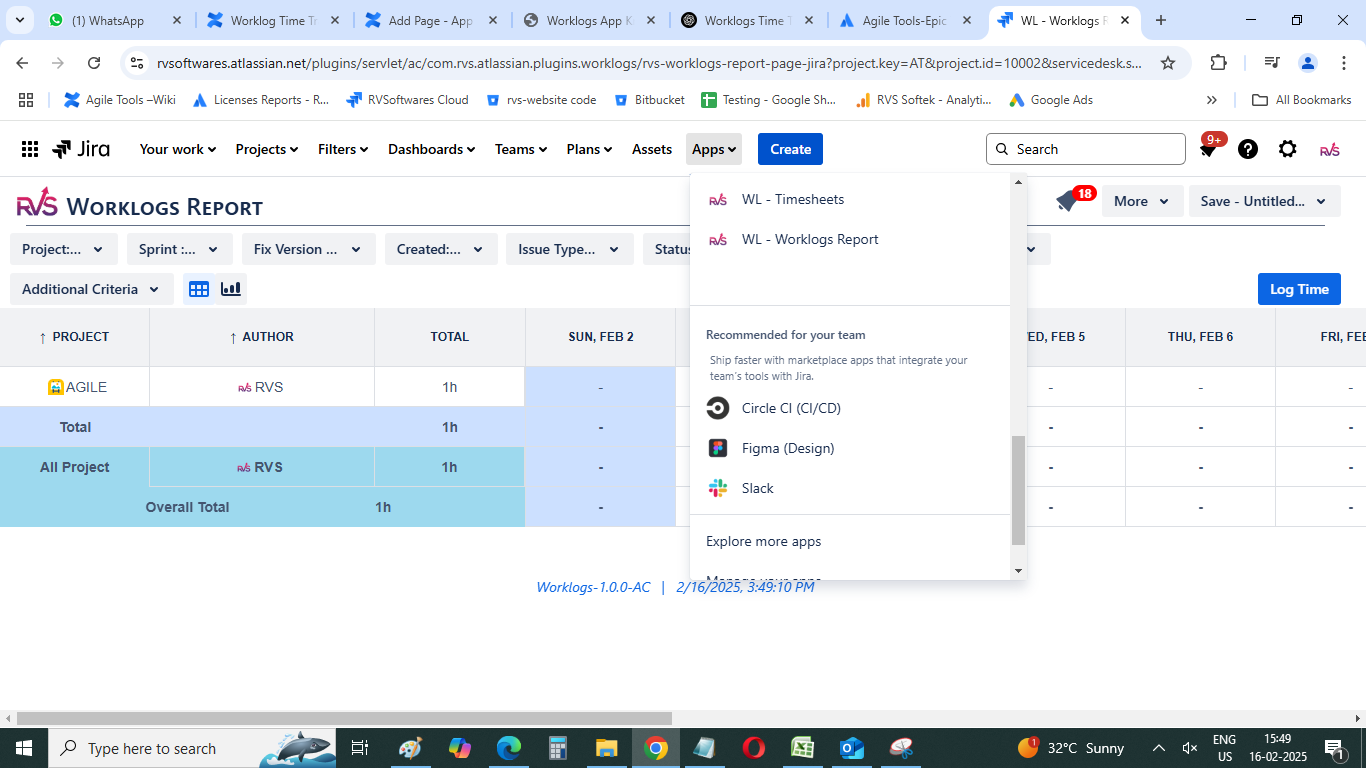
Once installed, you can find the “WL - Worklog Reports” & “WL - Timesheets” app under the Apps section in the Jira navigation bar.
Open Worklog Time Tracking & Timesheet Plugin
Open “Apps” from your top Navigation bar. You will find “WL - Worklogs Report”, “WL - Timesheets” submenus. Please click as per you need.
Worklogs Report :
Clicking on “WL - Worklogs Reports”: Clicking on “WL - Worklogs Reports” will navigate to the screen. Select the Project/Issue Created Dates/Issue Type/Status to view the report.
Additional Filter Criteria: Provides the options to select Worklogs Created Date range, Period Grouping, Category, and Group By.
Export to Excel: The report provides the facility to export to Excel. The time values in the report are exported by default in hours only.
Settings: The time value in reports can be changed in the Settings screen. They can be viewed in Hours/Days or the Jira default format.
Timesheets :
By default, the Timesheets reports open with a list of issues where current users are the author or assignee, and the issue status is not done
Clicking on “WL - Timesheets”: Clicking on “WL - Timesheets” will navigate to the screen.
Additional Filter Criteria: Provides the options to select the Worklogs Created Date range.
Export to Excel: The report provides the facility to export to Excel. The time values in the report are exported by default in hours only.
Settings: The time value in reports can be changed in the Settings screen. They can be displayed in Hours/Days orthe Jira default format.
Use Case and Benefits:
Accurate Time Tracking This Jira Worklog Plugin ensures precise time tracking for every task and issue within your Jira workflows. By logging actual time against estimates, it guarantees that teams capture every minute spent on work, providing project managers with the most accurate data to assess task efficiency. This transparency helps to avoid under- or over-reporting and supports more realistic project forecasting and goal setting.
Resource Allocation Insights With this Jira Worklog Plugin, managers gain valuable insights into how time is distributed across teams and projects. By analyzing time logs, leaders can identify areas where resources are either overburdened or underutilized. This information allows for more efficient task redistribution, optimizing workloads and ensuring a balanced, productive team.
Billing & Cost Management For businesses that rely on time-based billing or project costing, this Jira Worklog Plugin provides a critical feature for generating accurate reports for invoicing and financial analysis. With detailed time logs for each task, companies can calculate billable hours with confidence, ensuring clients are charged accurately and internal project costs remain aligned with budgets.
Team Performance Analysis This Jira Worklog Plugin helps track both individual and team productivity over time, providing valuable insights into performance trends. By comparing actual time spent versus initial estimates, managers can assess how well teams are sticking to deadlines, identify productivity bottlenecks, and create action plans for improvement in future projects.
Identify Gaps & Bottlenecks This Jira Worklog Plugin highlights discrepancies between estimated and actual times, identifying potential gaps in planning or execution. If tasks are consistently overestimated or underestimated, it points to issues such as unrealistic expectations or inefficiencies in execution. These insights enable teams to refine their planning and estimation processes, reduce wasted time, and improve overall workflow efficiency.
Why Use RVS Worklog Time Tracking and Timesheet?
For teams looking to maintain clear visibility on how much time is actually being spent on tasks versus initial estimates, the RVS Worklog Time Tracking and Timesheet plugin provides a simple yet powerful solution. It is particularly beneficial for teams that want to improve their project planning and ensure that time discrepancies are identified and addressed.
While it doesn't handle financial or labor cost tracking, the data it provides can be an essential component for PMOs to gain insights into team productivity and improve future project estimates, ultimately enhancing the overall project management process.
Conclusion
Inaccurate time tracking can silently drain profitability, but with the right tools, like Jira worklogs and the RVS Worklog Time Tracking plugin, businesses can gain valuable insights into project performance and team productivity. By identifying discrepancies between estimated and actual time, teams can refine their planning, improve forecasting, and enhance resource allocation.
While these tools don't provide financial tracking, they empower PMOs to optimize project workflows, making them an essential part of any efficient project management strategy.
Ready to optimize your workflow? Schedule your RVS demo today.
Frequently asked questions
1. What are Jira worklogs and why are they important?
Jira worklogs track the time spent on specific issues or tasks within your Jira projects, providing essential insights into resource allocation, project progress, and team efficiency.
2. How does incomplete worklogging affect project outcomes?
Incomplete worklogs can lead to inaccurate time tracking, impacting project planning, budgeting, and resource allocation, which hinders effective decision-making.
3. What are the consequences of missing worklog entries in Jira?
Missing worklog entries can result in discrepancies in project timelines, inaccurate billing, and missed opportunities to optimize workflows or identify potential bottlenecks.
4. How can I improve time tracking accuracy in Jira?
Consistently logging work on tasks and issues, setting clear guidelines for your team, and ensuring regular check-ins on time logs can improve time tracking accuracy in Jira.
5. Can I recover missing worklog entries in Jira?
While missing worklogs cannot be recovered, future time tracking can be made more accurate by setting clear expectations, monitoring worklogs more frequently, and implementing regular audits.
6. How can accurate worklogs help with project monitoring?
Accurate worklogs provide detailed reports comparing estimated vs. actual times, allowing project managers to monitor progress, identify discrepancies, and adjust resources or timelines accordingly.
7. Can incomplete worklogs impact billing and invoicing?
Yes, incomplete worklogs can lead to incorrect billing, especially in time-based billing scenarios. Ensuring accurate and complete worklogs helps maintain billing accuracy and financial transparency.
Recent Blogs
July 23, 2026
Jira Time in Status Report: Complete Guide for Project Managers








.webp)





