Tracking how long issues spend in each stage can reveal the hidden story behind your project’s efficiency. This blog explores smart ways to measure Jira transition times—using built-in features, automation, APIs, and tools like RVS Time in Status—to help you spot bottlenecks, improve workflows, and keep projects running smoothly.
Project timelines can feel like a race against time, with each second counting towards timely delivery. But here's the kicker—one often-overlooked factor is tracking how long each issue spends in the various stages of its lifecycle.
Measuring Jira transition times can unlock powerful insights into your workflow's performance, helping you spot bottlenecks, boost team efficiency, and fine-tune resource allocation. Think of it as a backstage pass to your project's inner workings, giving you the data to speed things up and keep things on track.
In this blog, we’ll take you on a journey through different ways to measure Jira transition times—from Jira’s built-in features to automation hacks and API wizardry. Ready to dive in? Let’s go!
1. Measuring Jira Transition Using Jira Built-in Features (JQL and Issue History)
Jira itself does not provide a direct field to measure the time spent in each status. However, you can leverage the Jira Query Language (JQL) and issue history to calculate it manually.
Time in Status: Jira users can use the "Time in Status" feature available via Jira Query Language (JQL). An example query looks like:
project = "Your Project" AND status changed TO "In Progress" DURING ("2024-12-01", "2024-12-20")
Issue History Search:
You can manually review the issue history to determine the time spent in each status by examining status change timestamps.
You can use issue history to see status changes, but you would need to calculate the duration manually based on timestamps from the history logs.
2. Using Jira Automation (Custom Field)
If you prefer a more automated approach to track Jira transitions, you can use Jira Automation to calculate and store the time spent in each status. This method eliminates the need for manual calculations and offers greater efficiency for teams working on multiple issues.
How to Set Up Jira Automation for Measuring Transition Times
Here’s how you can create an automation rule to calculate Jira transition times automatically:
Step 1: Create a rule that triggers whenever an issue transitions into a new status (e.g., "In Progress").
Step 2: Add actions to store the timestamp of each transition in a custom field like "Time In Status."
Step 3: When the issue transitions to another status (e.g., "Done"), calculate the time spent in the previous status by subtracting the stored timestamp from the current time.
Step 4: Store this calculated time in another custom field for easy reference.
Example Automation Rule:
Trigger: When an issue transitions to a new status (e.g., "In Progress").
Action: Store the timestamp of this transition in a custom field (e.g., "Time In Status").
Trigger: When an issue transitions to the next status (e.g., "Done").
Action: Subtract the timestamp of the last transition from the current time to calculate the time spent in the previous status.
3. Custom Scripting with Jira REST API
For teams with programming expertise, Jira’s REST API offers a robust way to measure transition times and extract detailed issue data. By using custom scripts, you can automate the collection and analysis of transition durations across all issues.
How to use the Jira REST API to Pull Transition Data
Step 1: Use the Jira REST API endpoint to get the change log for a specific issue: GET /rest/api/2/issue/{issueIdOrKey}/changelog
Step 2: Extract timestamps for each status change from the change log.
Step 3: Programmatically calculate the time between these status transitions.
Step 4: Use the calculated time to generate custom reports for further analysis.
While this method requires coding knowledge, it offers high customization and automation capabilities, making it ideal for teams that need deeper insights into Jira transition times.
4. Leveraging Apps from the Atlassian Marketplace: RVS Time in Status Reports
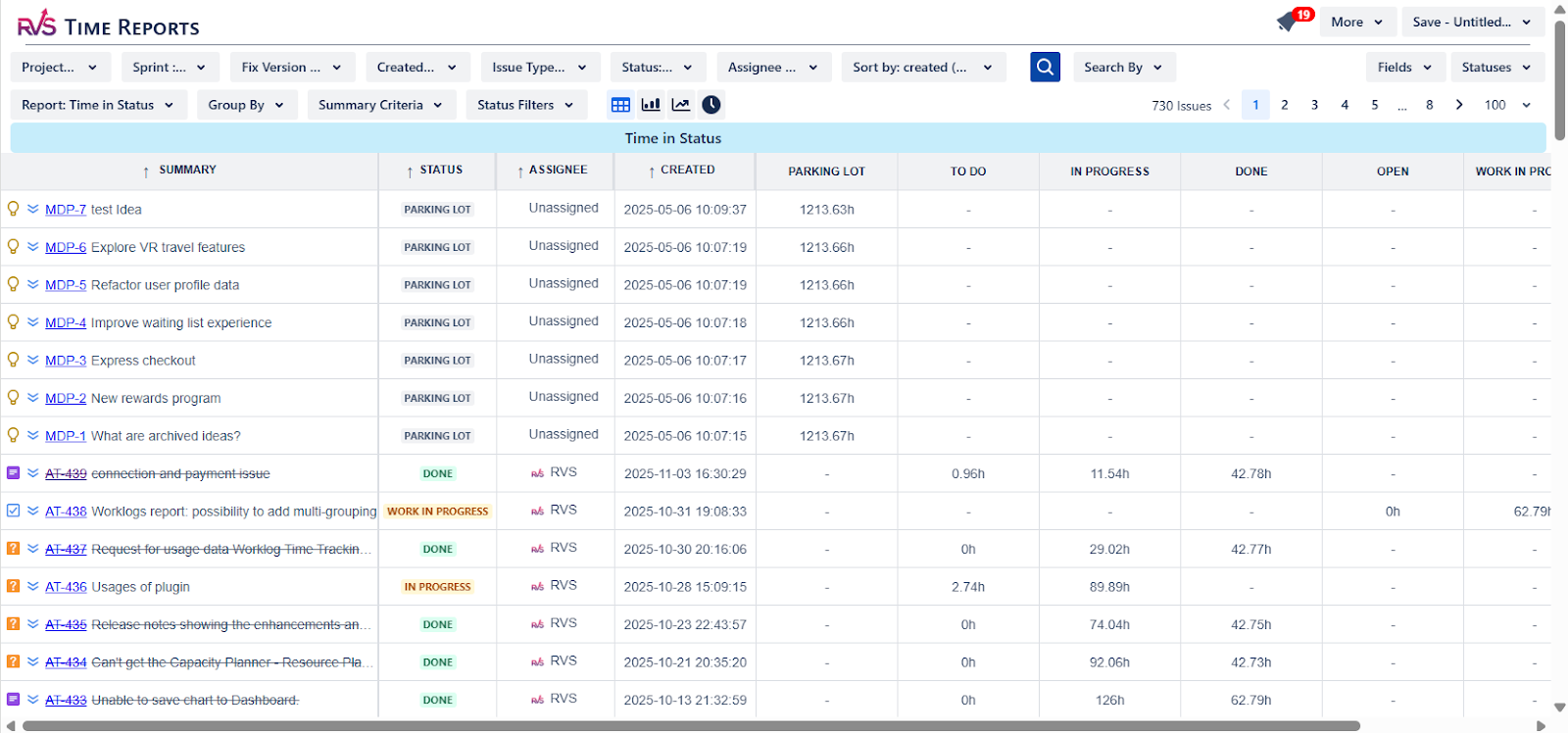
RVS Time in Status Reportsis one of the powerful time tracking tools Jira app by RVS Softek that provides real-time insights into how time is spent across tasks and project stages. Unlike traditional tools, it seamlessly integrates with Jira, enhancing workflow efficiency and boosting team productivity.
With detailed time-in-status reports, you can quickly identify bottlenecks, optimize resource allocation, and adjust timelines as needed. Customizable filters let you tailor reports by project, assignee, sprint, or other parameters, ensuring you have the data to make informed decisions.
Key Features:
Detailed Time Reports: Track time spent in each workflow stage to identify delays and optimize transitions.
Custom Filters: Analyze performance by project, assignee, or sprint for tailored insights.
Real-Time Analytics: Monitor team performance and address inefficiencies immediately.
Seamless Jira Integration: Easily integrates with Jira, making time tracking part of your workflow.
Data Export: Export reports to CSV, Excel, or Google Sheets for further analysis.
How RVS Time in Status Reports Helps Track Jira Transition Times
Once you install the RVS Time in Status Reports app from the Atlassian Marketplace, you can start tracking transition times easily.
Access the Issue: Open Jira and navigate to the issue you want to analyze.
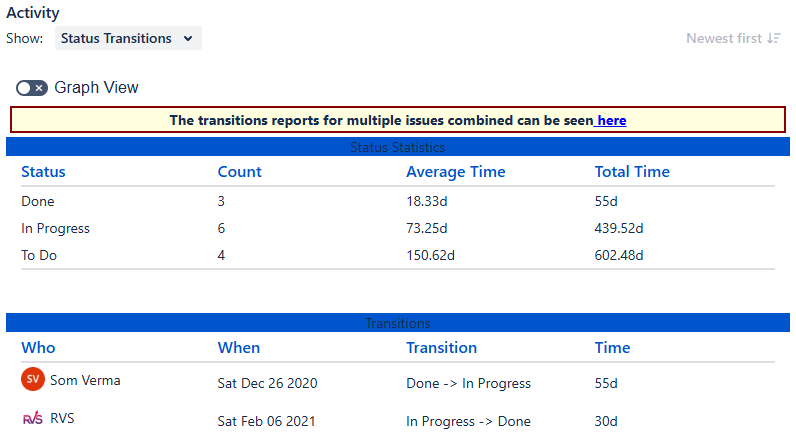
View the Status Transitions Tab: This tab displays a detailed breakdown of how long the issue spent in statuses like "To Do," "In Progress," and "Done."
Analyze Transition Data: Use the data to identify bottlenecks. For example, if issues spend too long in "In Progress," it could indicate a need for process optimization.
Implement Improvements: Based on the insights, project managers can adjust workflows, reallocate resources, or provide additional training to improve team efficiency.
The RVS TIS tool helps managers make data-driven decisions to streamline processes and optimize workflows, making it an invaluable asset for teams managing Jira projects.
Tracking Jira transition times isn’t just about generating reports—it's about improving your team's performance and ensuring timely project delivery. Below are some key benefits of using Jira transition tracking tools like RVS Time in Status Reports:
Time Insights: Gain visibility into how long tasks take to complete each stage of the workflow.
Identifying Bottlenecks: Find areas where tasks get delayed and work to eliminate these inefficiencies.
Enhanced Decision Making: Make data-driven decisions on resource allocation and process improvements.
Tracking Team Productivity: Measure how efficiently team members handle tasks and identify areas for improvement.
Improving Resource Allocation: Allocate resources where they are needed most based on real-time data.
Identifying Training Needs: Detect skills gaps and provide training to help team members perform better.
Client and Stakeholder Transparency: Share detailed reports with clients or stakeholders to improve project transparency.
These reports help project managers make informed decisions that ultimately lead to faster project delivery, better resource management, and improved overall productivity.
Generating Reports with Jira Time in Status
With RVS Time in Status Reports, generating detailed reports becomes a breeze. Whether you're tracking Jira transitions for a single issue or analyzing team-wide performance, the tool simplifies the reporting process and allows you to export data for further analysis.
Steps to Generate Reports Using RVS Time in Status Reports
Step 1: Navigate to the RVS Time in Status Reports app within Jira.
Step 2: Select the issues or projects you want to analyze.
Step 3: Choose the time periods and status transitions you want to track.
Step 4: Export the data to Excel or any other format for deeper analysis.
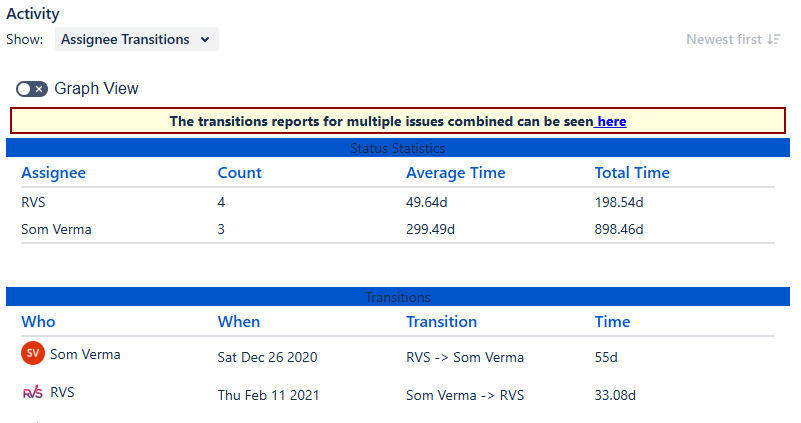
On the same screen, the app also provides the "Assignee Transitions" tab. This type of report helps organizations better understand how long issues remain in progress and how efficiently team members are handling their workload.
Conclusion
Measuring Jira transition times is a powerful way to optimize your project management processes. By leveraging built-in Jira features, automation, custom scripting, or third-party apps like RVS Time in Status Reports, you can gain valuable insights into how long issues spend in each status. This data helps project managers identify bottlenecks, allocate resources efficiently, and improve overall workflow management.
If you're looking to streamline your project management processes, improve team performance, and deliver projects on time, RVS Time in Status Reports is a must-have tool.
Schedule your RVS demo today and begin optimizing your Jira transition tracking for better results.
Frequently asked questions
1. What are Jira transitions, and why are they important?
Jira transitions represent the movement of an issue through different stages in a workflow. Understanding transitions is crucial for tracking project progress, identifying bottlenecks, and improving team efficiency.
2. How can I track Jira status changes effectively?
Tracking Jira status changes can be done by setting up customized reports, using the "Time in Status" feature, or integrating third-party tools like RVS Softek to get detailed insights into the time spent in each workflow status.
3. What is the 'Time in Status' feature in Jira?
The "Time in Status" feature tracks how long an issue remains in each status (e.g., To Do, In Progress, Done). It helps identify delays, bottlenecks, and opportunities for workflow optimization.
4. How can I measure the performance of Jira transitions?
You can measure the performance by analyzing metrics like the average time an issue spends in each status, transition speed, and the frequency of specific status changes. Tools like RVS Softek provide detailed time-tracking reports.
5. What are some best practices for optimizing Jira transitions?
Best practices include simplifying workflows, reducing unnecessary transitions, setting clear entry and exit conditions, and using automation to streamline repetitive tasks.
6. How can automation help with Jira transitions?
Automation can help by automatically transitioning issues based on predefined conditions (e.g., when a task is marked as complete, it moves to the next status), reducing manual work and ensuring smooth workflow progression.
7. What are the most common Jira transition mistakes, and how can I avoid them?
Common mistakes include overcomplicating workflows, not defining clear status transitions, and failing to track key metrics. To avoid these, keep workflows simple, ensure status definitions are clear, and regularly analyze transition data for improvement.
Recent Blogs
July 23, 2026
Jira Time in Status Report: Complete Guide for Project Managers







.webp)





