The Time in Status per Assignee report helps project managers and teams measure how long an issue stays in each status while assigned to different team members. This report provides insights into individual and overall team performance.
Overview: Unlock the full potential of your team’s productivity with Jira Time in Status reports. Learn how analyzing Time in Status per Assignee can help identify workflow bottlenecks, improve task management, and enhance overall efficiency for your projects.
Unlocking efficiency in agile project management starts with understanding how time is spent at each stage of a task. Time with Assigneeper Status in Jira is the key metric that reveals exactly where bottlenecks occur and how long each team member spends in each task phase.
This Jira Time in status report provides a detailed view of how long each team member spends in each status of their tasks, offering insights into task flow, bottlenecks, and individual performance.
For managers, scrum masters, and team leads, Time with Assignee per Status is more than just a tracking tool—it’s a key driver of productivity and accountability. By analyzing this data, you can identify inefficiencies, improve resource allocation, and enhance team performance.
In this article, we’ll dive into the importance of this report, how to generate it in Jira, and how to leverage the data to optimize your project management strategy.
What is Time with Assignee per Status?
Time with Assignee per Status refers to the amount of time an issue spends in a specific workflow status while being assigned to a particular team member. This metric is crucial for understanding:
The efficiency of individual team members in resolving issues.
Workflow bottlenecks that cause delays in task progression.
Workload distribution and resource optimization.
Potential areas for process improvement.
Example:
Imagine a project where you are tracking a bug fix task:
Task: Bug Fix for Feature A
Workflow Stages:
To Do
In Progress
Review
Done
How Time with Assignee per Status Works:
Assignee: John
To Do: John assigns the task to himself, and it stays in "To Do" for 1 day.
In Progress: John works on fixing the bug and moves the task to "In Progress" for 3 days.
Review: John submits it for review, and it stays in "Review" for 2 days.
Done: After final approval, the task is marked "Done," and this takes 1 day.
In this scenario, Time with Assignee per Status for John is:
To Do: 1 day
In Progress: 3 days
Review: 2 days
Done: 1 day
This helps to measure how efficiently John is moving through the workflow and where he might need support (e.g., if tasks take too long in certain stages).
Why Time with Assignee per Status Report Matters
In Jira Time in Status Report, this particular Assignee report provides valuable insights into how long each team member spends in different stages of a task, helping to optimize workflows and improve team performance.
Identifies Delays and Bottlenecks: Pinpoints where tasks are getting delayed and highlights stages where assignees need support to keep things moving.
Improves Accountability: Keeps team members accountable for their tasks by making it clear how long they’ve spent in each status and their role in task progression.
Enhances Performance Evaluation: Offers data-driven insights that enable managers to assess both individual and team performance effectively.
Optimizes Workflow Efficiency: Helps managers identify and eliminate inefficiencies in the process, allowing teams to work more cohesively and productively.
Facilitates Better Resource Allocation: Provides visibility into team members' workloads, ensuring resources are balanced and no one is overwhelmed.
Introducing RVS Jira Time in Status Report
RVS Jira Time in Status Report is a transformative Jira time tracking solution that revolutionizes workflow management. Unlike traditional time tracking tools, RVS Jira Time in Status integrates seamlessly with Jira, offering real-time insights into how time is spent at each task stage and within every project. This integration simplifies your workflow while providing actionable data that boosts project efficiency and team productivity.
With detailed time-in-status reports, you’ll gain a comprehensive view of your project’s performance. This allows you to identify bottlenecks, optimize resource allocation, and adjust timelines in real time.
The customizable filters let you tailor reports to your specific needs, whether you're tracking individual tasks, specific sprints, or the entire project timeline. This flexibility ensures you have all the data necessary to make informed decisions that keep your projects on schedule and within budget.
Key Features of RVS Jira Time in Status Report:
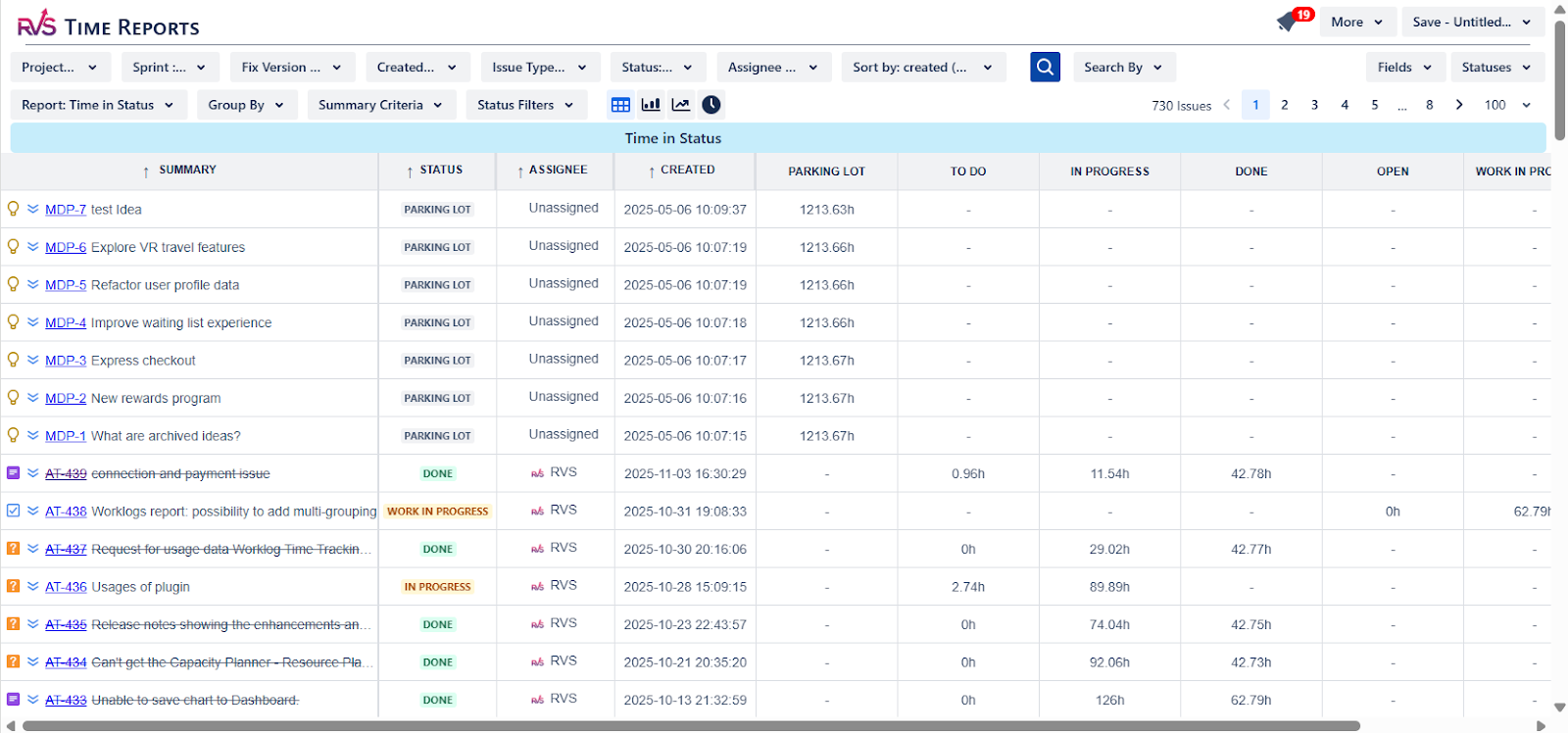
Detailed Time-in-Status Reports: Track how long tasks spend in each workflow stage, identify delays, and improve task transitions.
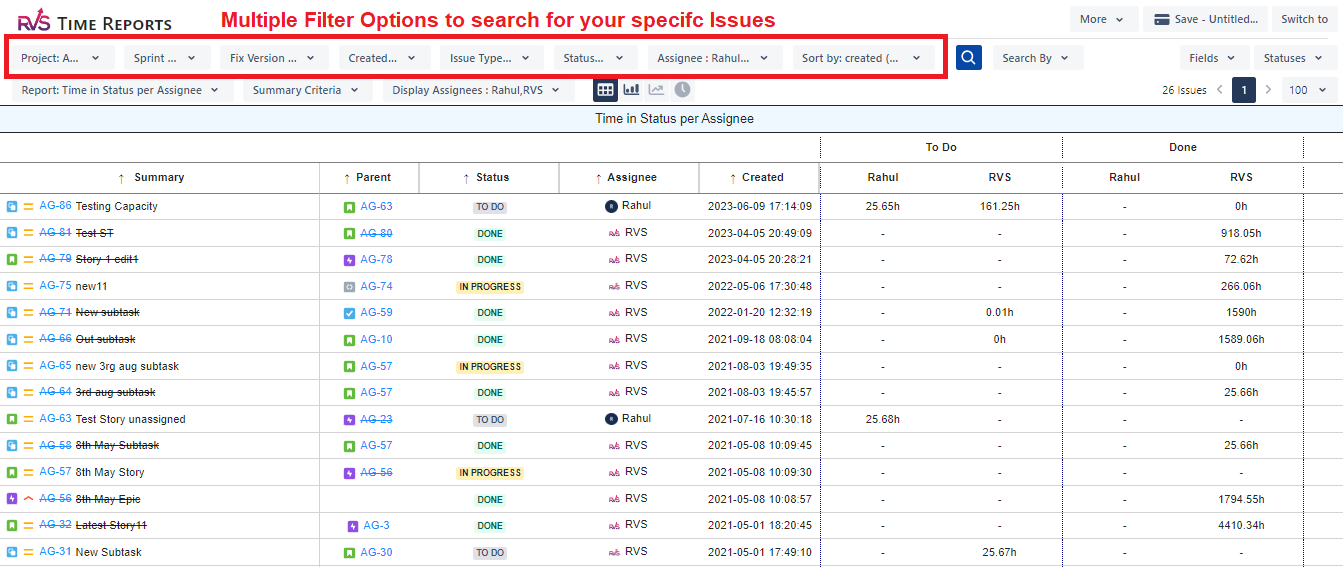
Customizable Filters: Adjust reports based on project, assignee, sprint, or other parameters to analyze performance from any perspective.
Real-Time Analytics: Monitor team progress and workflow performance live, allowing you to address delays or inefficiencies immediately.
Seamless Jira Integration: Integrates effortlessly with Jira, eliminating the need to switch platforms and making time tracking a smooth part of your process.
Data Export Options: Easily export time data to CSV, Excel, or Google Sheets for analysis, sharing, or reporting purposes.
How to get the Jira Time with Assignee per Status report
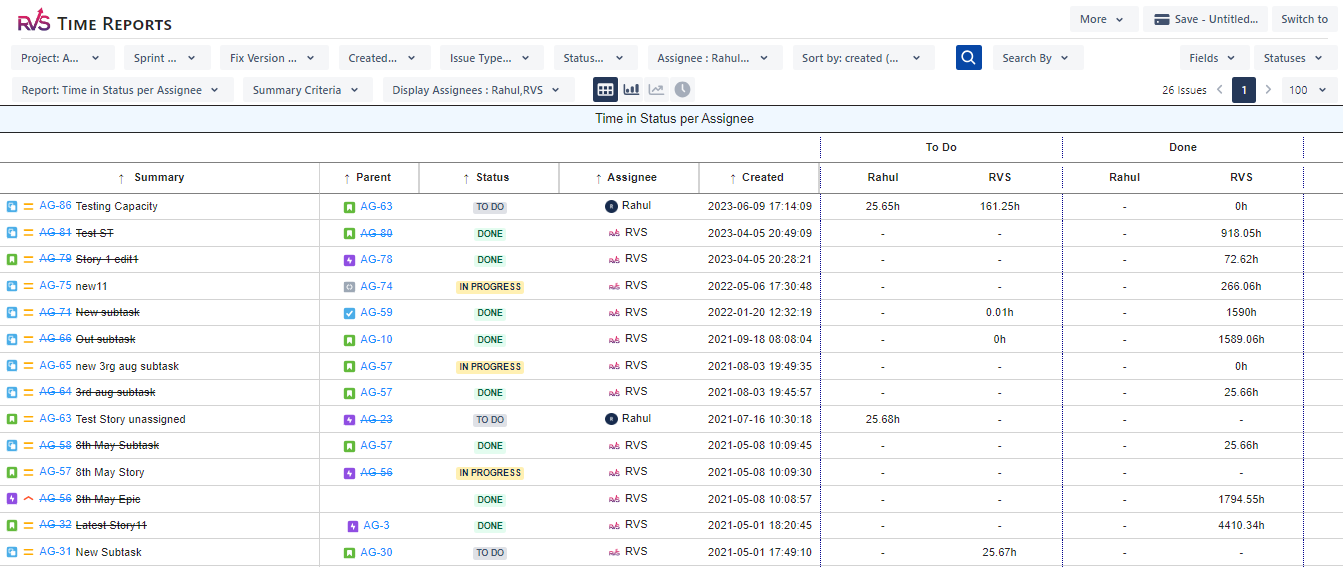
Select the “Time with Assignee per Status” report.
This is a more granular report to track the various statuses the issues have gone through, and in those statuses, which assignee they were with which assignee.
You can also add/remove fields from the report, and also focus on time in specific statuses for your issues by selecting the desired ones from the Status dropdown.
Interpreting the Time with Assignee per Status Report
Key Metrics to Analyze
Total Time with Assignee per Status – The cumulative time each assignee spends in various statuses.
Average Time with Assignee per Status – Helps compare performance among team members.
Status Transition Trends – Identifies frequent blockers and inefficiencies.
Cycle Time per Assignee – Evaluates the time from issue assignment to resolution.
Lead Time per Assignee – Measures the time from issue creation to resolution for individual team members.
Identifying Patterns and Issues
Prolonged Time in "In Progress" Status – May indicate task complexity or inefficiency.
Frequent Reassignments – Could suggest unclear responsibilities or task dependencies.
High Time Spent in "Review" Status – Might signal bottlenecks in quality control or approvals.
Best Practices for Using Time with Assignee per Status Data
Understanding how to interpret Time with Assignee per Status data is only part of the equation. To truly optimize your workflow and improve team productivity, you need to take proactive steps based on this data. Here are some best practices to maximize the impact of your Jira Time in Status reports:
Regularly Review and Adjust Workflows: Use the insights from the Jira Time in Status report to identify and adjust any bottlenecks in the workflow. If certain statuses are consistently delayed, it may be time to revisit how tasks move through that stage and adjust the process accordingly.
Set Clear Expectations for Assignees: Ensure that each team member understands their role in each stage of the workflow. By setting clear expectations, you can reduce the chances of delays due to misunderstandings or unclear responsibilities.
Focus on Cycle and Lead Time: Regularly track Cycle Time per Assignee and Lead Time per Assignee to identify performance trends. Aim to minimize these times without compromising quality. This will help ensure that tasks are completed faster while maintaining high standards.
Optimize Resource Allocation: Use the Jira Time in Status data to identify whether your team is overburdened or underutilized. If certain team members have tasks consistently lingering in specific statuses, they may need additional support, training, or resource reallocation.
Address Delays Early: When you spot prolonged time in specific statuses, especially in areas like "In Progress" or "Review," take immediate action. Proactively engage with the assignees to understand the cause and offer assistance before the delays impact overall project timelines.
Conclusion
The Jira Time with Assignee per Status report is an invaluable tool for teams aiming to enhance efficiency, improve accountability, and optimize workflow processes. Whether using Jira’s built-in reports, add-ons, or custom API integrations, this report provides critical insights into how tasks move through the workflow and how effectively team members contribute to issue resolution.
By implementing best practices and leveraging the right tools, organizations can improve project transparency, reduce inefficiencies, and ensure that tasks are completed promptly. Investing in the right reporting strategies will ultimately lead to a more productive and streamlined development or project management process.
Ready to improve your workflow? Book your RVS demo today.
Frequently asked questions
1. What is a Jira Time in Status report?
A Jira Time in Status report shows how long issues stay in each workflow status, helping teams measure productivity, identify delays, and track project progress.
2. What does Time in Status per Assignee mean in Jira?
Time in Status per Assignee tracks how long each team member spends on issues in different statuses, revealing performance trends and workload distribution.
3. How can Time in Status per Assignee improve team efficiency?
By showing where tasks get stuck or delayed, this report helps managers balance workloads, improve accountability, and enhance team performance.
4. How do I generate a Jira Time in Status report?
You can create Time in Status reports using Jira add-ons like RVS Time in Status, which offer ready-made templates and custom charts for faster insights.
5. Why is tracking Time in Status important in Agile projects?
It helps Agile teams monitor workflow health, measure sprint efficiency, and spot process bottlenecks that slow down delivery.
6. Can I customize Jira Time in Status reports by assignee or project?
Yes, advanced tools like RVS Time in Status allow you to filter reports by assignee, project, sprint, or status for more detailed analysis.
7. What’s the best way to use Jira Time in Status data for improvement?
Use the insights to review bottlenecks, optimize workflows, set realistic deadlines, and create more predictable delivery cycles.
Recent Blogs
July 23, 2026
Jira Time in Status Report: Complete Guide for Project Managers







.webp)





