The Problem: Standard Jira reports show what was finished but fail to explain why tasks are delayed, leaving managers blind to workflow bottlenecks and inefficient resource allocation.
The Shift: Move beyond basic completion charts. By tracking Time in Status, teams can pinpoint exactly where work stalls, whether it’s stuck in "In Review" or sitting idle in "To Do", turning vague metrics into actionable process improvements.
The Fix: Use the Time in Status Report by RVS to bridge the gaps in Jira’s native reporting. Gain cross-project visibility, identify hidden blockers, and export granular data to optimize your Agile delivery.
Jira helps track your Agile team's sprint efficiency, but its standard performance reports only show what's completed and don't explain why tasks are delayed!
Project and team managers often face the same issue: Jira’s native reports don't provide the detailed insights needed to optimize workflows and track team performance.
Here are the critical productivity gaps with Jira performance reports:
Limited Workflow Visibility: Jira doesn’t provide insights into time spent in each workflow status, making it hard to identify delays.
Hidden Bottlenecks: It’s difficult to spot inefficiencies in the workflow that slow down progress.
Ineffective Resource Allocation: Lack of visibility into how time is spent makes it hard to allocate resources efficiently.
The solution? A smart plugin like Time in Status Report, which tracks the exact time spent in each workflow status, provides the real-time insights needed to optimize workflows and improve team performance.
In this blog post, we'll explore how the Time in Status Report by RVS Softek can turn Jira’s basic reports into actionable, detailed performance data, helping you enhance efficiency, allocate resources better, and streamline project delivery.
Why Tracking Team and Project Performance is Crucial in Agile Environments
In agile environments, teams are encouraged to embrace flexibility, adapt to changes, and deliver iterative results. However, without proper tracking, it’s difficult to gauge whether the team is progressing in the right direction or whether certain elements are slowing down the project.
Why tracking the Jira team performance is vital:
Predicting Future Performance: By understanding past team behaviors and performance trends, agile teams can better predict how much work they can accomplish in future sprints.
Resource Allocation: Effective performance tracking helps managers allocate resources efficiently by identifying bottlenecks or areas where the team may need additional support.
Continuous Improvement: Agile emphasizes iterative improvements. Performance data provides the baseline for these improvements, helping teams refine their processes with every sprint.
Timely Adjustments: Real-time data from Jira team performance reports allows project managers to make timely adjustments to processes, timelines, or team members to ensure project success.
Key Jira Team Performance Metrics You Should Track
Metric
What It Measures
Good Indicator
Red Flag
Recommended Action
Sprint Velocity
Story points completed per sprint
Stable trend across sprints
Large fluctuations
Re-evaluate the estimation process and scope control
Cycle Time
Time from “In Progress” to “Done”
Decreasing over time
Increasing duration
Identify bottlenecks and remove blockers
Lead Time
Time from task creation to completion
Short and consistent
Long delays in the backlog
Improve prioritization and backlog grooming
Throughput
Number of issues completed in a timeframe
Steady output
Sudden drops
Review team capacity and workload distribution
Work in Progress (WIP)
Tasks currently in progress
Controlled/limited tasks
Too many concurrent tasks
Implement WIP limits to reduce multitasking
Sprint Burndown Rate
Work completed vs remaining in the sprint
Smooth, steady decline
Flat or erratic trends
Improve sprint planning and daily tracking
Escaped Defects
Bugs found after release
Low defect count
Increasing defects
Strengthen QA processes and testing coverage
Limitations of Jira’s Built-In Reports
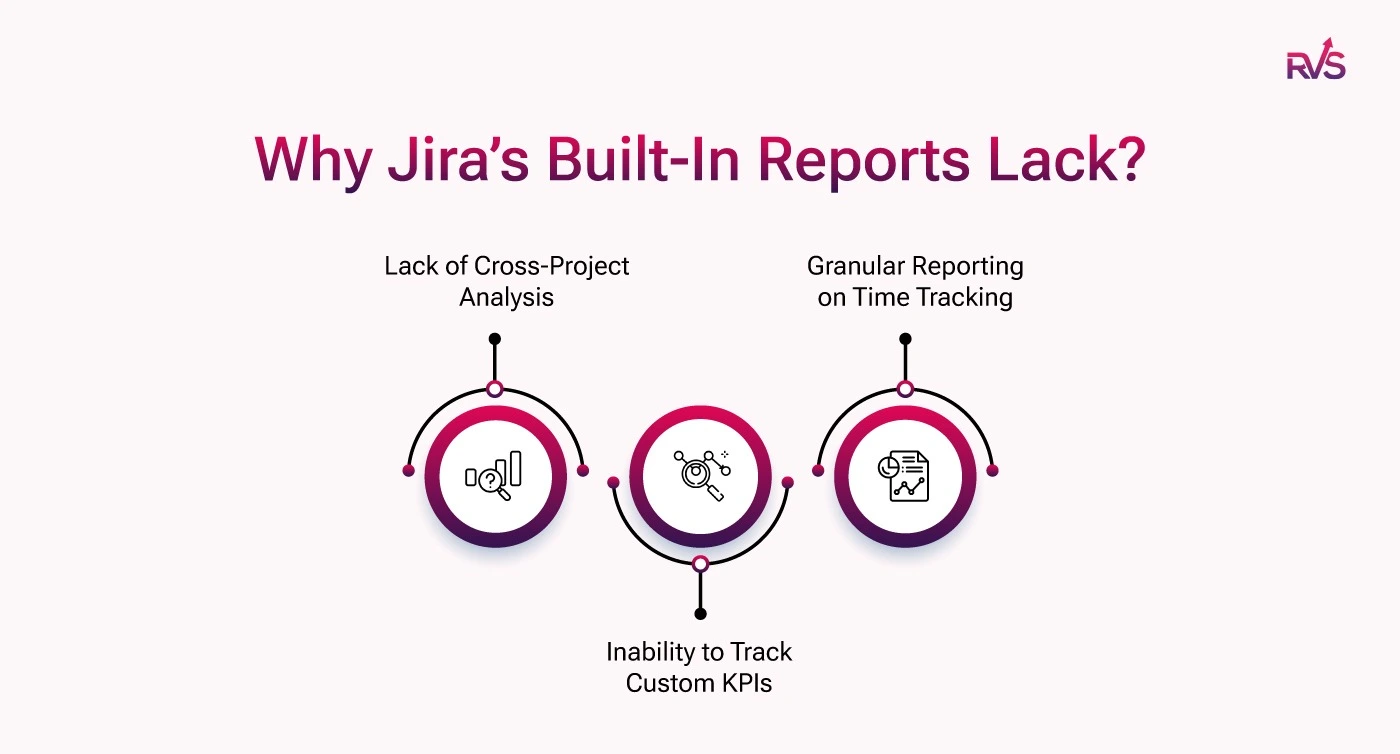
While Jira’s built-in reports provide valuable insights, they also have limitations that can hinder a team’s ability to make fully informed decisions. Here are a few limitations:
1. Lack of Cross-Project Analysis
Jira’s native reports are often most effective at the individual project level. For teams managing multiple projects, programs, or business initiatives, bringing data together across projects can require additional configuration or specialized reporting tools. A more consolidated cross-project view can help project managers better understand overall team performance, resource allocation, and delivery trends across the organization.
2. Inability to Track Custom KPIs
Jira includes several widely used reports, such as burndown charts, sprint reports, and velocity charts. These are valuable for standard Agile reporting. At the same time, some organizations need to monitor custom KPIs that reflect their own operational or business goals.
For example, teams may want to measure workflow-specific efficiency, time spent at specific stages, or other performance indicators tailored to their internal processes. In these cases, extended reporting options can provide greater flexibility.
3. Granular Reporting on Time Tracking
Jira’s built-in time tracking supports general effort monitoring, but some teams require deeper visibility for performance analysis. More detailed reporting can help managers understand how long issues remain in specific workflow stages, where delays occur, and which parts of the process may need improvement.
This type of insight is especially useful for identifying bottlenecks, improving workflow efficiency, and supporting data-driven process optimization.
Tools like RVS Softek’s Time in Status Report Plugincan extend Jira reporting by offering more detailed visibility into how time is distributed across workflow stages.
By tracking how long issues remain in each status, the plugin helps teams uncover bottlenecks, improve process transparency, and make more informed operational decisions.
How Time in Status Helps Understand Jira Team Performance Reports Better
Let’s understand how the Time in Status Report Plugin improves Jira team performance reports by providing detailed insights into time spent in each workflow status, identifying bottlenecks, and optimizing workflows for greater efficiency.
1. Cross-Project Reporting
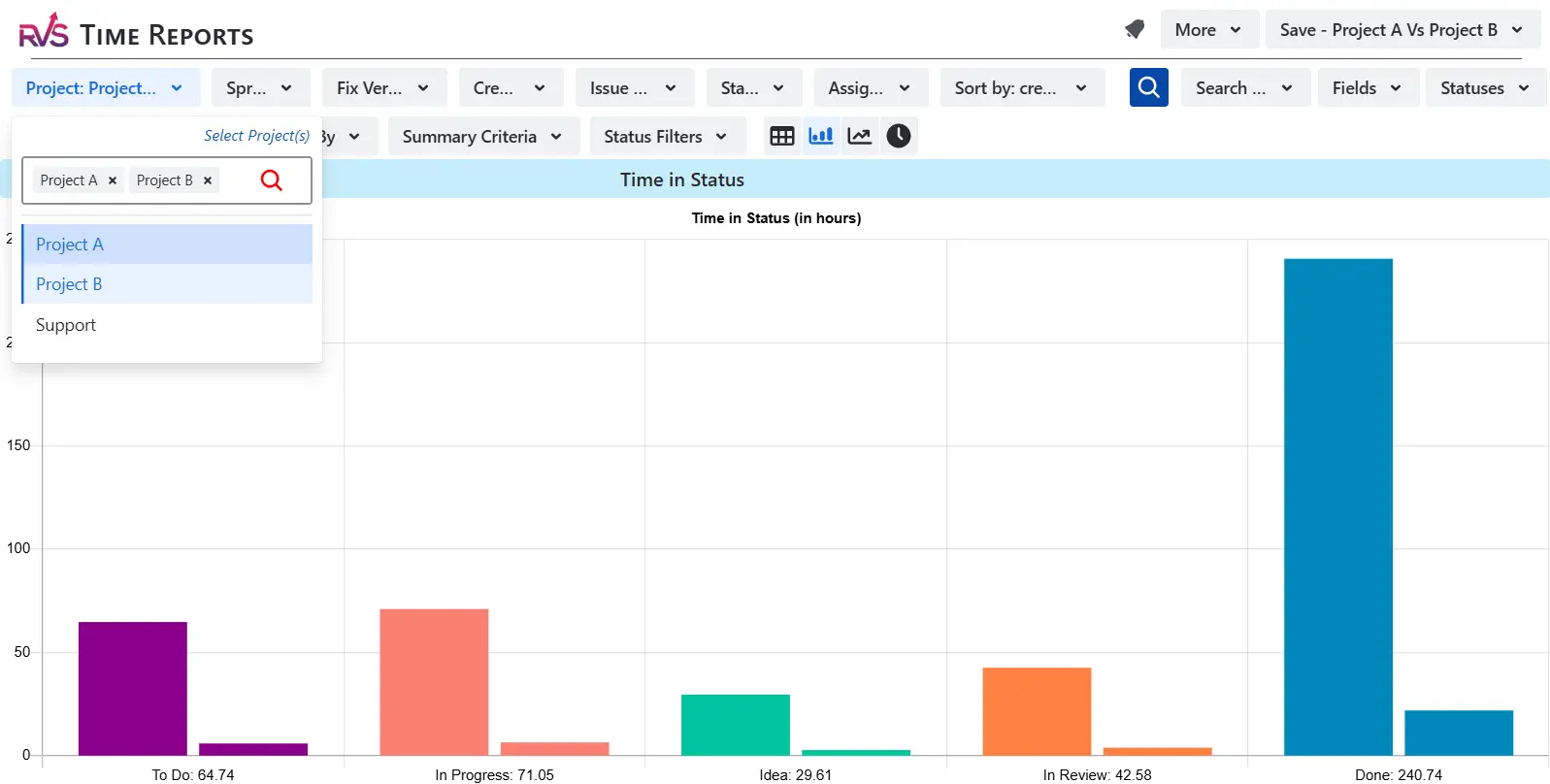
Time in Status Report by RVS allows you to aggregate data across multiple projects. Unlike Jira’s default reports, which are confined to individual projects, this capability provides a unified view of team activities and resource allocation across different initiatives, helping project managers get a clearer picture of overall team performance.
How to do it:
Step 1: Open the Time in Status Report plugin from the Jira sidebar.
Step 2: Select the “Projects” filter option.
Step 3: Choose multiple projects you want to aggregate the data for.
Step 4: Apply the filters for assignee, status, or time range (e.g., last sprint, last month).
Step 5: The plugin will generate a cross-project report that shows performance and time spent in different workflow statuses across all selected projects.
Example: If you're tracking time spent in “In Progress” across Project A and Project B, you'll see the combined data in one report, providing a holistic view of where delays are occurring.
2. Customizable Report Filters
Time in Status Report allows you to customize reports based on project, assignee, sprint, and other factors.
Jira’s built-in reports have limited customization options. Still, with this plugin, you can tailor the reports to focus on the data that matters most, making it easier to analyze performance and track specific metrics.
3. Detailed Time Tracking
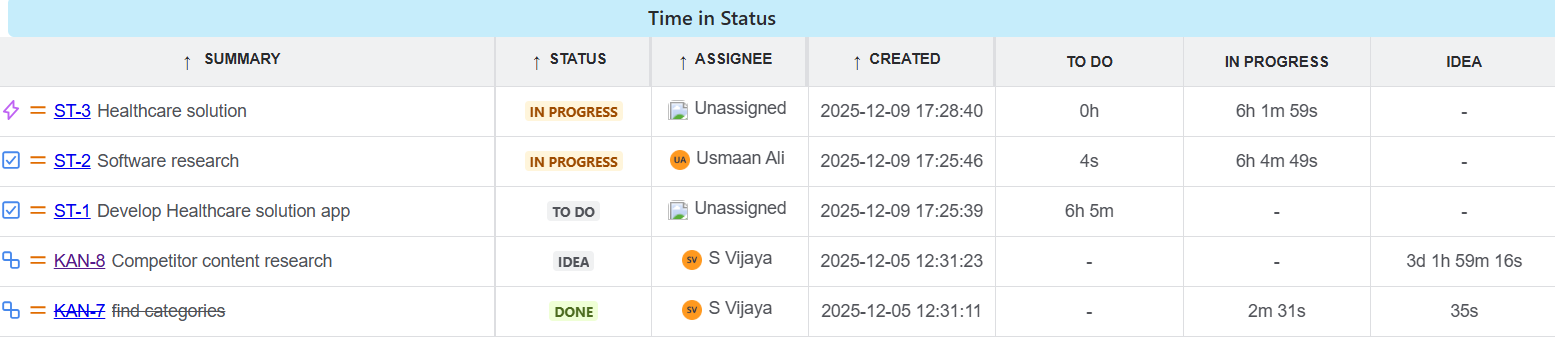
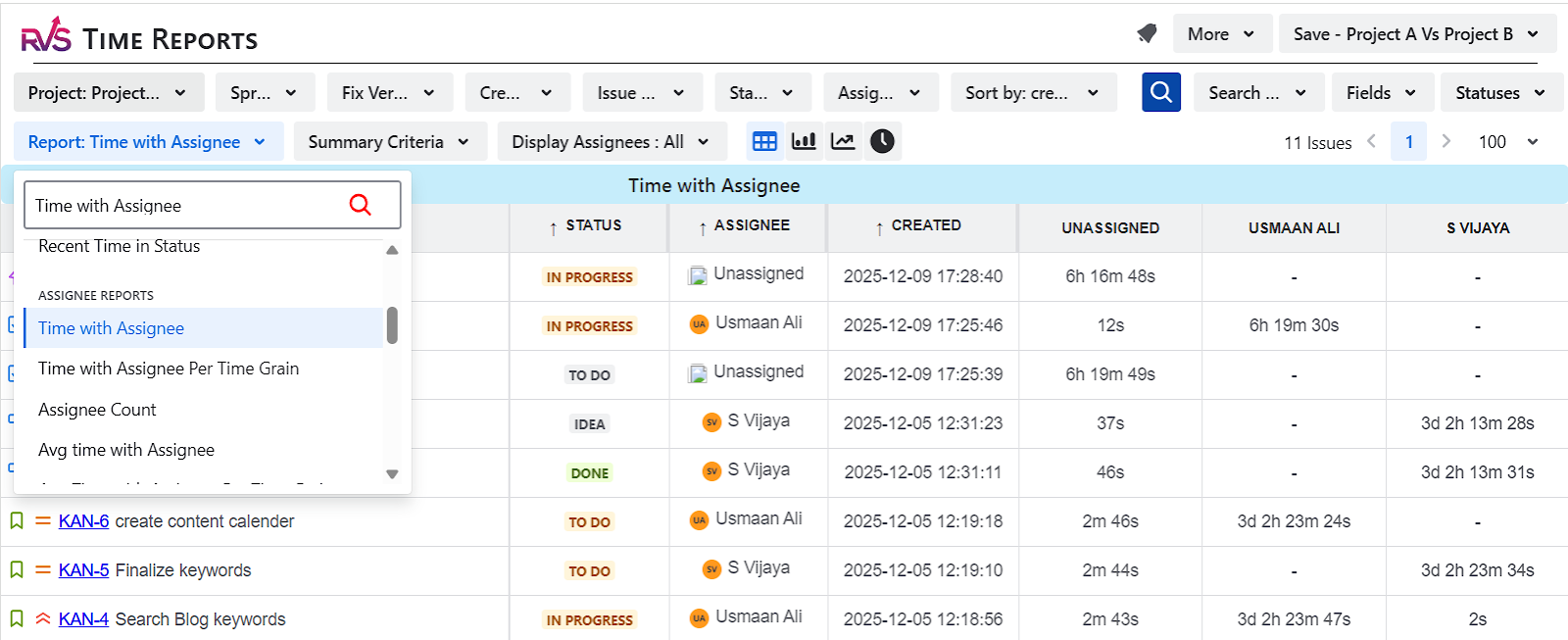
Time in Status Reports by RVS tracks how much time issues spend in each workflow status and with each assignee.
This level of granularity is missing from Jira’s default time tracking, which simply logs hours worked. By providing insights into where time is spent, the plugin helps identify delays, inefficiencies, and areas needing improvement.
4. Resource Allocation Insights
By tracking time with assignee, the plugin provides visibility into workload distribution.
It helps project managers identify whether any team members are overburdened or underutilized, enabling better resource allocation and ensuring work is distributed more evenly across the team.
5. Exportable Data
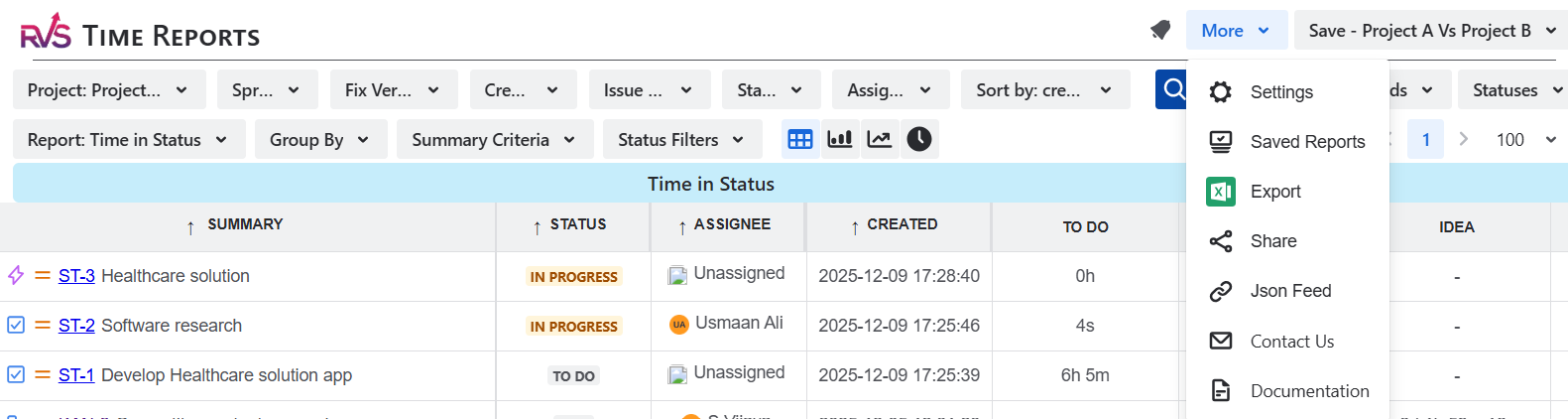
Time in Status Report allows you to export reports in CSV, Excel, or Google Sheets formats.
This makes it easier to share insights and perform further analysis, providing flexibility that Jira’s native reporting tools may not offer.
Conclusion
Jira's built-in performance reports are essential for tracking team and project performance, but they have limitations that prevent teams from fully understanding their workflows. By integrating third-party plugins such as RVS Softek’s Time in Status Report Plugin, teams can enhance their Jira reports, gain detailed insights into time spent across workflow statuses, and identify bottlenecks.
Whether you're looking to optimize workflows, improve team efficiency, or better allocate resources, the Time in Status plugin provides the actionable data needed to elevate your Jira reporting and decision-making.
Frequently asked questions
1. What Is a Jira Team Performance Report?
A Jira team performance report is a comprehensive analysis of your team's performance in Jira. It tracks key metrics such as issue resolution times, task assignments, and team efficiency, offering insights into areas for improvement and optimizing workflow.
2. How Do Jira Team Performance Reports Benefit Teams?
Jira team performance reports help teams by providing actionable insights into task progress, Jira bottleneck detection, and measuring team velocity. With this data, teams can make informed decisions to enhance productivity and optimize project timelines.
3. What Metrics Are Included in a Jira Team Performance Report?
A Jira team performance report includes metrics like task cycle times, jira assignee performance, sprint velocity, issue resolution time, and defect rates. These metrics allow teams to evaluate their efficiency and make adjustments to improve workflow.
4. How Can I Generate a Jira Team Performance Report?
To generate a Jira team performance report, navigate to the Reports section within your Jira project. You can filter by specific time periods, assignees, or tasks to tailor the report to your needs and track key metrics across sprints or projects.
5. Can Jira Team Performance Reports Be Customized?
Yes, you can customize Jira team performance reports. You can adjust the filters to focus on specific assignees, projects, or issue types, ensuring the report highlights the metrics most relevant to your team's performance and goals
6. How Do Jira Team Performance Reports Improve Project Management?
Jira team performance reports enable project managers to track the overall progress of their teams. By providing real-time insights into team efficiency, these reports help managers adjust timelines, allocate resources effectively, and predict project outcomes with greater accuracy.
7. How Do Jira Team Performance Reports Identify Bottlenecks?
Jira team performance reports help identify bottlenecks by showing where tasks are getting delayed or stuck in the workflow. By analyzing metrics like time spent in specific statuses, teams can pinpoint issues and take action to speed up transitions and improve efficiency.
Recent Blogs
July 23, 2026
Jira Time in Status Report: Complete Guide for Project Managers









.webp)





