Jira's Time in Status report by RVS is a powerful tool that helps teams analyze workflow efficiency, identify bottlenecks, and optimize processes. Here are some real-world use cases
Project managers, Agile teams, and service desk professionals are always looking for ways to gain deeper insights into their workflows. Without visibility into how long tasks spend in each stage, bottlenecks can easily go unnoticed, and valuable time is wasted—leading to delays and frustration.
That’s where the Jira Time in Status Report from RVS Softek truly shines. This powerful tool provides real-time, accurate data on how long tasks spend in each Jira status, empowering teams to make data-driven decisions.
By eliminating inefficiencies and improving workflow visibility, RVS Time in Status Report helps teams stay on track, meet deadlines, and drive better overall performance.
In this blog, we’ll walk through seven practical use cases that demonstrate how teams across various industries are leveraging this tool to maximize productivity and drive results.
Why Project Teams Need Time in Status Reports?
Visibility into each stage of a project is a must-have for modern teams. Whether you're working in Agile sprints or managing a customer support queue, tracking how long issues stay in each Jira status can provide critical insights into your team’s performance.
Challenges Faced Without Time in Status Reports
Lack of Transparency: Without tracking Jira time in status, it becomes difficult to understand where bottlenecks occur, which leads to missed deadlines and frustrated team members.
Inefficient Resource Allocation: When teams don't know which status is holding up progress, they can't allocate resources effectively, resulting in inefficiencies.
Inaccurate Sprint Planning: Agile teams struggle to predict how long tasks will take without historical time data on how long tasks spend in each status.
Tracking time in status ensures that project managers have a real-time understanding of workflow management and can act quickly to resolve delays before they escalate.
Introducing the RVS Time in Status Reports
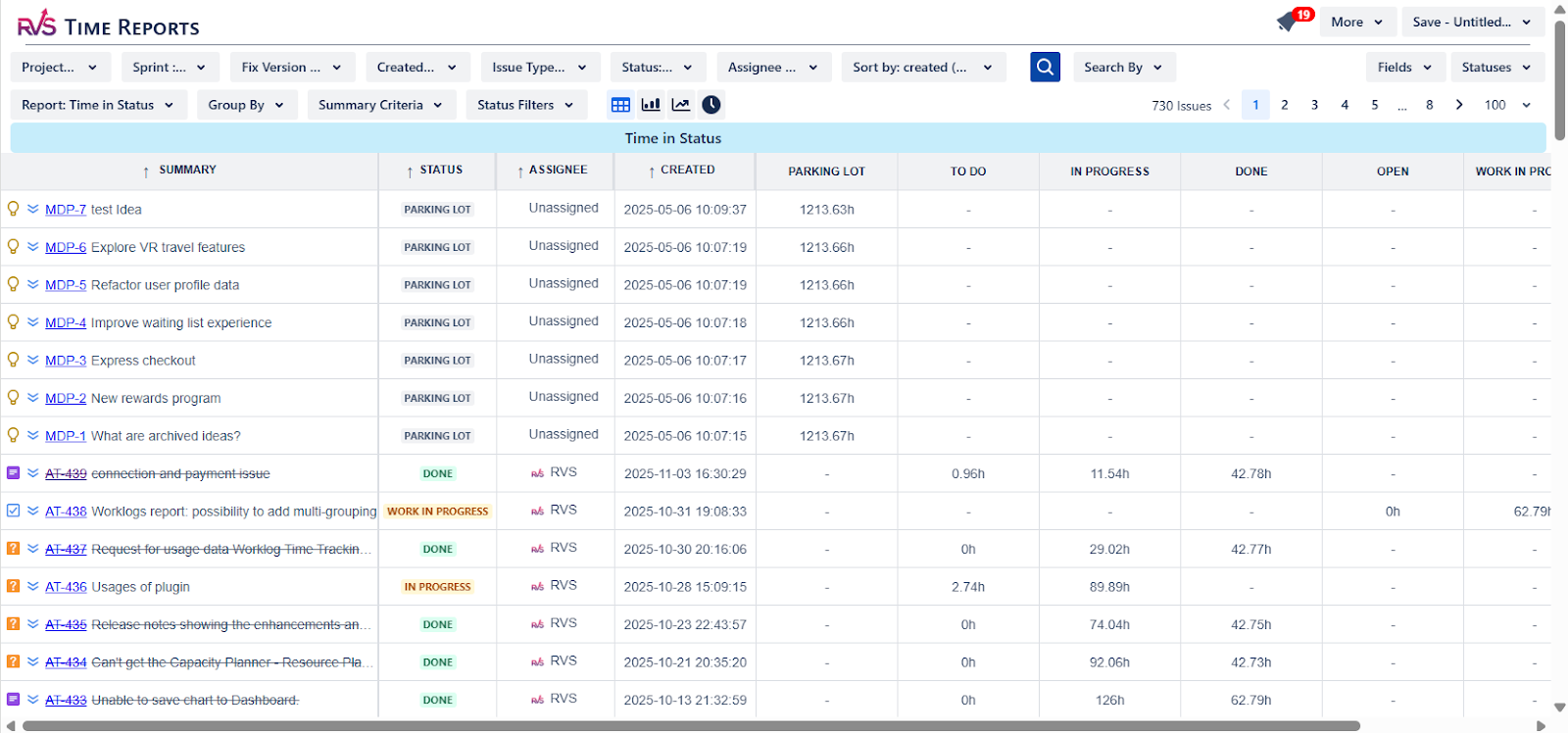
The RVS Time in Status Report for Jira, powered by RVS Softek, integrates seamlessly into your project management workflow. This app for Jira automatically tracks how long each issue spends in every Jira status (e.g., "To Do," "In Progress," "Done"), providing detailed, actionable reports that help you optimize your workflow and make data-driven decisions.
Key Features of RVS Time in Status:
Automated Time Tracking: The tool tracks time spent in each Jira status automatically, eliminating the need for manual tracking.
Customizable Reports: You can customize reports based on different Jira filters, such as project, issue type, or sprint, and gain insights into your team’s performance.
Visual Dashboards: The tool provides intuitive dashboards and visualizations, making it easy to spot delays and inefficiencies at a glance.
Integration with Jira Query Language (JQL): The Jira Query Language (JQL) integration allows you to filter time tracking data based on specific criteria, giving you full control over how you track your team’s performance.
Exportable Reports: Export your Jira time in status report into Excel or PDF for easy sharing with stakeholders or for analysis.
By giving teams the power to change Jira status and track time across all statuses, RVS Time in Status Report helps ensure projects stay on track, goals are met, and deadlines are respected.
Use Cases of RVS Time in Status Reports
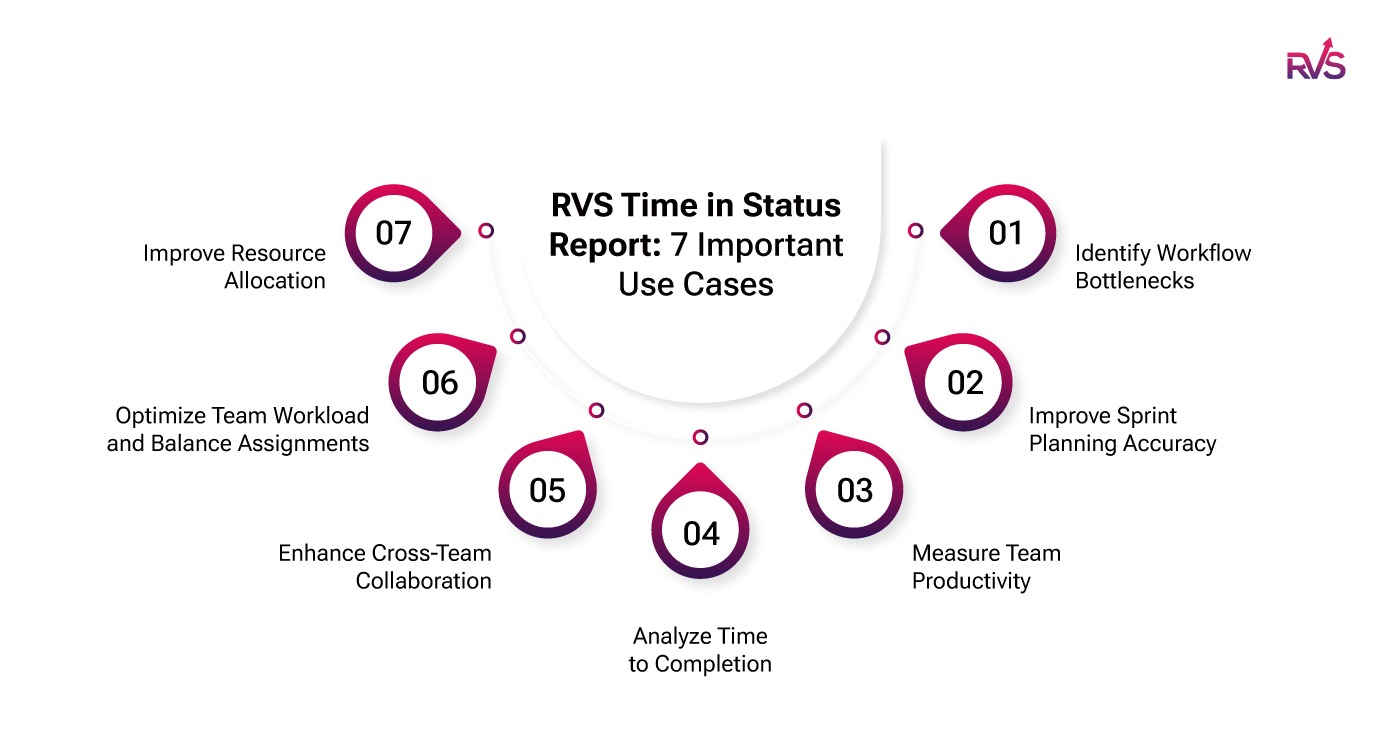
Jira's Time in Status report by RVS is a powerful tool that helps teams analyze workflow efficiency, identify bottlenecks, and optimize processes. Here are some real-world use cases:
Use Case 1: Identify Workflow Bottlenecks
Problem: Development teams often struggle with tasks getting delayed in specific stages of the process, such as "Code Review," "QA Testing," or "In Progress." Without real-time insights, these bottlenecks go unnoticed, resulting in project delays.
Solution: The RVS Time in Status Report provides detailed reports on how long each issue stays in each status. By analyzing these reports, teams can easily identify which stage of the workflow is causing the delays.
For example, if the "In Progress" status consistently has issues that linger for a week, it’s clear that a rebalancing of resources or process improvements is needed.
Benefits:
Quickly pinpoint where tasks are getting delayed in the workflow.
Reduce time spent identifying bottlenecks manually, saving valuable hours.
Improve overall cycle time by addressing inefficiencies at the root.
Increase task completion speed by eliminating process slowdowns.
Enhance team collaboration by proactively resolving issues holding up progress.
Use Case 2: Improve Sprint Planning Accuracy
Problem: Agile teams often struggle with sprint planning due to a lack of historical data on how long tasks take to progress through different stages. This leads to inaccurate estimates, resulting in delays or task overload.
Solution: With the Jira Average Time in Status Gadget, teams can easily gain insights into how long tasks spend in each Jira status during past sprints.
For example, if the gadget shows that tasks typically spend an average of 3 days in the "Testing" status, the team can factor this into their sprint estimates. This data-driven approach helps teams plan more accurately and avoid underestimating or overloading tasks in the next sprint.
Benefits:
Accurate sprint estimations based on historical time data.
Better resource allocation, as teams can anticipate how much work they can handle.
Increased confidence in the team’s ability to meet sprint goals.
Reduced risk of overloading team members, leading to smoother sprint executions.
Enhanced predictability of sprint timelines improves stakeholder expectations.
Use Case 3: Measure Team Productivity
Problem: Project managers need a way to measure how efficiently their teams are performing across different Jira statuses. Without this insight, it’s difficult to understand where delays are occurring and whether certain team members or processes need improvement.
Solution: By analyzing the time spent in each Jira status, the RVS Time in Status Report enables managers to assess the productivity of their teams. If certain team members consistently take longer in the "Development" stage, it may indicate they need additional training or support.
On the other hand, if the "QA" status is always taking longer than expected, it may suggest that the testing process needs to be optimized.
Benefits:
Get a clear, data-driven view of individual and team productivity.
Spot inefficiencies in specific stages of the workflow and address them.
Identify team members who may need additional training or support.
Optimize resource allocation based on performance insights.
Increase team morale by recognizing high performers and addressing blockers.
Use Case 4: Analyze Time to Completion
Problem: Product teams or project managers may want to track how long it takes to complete a feature or fix an issue, from its initial creation to release, but often lack visibility into specific status durations.
Solution: The Time in Status Count gadget provides a comprehensive view of how long each task spends in various stages (e.g., "To Do," "In Progress," "Testing," "Completed"). By analyzing this data, teams can identify which stages take the longest.
For example, if a feature consistently takes 3 days in "Development" and 2 days in "Testing," teams can focus on optimizing these stages to speed up the delivery process.
Benefits:
Measure and reduce the turnaround time it takes to complete tasks from start to finish.
Identify long-running tasks or delays in specific stages, enabling process improvements.
Improve delivery time for features and fixes by streamlining critical stages.
Provide stakeholders with more accurate project timelines.
Optimize resource usage by understanding where time is being spent.
Use Case 5: Enhance Cross-Team Collaboration
Problem: Cross-functional teams (e.g., development, QA, design, product management) often work on different parts of the project, and it’s difficult for them to track how their work is impacting others. As a result, handoffs and dependencies can create delays.
Solution: The RVS Time in Status Report helps break down these silos by providing real-time visibility into the status of issues across different teams.
For instance, if the "Development" stage is finished, but the task is waiting for QA approval, the tool can help identify this hold-up and allow the QA team to prioritize or speed up their review process.
Benefits:
Improve transparency between cross-functional teams like development, QA, and design.
Reduce friction in handoffs between departments, speeding up task completion.
Improve communication and accountability across teams by having a clear view of each department’s status.
Ensure all teams are aligned with project progress, minimizing delays due to miscommunication.
Promote teamwork by identifying areas where one team might be holding up progress.
Use Case 6: Optimize Team Workload and Balance Assignments
Problem: Project managers often face challenges when it comes to balancing workloads across team members. Without tracking how long issues stay with each assignee, it’s easy to miss overloading certain team members, which can lead to delays and burnout.
Solution: With the Time with Assignee Per Time Grain gadget, project managers can track the total time issues were assigned to each team member over specific periods. By comparing this data across historical timeframes, managers can easily identify if any assignee is consistently overloaded or if task assignments are unbalanced.
For example, if one team member is consistently receiving more issues during specific sprints, managers can redistribute tasks more evenly, ensuring a balanced workload for the entire team.
Benefits:
Identify workload imbalances by tracking time spent in each status for individual team members.
Spot underutilized or overwhelmed team members, allowing managers to take action before issues arise.
Improve resource allocation and ensure that all team members are working at optimal capacity.
Use Case 7: Improve Resource Allocation
Problem: Managers need to know whether their team members are underutilized or overwhelmed, but without insight into how long tasks are spending in different statuses, it’s impossible to identify resource gaps.
Solution: By analyzing Time with Assignee Per Status, managers can track how long tasks are taking in each Jira status for individual team members. If a developer consistently takes longer to complete tasks in the "Development" status, it may indicate that they are overloaded and need help or a more balanced workload. This insight allows managers to redistribute tasks or provide support where it's needed most.
Benefits:
Identify workload imbalances by tracking time spent in each status for individual team members.
Spot underutilized or overwhelmed team members, allowing managers to take action before issues arise.
Improve resource allocation and ensure that all team members are working at optimal capacity.
The RVS Time in Status Report for Jira provides a clear, actionable view of how long tasks spend in each status, empowering teams to identify bottlenecks, optimize workflows, and meet deadlines.
Whether you're improving sprint planning or measuring team productivity, RVS Time in Status Reports offers the insights necessary to boost efficiency and drive better project outcomes.
By implementing this tool, teams can unlock valuable data that allows them to optimize their Jira workflows, ultimately leading to faster delivery, higher quality, and greater satisfaction for stakeholders.
Start using RVS Time in Status now and begin streamlining your team's workflow. Track, optimize, and accelerate project delivery like never before.
Ready to improve your workflow? Book your RVS demo today.
Frequently asked questions
1. How does RVS Time in Status Report help improve project workflows in Jira?
The RVS Time in Status Report for Jira tracks how long each issue spends in each status, helping project managers identify bottlenecks and optimize workflows. By visualizing status transitions and durations, teams can make data-driven decisions, improve efficiency, and deliver projects faster.
2. How do I generate the average time in status per issue in Jira?
To generate the average time in status per issue in Jira, simply use the RVS Time in Status Gadget. This tool provides a detailed breakdown of how long issues spend in each status, allowing you to track averages and identify stages that need improvement.
3. How can Jira Time in Status metrics benefit Agile teams?
Jira Time in Status metrics are essential for Agile teams, as they allow you to track the time each task spends in various workflow stages. This visibility helps teams improve sprint planning, reduce cycle times, and focus on optimizing bottleneck areas for smoother, faster project delivery.
4. Can RVS Time in Status Report help reduce SLA breaches in Jira?
Yes! RVS Time in Status Report provides real-time data on how long tasks stay in each status, helping teams spot inefficiencies that may lead to SLA breaches. By tracking these time metrics, teams can make proactive adjustments to meet deadlines and maintain service levels.
5. How can I optimize my team’s workflow using Jira Time in Status Tool?
The Jira Time in Status Tool by RVS Softek provides real-time insights into task progress and status durations. By analyzing this data, you can pinpoint inefficiencies, redistribute workloads, and streamline processes to optimize your team's overall performance and accelerate project delivery.
6. What are the key Jira Time in Status metrics for Agile teams to track?
Key Jira Time in Status metrics for Agile teams include the time spent in each status, status transition times, and the average time per issue. These metrics help Agile teams identify bottlenecks, improve sprint planning, and ensure tasks move smoothly through each phase of development.
8. How can RVS Time in Status improve sprint planning for Agile teams?
RVS Time in Status helps Agile teams improve sprint planning by providing detailed insights into how long tasks spend in each status. By analyzing historical data, teams can make more accurate estimates, optimize workflows, and allocate resources efficiently to ensure timely delivery of sprints.
Recent Blogs
July 23, 2026
Jira Time in Status Report: Complete Guide for Project Managers







.webp)





