Explore the role of workflow analytics in boosting Jira productivity. This blog covers how tracking task transitions, identifying bottlenecks, and optimizing workflows with tools like RVS Softek can enhance team performance and deliver projects faster.
Managing projects inside Jira becomes easier when teams understand how their work moves through every stage. The Jira status workflow decides how tasks progress, who works on them, and where delays appear.
But as teams grow, the workflow gets more complex. Without clear visibility, tasks slow down, bottlenecks appear, and productivity drops. Solution?
This is where workflow analytics becomes essential. When teams can measure how work moves, how long tasks stay in each stage, and where delays happen, they can improve their processes and deliver work faster.
This blog will break down why workflow analytics matters, how it improves productivity, and how teams can use the right tools, like RVS Softek, to manage their workflows better.
The Current State of Jira Workflows
A Jira workflow defines every step a task takes, usually from To Do → In Progress → In Review → Done. While this looks simple, the reality is different. Teams add custom steps, more people get involved, and tasks jump back and forth between statuses.
This makes the Jira status workflow harder to track. And when teams do not track it well, they face several issues:
1. Lack of Visibility into Workflow Efficiency
Without a clear picture of how long tasks stay in each stage of the process, teams are left in the dark about the efficiency of their workflows. This makes it challenging to spot areas where delays are occurring, hindering proactive adjustments to improve overall flow.
2. Inability to Identify Bottlenecks
When the time spent during each status transition in Jira is not measured, bottlenecks remain hidden. Tasks may stall in certain stages, but without concrete data, teams are unable to quickly identify and address these slowdowns, resulting in prolonged delays.
3. Difficulty in Making Data-Driven Decisions
When teams cannot accurately measure task progress across various stages, decision-making becomes guesswork. Without concrete data, managers may struggle to optimize workflows, reallocate resources, or adjust priorities effectively, leading to inefficiencies.
What Is Workflow Analytics in Jira?
Workflow analytics means measuring how work moves through your Jira workflow. It answers:
How long does each task stay in each status?
Where do bottlenecks occur?
How does each team member contribute?
Which stages slow down delivery?
A strong Jira workflow analytics tool provides visual data about the complete workflow. It helps teams find hidden delays, understand performance patterns, and make data-driven decisions.
While basic Jira time tracking tells you how long a task took overall, workflow analytics tells you where that time was spent by status, revealing hidden process inefficiencies.
Key Features of Workflow Analytics
Time Spent in Each Status: Time in status shows how long tasks stay in each part of the Jira status workflow. This data helps identify inefficiencies, such as tasks that spend too much time in one stage.
Workflow Visualizations: Custom charts in Jira & dashboards show transitions, task clusters, and slow-moving areas. With visual insights, teams can quickly pinpoint where problems occur and focus their efforts on optimizing those areas.
Performance Reports: Helps teams understand who is overloaded and which tasks slow down the project. By examining individual task performance, teams can address skill gaps or bottlenecks that might be affecting progress.
Real-Time Insights: No waiting for manual exports, data updates automatically as work moves. With real-time insights, managers can make quick adjustments, reducing delays and improving overall efficiency.
With the right numbers, even small changes can create major improvements in delivery speed.
How Workflow Analytics Boosts Jira Productivity
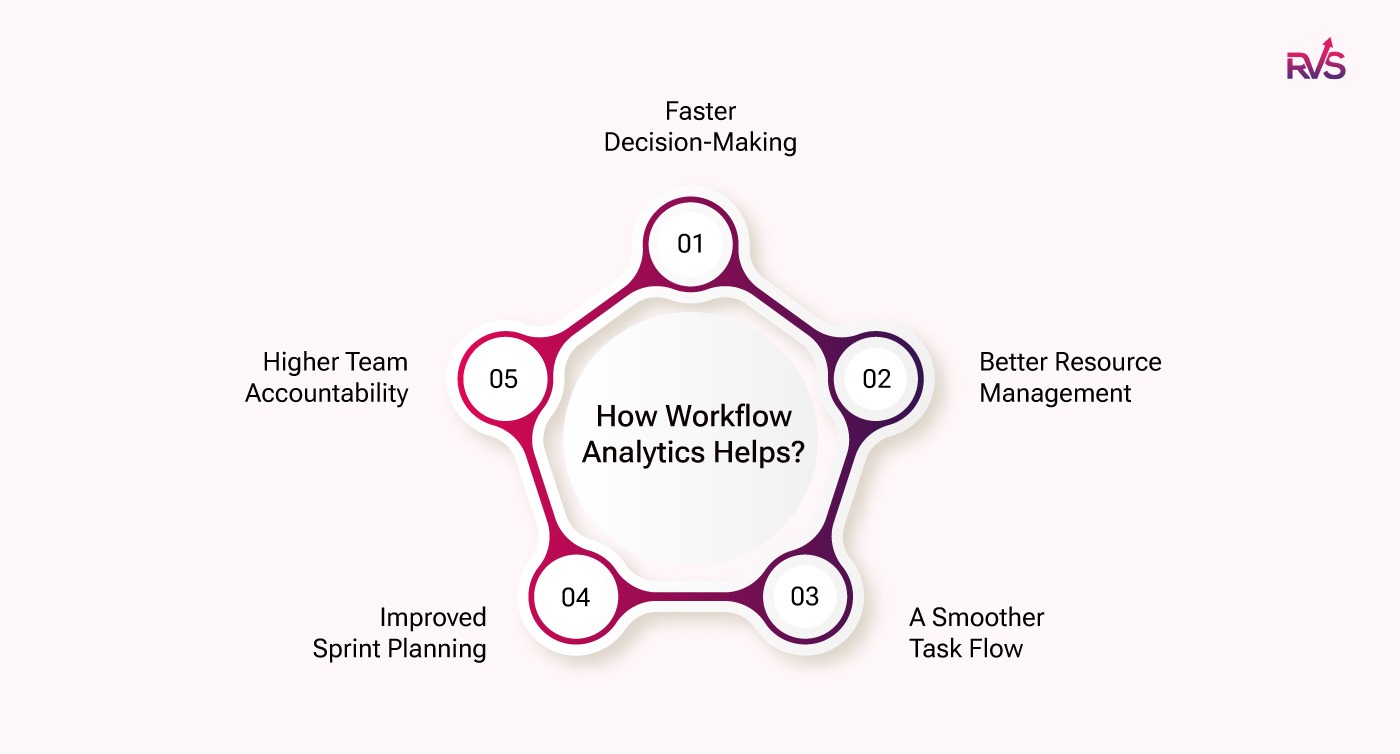
Faster Decision-Making
Instead of guessing where work is slowing, data reveals the truth. Real insights replace assumptions. When teams understand their Jira status workflow, they act faster and smarter.
For example, if you notice that the "Code Review" stage always takes longer than expected, you can assign more resources or reassign tasks to speed it up, ensuring the task flows smoothly through the process.
Better Resource Management
Workflow analytics show where work piles up. Maybe QA takes too long. Maybe the design is overloaded. Maybe approvals slow down. With facts, managers can redistribute tasks and reduce overload. For instance, if testing always takes longer, a manager might decide to increase the size of the testing team or train existing staff to improve efficiency.
A Smoother Task Flow
Bottlenecks become obvious with tools like a Jira workflow bottleneck analysis report. Once teams know where tasks slow down, they can fix the root cause and improve delivery speed. For example, if multiple tasks are getting stuck in "Review" due to a lack of available reviewers, you can add more reviewers or automate the process to improve speed.
Improved Sprint Planning
Teams can estimate more accurately by analyzing numbers from a Jira workflow duration report. They understand real timelines, not assumptions, and plan sprints based on actual performance. Using real data ensures that teams don’t overestimate or underestimate the time needed for future tasks, making planning more reliable and predictable.
Higher Team Accountability
Analytics show time with assignee per status. This builds a transparent and accountable culture. When team members know their performance is tracked, they are more likely to stay focused and improve their work habits.
What’s Next? How Can You Improve Your Workflows?
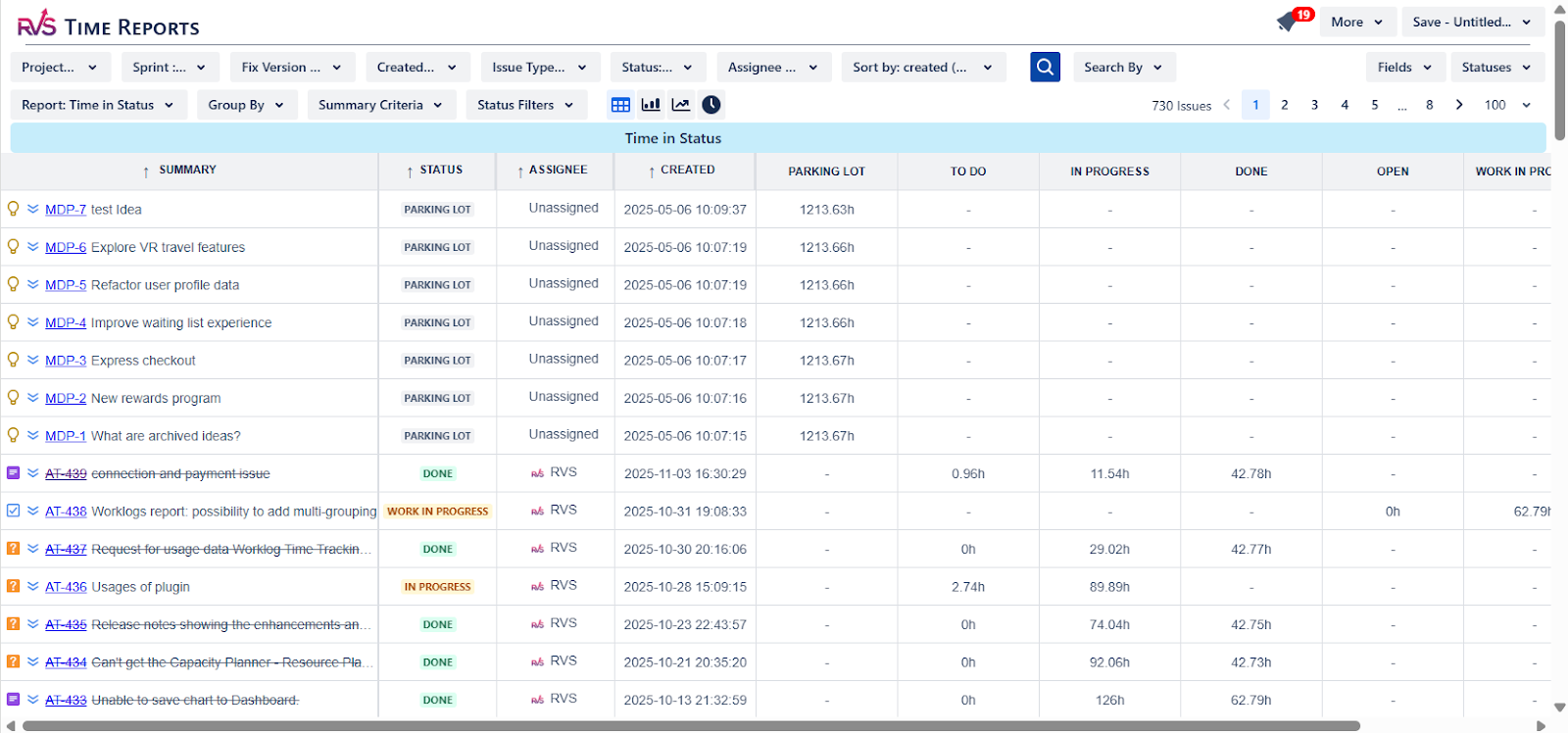
To improve your workflow, you need a better understanding and data on workflow analytics like task progression, tasks assigned to each person, and status transitions in Jira. These insights can be gained through Time in Status reports.
For Jira, you need a plugin to provide these detailed insights. And RVS Time in Status Report offers real-time, customizable reports, allowing you to track how long tasks spend in each status, by project, sprint, assignee, or version. With these insights, you can make data-driven decisions, optimize workflows, and improve overall efficiency.
Boost Your Workflow With Time in Status Report by RVS
The RVS Time in Status Report offers a comprehensive solution for project managers by providing customizable, real-time time tracking reports. This tool allows teams to monitor how long tasks spend in each status across the Jira status workflow, offering clear insights into task progression and identifying potential bottlenecks.
How RVS Time in Status Report Improves Jira Workflow?
Get Real-Time Workflow Insights: RVS gives teams a clear view of how work moves inside the Jira status workflow. Real-time dashboards show delays, task transitions, and performance trends.
Generate Detailed Workflow Reports: With tools like a Jira workflow duration report, managers see how long tasks stay in each status. This helps identify areas where work slows down.
Identify Bottlenecks Early: RVS offers built-in Jira workflow bottleneck analysis features to highlight slow-moving stages. This helps teams remove blockers before they affect delivery timelines.
Improve Resource Planning: With accurate historical data, managers can match capacity with workload. This reduces burnout and improves predictability.
Seamless Jira Integration: RVS Softek plugins work smoothly inside Jira. No long setup. No complex learning curve. Just install and get immediate value.
How to Configure Jira Workflow for Better Analytics
Many teams ask: How to configure Jira workflow for better reporting?
When the workflow is structured, analytics become more accurate and useful.
Conclusion
The Jira status workflow is the core of every team’s productivity inside Jira. But without proper analytics, teams make decisions based on guesswork. Workflow analytics bring clarity, speed, and transparency to the system.
Tools like RVS Softek give teams everything they need: workflow insights, duration reports, bottleneck detection, and planning tools, to work smarter and deliver faster.
If you want to improve your Jira productivity, start with the right analytics and the right tools.
Ready to improve your workflow? Book your RVS demo today.
Frequently asked questions
1. What is workflow analytics in Jira?
Workflow analytics in Jira tracks how tasks move through different stages in your project workflow. It provides data on how long tasks spend in each status, helping teams identify bottlenecks and optimize processes to improve overall productivity.
2. How can workflow analytics improve Jira project management?
Workflow analytics improves Jira project management by offering insights into delays, inefficiencies, and resource allocation. It allows teams to optimize task transitions, track progress, and ensure that workflows run smoothly, leading to faster project delivery.
3. Why is workflow optimization important in Jira?
Workflow optimization in Jira is essential for increasing efficiency. By identifying areas where tasks get delayed or bottlenecked, teams can adjust their processes, reduce downtime, and ultimately improve the speed and quality of project outcomes.
4. How does RVS Softek improve workflow management in Jira?
RVS Softek enhances workflow management in Jira with its Time in Status plugin, which tracks the time spent in each status, offering detailed insights. This helps teams optimize their workflows, identify issues early, and improve overall productivity by making data-driven decisions.
5. What are the key benefits of using workflow analytics in Jira?
Key benefits of workflow analytics in Jira include:
1. Identifying bottlenecks
2. Improved resource allocation
3. Better forecasting
4. Enhanced productivity
These benefits help teams streamline processes and optimize timelines for successful project completion.
6. How does workflow analytics affect sprint planning in Jira?
Workflow analytics significantly impacts sprint planning in Jira by providing insights into how long tasks spend in each workflow status. Teams can use this data to forecast task completion more accurately, adjust timelines, and allocate resources effectively for each sprint.
7. Can I customize workflow reports in Jira for specific team needs?
Recent Blogs
July 23, 2026
Jira Time in Status Report: Complete Guide for Project Managers







.webp)





