The Problem: Jira's native time tracking lets teams log hours, but logging hours and understanding where time actually goes are two very different problems.
The Split: Manual time tracking answers billing and capacity questions. Automatic workflow tracking answers process efficiency questions. Most teams need both, and are solving neither properly.
The Fix: Use the right Jira plugin time tracking tool for the right job: Worklog Time Tracking & Timesheets for logged hours, Time in Status Reports for workflow-level visibility.
Keep reading to understand which type of time tracking your team actually needs, and which best Jira time tracking plugin solves each problem.
Ask any Jira admin what time tracking looks like in their team, and you'll get one of two answers.
Answer one: Either the team logs hours against issues to track effort, bill clients, or hit capacity targets.
Answer Two: They're trying to understand why a particular ticket took three weeks when it should have taken three days.
These sound like the same problem. They're not.
Key difference: Logging time is about recording what people worked on. Understanding where time goes is about analyzing how work moves through your process. One is a human input. The other is a system observation. Teams that treat these as the same thing often fail to get the workflow intelligence they actually need from Jira.
There are two distinct categories of Jira time tracking plugins, and choosing the wrong one or using only one when you need both creates real operational blind spots.
This is where RVS Softek comes in. With plugins covering both time logging and process analysis, it gives Jira teams full visibility, tracking hours accurately while revealing workflow bottlenecks, so teams can act faster and smarter.
This blog breaks down what each type does, who needs it, and which Jira time tracking plugin is purpose-built for each job.
Two Types of Jira Time Tracking and Why the Difference Matters
Most discussions about the best Jira time tracking plugin treat the category as a single thing. In practice, time tracking in Jira splits into two distinct areas, each with different data sources, different outputs, and different audiences.
Manual Time Tracking: It is intentional. A team member finishes work on an issue and logs the time they spent. That log becomes a worklog entry against the issue, visible in reports, exportable for billing-ready records, and aggregatable into timesheets with worklog attributes like billable hours, account, or cost center tags. The data is as accurate as the person logging it, and its value is in the human detail it captures: what was worked on, by whom, for how long.
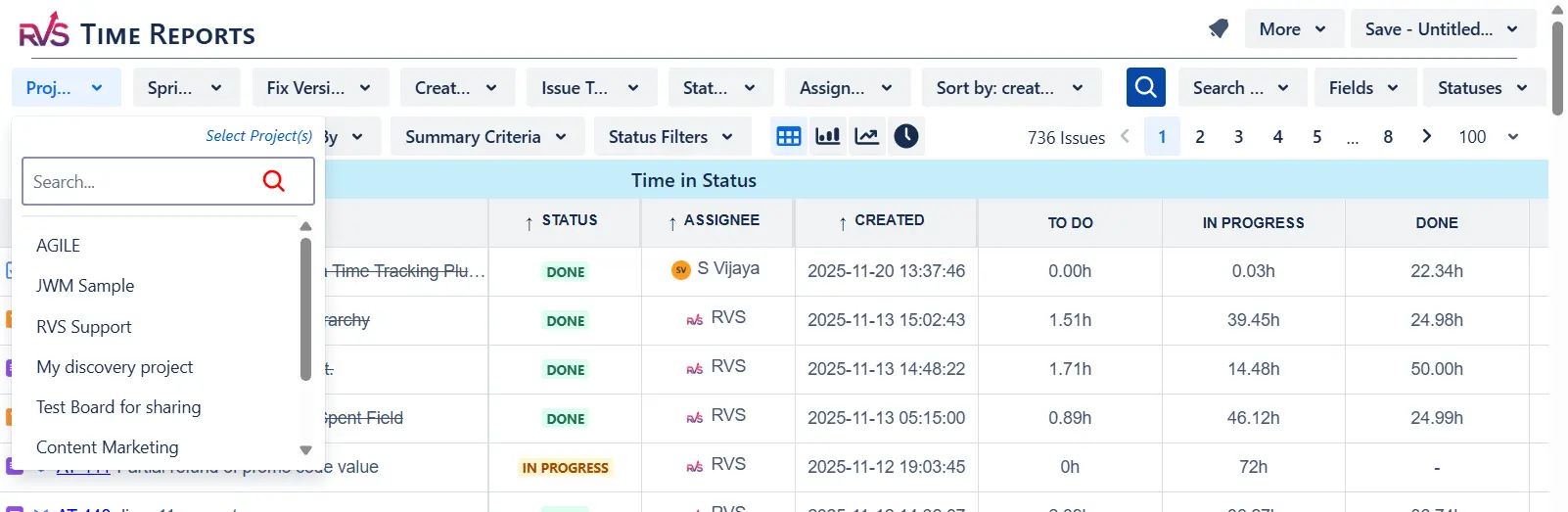
Automatic Time Tracking: Itis observational. Every time an issue moves from one Jira status to another, the system records a timestamp. This is commonly known as Jira time in status tracking. The cumulative duration across all statuses becomes the issue's lifecycle, revealing how your process actually operates, independent of what anyone manually recorded. The data is complete and unbiased because it requires no human input.
Both approaches are legitimate forms of Jira plugin time tracking. The mistake is treating one as a substitute for the other.
Manual Time Tracking in Jira: Logging What Your Team Actually Worked On
Manual time tracking is the right tool when the question is about effort. Like:
How many hours did the team log against this project?
Are we on track against our estimates?
How do I generate a timesheet for a client invoice?
These are billing questions, capacity questions, and resource questions, and they require human-entered data to answer them accurately.
Jira's native worklog functionality gives teams a basic mechanism for this, but it doesn't go far enough for teams that actually depend on worklog data for operational decisions. Native Jira logging lacks grouping by project or user across sprints, proper timesheet views that managers can review at a glance, billing-ready export formats, and any sense of time logged versus time estimated at a portfolio level.
Who needs manual time tracking in Jira:
Agencies and consultancies: They bill clients by the hour; every logged hour needs to be traceable, exportable, and auditable.
Engineering managers: They are justifying headcount or tracking utilization across projects.
Teams: Who run time-boxed sprints that need effort logged per issue to compare against story point estimates.
Finance & operations teams: Who build resource cost models from Jira worklog data.
The core limitation of manual time tracking is that it only captures what people choose to record. If a ticket bounced between review and rework four times over two weeks, none of that process friction shows up in a worklog. What shows up is the hours the developer chose to log, which is useful, but incomplete.
For teams that rely heavily on Jira worklogs for billing, utilization tracking, and operational reporting, tools like RVS Softek’s
Worklog Time Tracking and Timesheets plugin
help extend Jira beyond basic logging.
With centralized timesheet views, worklog reporting, billing-ready exports, and project-level effort tracking, teams get clearer visibility into how time is being recorded and distributed across projects, users, and clients.
Automatic Time Tracking: Understanding Where Time Actually Goes
Here's the operational problem that manual time logging will never solve: a ticket is opened on Monday. It closes on Friday. The developer logged six hours. But the issue was in "In Review" for three days and sat in "Ready for QA" for another day and a half before anyone picked it up. The six hours of logged effort are accurate, but they represent less than half of the issue's actual lifecycle time.
The other four-plus days were process time. Waiting time. Queue time. And none of it shows up in a Jira worklog.
This is the gap that automatic workflow time tracking closes. Rather than relying on what team members log, it reads the:
Jira status history that already exists on every issue
calculates exactly how long each issue spent in each stage.
Who needs automatic workflow time tracking in Jira:
Engineering managers: They are trying to identify where their delivery pipeline slows down
Support and operations teams: They track SLA performance, median resolution time, 85th percentile, and P1 response time
Delivery leads: Leads who want cycle time and lead time data to run more accurate sprint planning
Any team where issues are taking longer than expected, and nobody can explain why
For teams that need visibility into workflow delays, bottlenecks, and SLA performance, tools like RVS Softek’s
Time in Status Reports plugin
help turn Jira workflow history into actionable operational insights.
Teams can track how long issues stay in each status, analyze transition delays, monitor cycle time trends, and identify where delivery slows down across projects, assignees, or workflows, all directly inside Jira.
Manual vs Automatic: Which Type of Jira Time Tracking Does Your Team Need?
The honest answer for most teams is: both. They solve different problems, and the organizations that have complete time intelligence in Jira are the ones running both types.
But if you're starting from scratch or choosing where to invest first, here's the decision framework:
Manual Time TrackingRVS Worklog & Timesheets
Automatic Time TrackingRVS Time in Status Reports
What it tracks
Hours logged by team members against Jira issues
Time each issue spent in every workflow status, automatically
Data source
Manual input; team members log time themselves
Jira's existing status transition history; no manual input needed
Primary question answered
How many hours did we work on this, and who worked on it?
Why did this take so long, and where in the workflow did it stall?
Engineering managers, ops leads, support teams, delivery managers
Requires manual input
Yes, team members log time against issues
No, reads Jira's existing status history automatically
Key reports
Worklog reports, timesheets, effort vs estimate, billing exports
Status duration, time between statuses, cycle time trends, SLA percentiles
What it can't show
Process bottlenecks, idle time between stages, or why an issue sat in review for a week
Effort against estimates
RVS plugin
Worklog Time Tracking & Timesheets
Time in Status Reports
Choose manual time tracking (RVS Worklog Time Tracking & Timesheet) if your primary questions are:
How many hours did we log against this project?
Are we over- or underestimating?
How do I bill this client accurately?
How is each team member's time being allocated?
Choose automatic workflow tracking (RVS Time in Status Reports) if your primary questions are:
Why is this taking so long?
Where in the workflow are issues sitting idle?
Are we meeting our SLA targets?
Which stage is our bottleneck?
What does our real cycle time look like?
Run both if: You need to bill accurately and improve delivery speed. You manage a support or ops team with SLA commitments and a dev team with sprint targets. You want to close the gap between 'what we logged' and 'what actually happened to that issue.'
The best Jira time tracking plugin setup for a mature team isn't a single tool, it's the right tool for each dimension of the time problem. RVS builds both, and they work independently or together, depending on what your team needs first.
Conclusion
Jira already contains two types of time data. The first is what your team manually enters: worklogs, effort estimates, and billable hours. The second is what Jira records automatically every time an issue changes status: the actual lifecycle of every ticket your team has ever worked on.
Most teams are underusing both. They're logging time into a native Jira worklog that lacks proper reporting. And they're leaving years of workflow history completely unread, with no tool surfacing what it reveals about their process.
The best Jira time tracking plugin isn't the one with the most features. It's the one that answers the specific time question your team is actually asking. If that question is about effort and billing, RVS Worklog Time Tracking & Timesheets is built for it. If that question is about workflow efficiency and delivery speed, RVS Time in Status Reports is built for it.
Know which question you're asking. Then pick the right Jira plugin time tracking tool to answer it.
Frequently asked questions
What is the best Jira time tracking plugin for billing and client reporting?
For billing and client reporting, the best Jira time tracking plugin is one built around manual worklog management, specifically, filtering, grouping, and exporting logged hours in billing-ready formats. RVS Worklog Time Tracking & Timesheets is built for exactly this: it adds consolidated timesheet views, effort-vs-estimate comparisons, and clean Excel exports on top of Jira's native worklog structure. It supports agencies, consultancies, and any team that needs worklog data to be accurate, reportable, and auditable.
What is the best free Jira time tracking plugin?
Both RVS Worklog Time Tracking & Timesheets and RVS Time in Status Reports are available as free trials on the Atlassian Marketplace with no credit card required, making either a strong candidate for the best free Jira time tracking plugin, depending on your use case. For manual hour logging and timesheets, start with Worklog. For workflow analytics and status duration analysis, start with Time in Status Reports. Both have accessible flat-tier pricing that doesn't scale steeply per user.
Which Jira plugin is best for time tracking and billing?
RVS Worklog Time Tracking & Timesheets is the most focused answer for teams whose primary requirement is billing accuracy. It aggregates Jira worklog data into clean timesheet views, supports filtering by user, project, and issue type, and exports to Excel for client invoices and audit trails. It's purpose-built for the billing use case, not a broad project management tool with billing added as a secondary feature.
What is the difference between a Jira worklog plugin and a time in status plugin?
A Jira worklog plugin captures and reports on the time that team members manually log against issues and effort data. A time in status plugin reads Jira's automatic status history to measure how long issues are spent in each workflow stage, and processes data. Worklogs tell you what people worked on. Time in status tells you how work moved through the system. Both are valid forms of Jira plugin time tracking, but they answer different questions and serve different audiences.
Can a Jira time tracking plugin show cycle time and lead time?
Yes, but only through automatic workflow time tracking, not manual worklogs. Cycle time and lead time are calculated from Jira status transition timestamps, not from logged hours. RVS Time in Status Reports surfaces cycle time, lead time, and resolution time trends across sprints and configurable time periods, giving engineering managers the flow efficiency data they need to diagnose delivery slowdowns and improve predictability.
Does RVS Time in Status Reports work without any manual time logging?
Yes. RVS Time in Status Reports requires no manual input at all. It reads the status transition history that Jira already records automatically on every issue. As long as your team has been moving issues through workflow stages in Jira, the historical data is already there, RVS surfaces it immediately on install. Setup takes under 10 minutes and there's nothing to configure before running your first report.
Do RVS Jira time tracking plugins support both Jira Cloud and Data Center?
Yes. Both RVS Worklog Time Tracking & Timesheets and RVS Time in Status Reports support Jira Cloud and Jira Data Center. Both install directly through the Atlassian Marketplace with no external accounts required. RVS Time in Status Reports is built on Atlassian's native Forge framework, meaning all data is processed within your Jira environment and never reaches a third-party server.
Recent Blogs
July 23, 2026
Jira Time in Status Report: Complete Guide for Project Managers







.webp)





