The Problem: Native Jira only tracks time at the issue level, making it difficult to understand workload distribution, sprint effort, or overall team capacity across projects.
The Insight: A timesheet tracker audit brings structure to raw worklog data, helping teams spot workload imbalance, effort spikes, estimation gaps, and hidden capacity issues early.
The Fix: With Jira Worklog & Timesheet Reports (RVS Softek), teams can consolidate worklogs into sprint and team-level views, compare estimated vs actual effort, and turn fragmented time data into actionable delivery insights.
Every Jira project appears to have accurate time data. Hours are logged against issues, estimates are set at sprint planning, and the numbers technically add up. But ask a PM or tech lead a direct question, "Where did our team's hours actually go last sprint?", and most can't answer without exporting a CSV and rebuilding a spreadsheet by hand.
That gap is exactly what a timesheet tracker is supposed to close. Not just record hours against tickets, but make that data auditable, comparable across people, issues, and sprints, instead of locking one ticket at a time inside native Jira. The problem is, most teams never actually run that audit. They assume their worklogs are accurate simply because the data exists, not because anyone checked it.
This blog covers:
Importance of Timesheet Tracker Audit
A detailed checklist for Jira time management audit checklist
Additional Jira time tracker suggestion for your Jira worklog
Why Run a Timesheet Tracker Audit At All?
Native Jira logs time at the issue level and stops there; there's no built-in view that rolls worklogs up across a sprint, a team, or a project. That gap is exactly where a timesheet tracker audit earns its keep. Without one:
Inaccurate or incomplete time data doesn't announce itself; it just sits there quietly, issue by issue
A sprint can slip with no clear record of where the hours actually went
A client can dispute an invoice with no exportable, defensible time report to point to
Leadership can ask a capacity question that nobody on the team can answer with real numbers
That’s also why many teams eventually realize that native Jira reporting only solves part of the problem. It records time, but it doesn’t structure it in a way that’s easy to analyze across sprints, teams, or clients.
This is where a dedicated Jira time tracking tool like Worklog time tracking & timesheet by RVS Softek becomes useful. Instead of stitching together issue-level logs manually, teams get consolidated timesheets, workload views, and sprint-level summaries in one place. It turns scattered worklogs into something you can actually audit, compare, and act on, without relying on manual reporting work.
The Ultimate Jira Time Tracker Audit Checklist
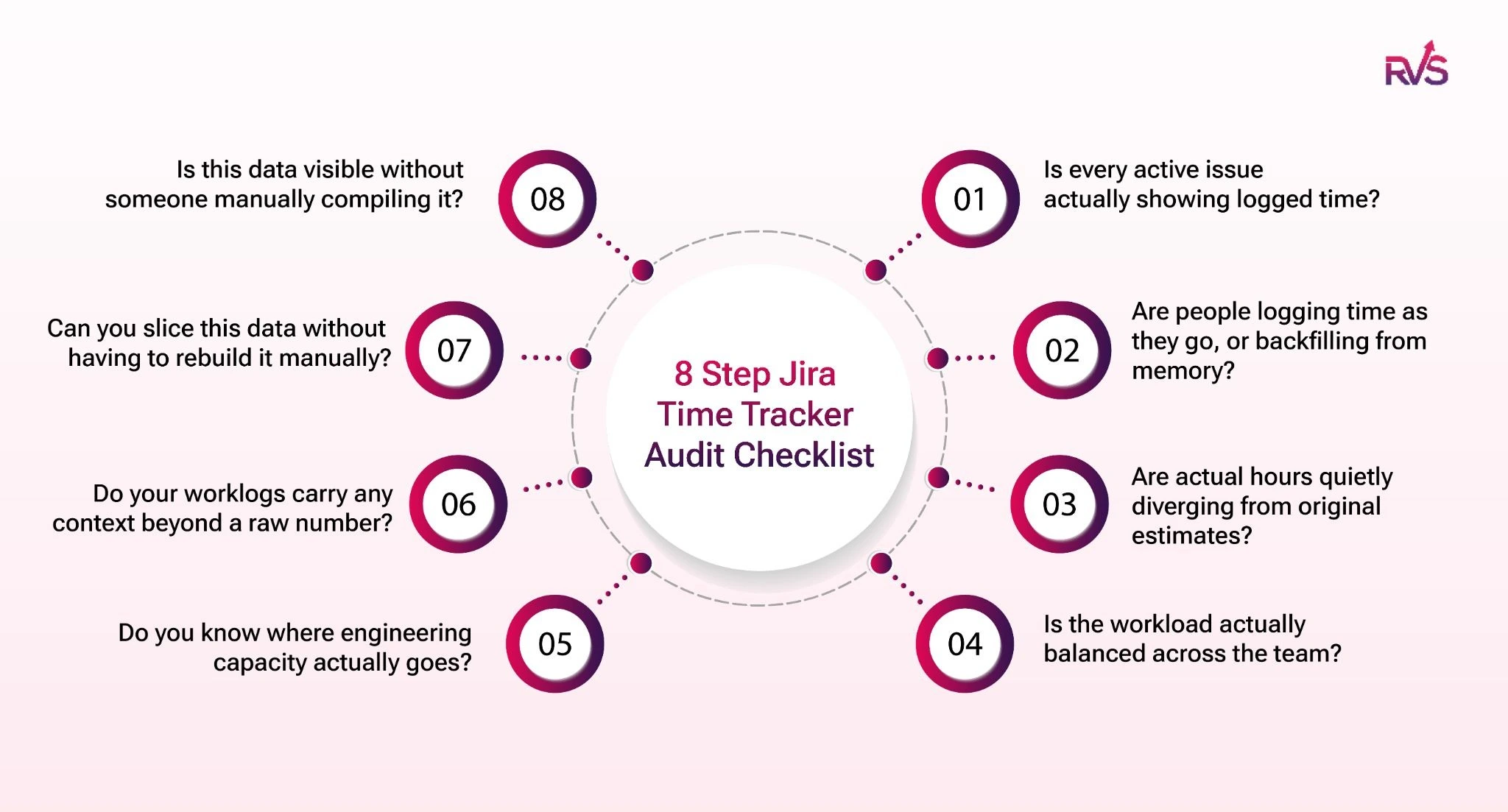
Work through these eight checkpoints against your own Jira data. Each one targets a specific way worklogs quietly go wrong, and what a proper timesheet tracker should let you check in minutes rather than hours.
1. Coverage Check:
☐ Is every active issue actually showing logged time?
Open the Timesheet View, filter by your current sprint, and scan for issues that show visible activity in Jira but little or no logged time. This is the most basic worklog accuracy test. If work is happening but hours aren't being recorded against it, every report built on that data is already wrong.
Because the timesheet tracker's Timesheet View consolidates this into a single screen, the gap is visible in seconds instead of requiring you to click through tickets one by one.
2. Logging Frequency Check:
☐ Are people logging time as they go, or backfilling from memory?
Set the Timesheet View's date range to the current week and look at when hours are actually being entered, not just how many. Daily logging tends to be accurate; hours reconstructed from memory on a Friday afternoon are a different story.
Such a pattern is easy to miss in native Jira because there's no consolidated, date-range view to flag it, exactly what this timesheet tracker is built to make routine.
3. Estimate Drift Check:
☐ Are actual hours quietly diverging from original estimates?
Pull up the Estimated vs. Actual Time Comparison report for the sprint and look at the gap between original estimates and total logged hours, issue by issue. A handful of overruns is normal; a pattern of consistent, sprint-over-sprint overruns on the same work type usually means the estimates are wrong, not the team. Because this timesheet tracker surfaces the comparison automatically, you can reassign work or adjust scope mid-sprint, before the overrun becomes the reason the sprint slips.
4. Distribution Check:
☐ Is the workload actually balanced across the team?
Open the Team-Level Time Summary for the current sprint and look at aggregated logged hours per person. A sprint can look healthy in a standup while two people quietly carry most of the logged effort, and others have spare capacity.
Because the timesheet tracker aggregates this automatically, that kind of imbalance doesn't stay invisible until someone burns out or a deadline slips.
5. Issue-Type Breakdown Check:
☐ Do you know where engineering capacity actually goes?
Filter Advanced Worklog Reports by issue type across the sprint or project and see how hours are split between feature work, bug fixes, support requests, and technical debt. Most teams are surprised by how much capacity reactive work consumes compared to what was planned.
The timesheet tracker's issue-type filter turns this from a guess into a number you can actually plan around.
6. Categorization Check:
☐ Do your worklogs carry any context beyond a raw number?
This is where Worklog Attributes come in, available on the Advanced license tier. Add a custom field like text, dropdown, or checkbox directly to the worklog entry itself, such as a "Billable / Non-Billable" dropdown that a developer selects at the moment they log time.
Without this, every worklog in native Jira is just an untagged number with no category attached. Because this timesheet tracker supports custom worklog attributes, billing and utilization data stay accurate from the point of entry instead of being reconstructed afterward in a spreadsheet. If you're on the Standard tier, this is the first checkpoint worth evaluating for an upgrade.
7. Filterability & Export Check:
☐ Can you slice this data without having to rebuild it manually?
Try filtering your worklog data by sprint, assignee, project, and date range, then export it to CSV. If that takes more than a couple of minutes, your setup isn't audit-ready; it's just data storage. Advanced Worklog Reports handles this directly: filterable cuts of worklog data, exportable for billing or reporting, without anyone touching a spreadsheet formula.
This single checkpoint is usually the clearest sign of whether your timesheet tracker is actually audit-ready, or just a place where hours get typed in.
8. Stakeholder Visibility Check:
☐ Is this data visible without someone manually compiling it?
Check whether logged vs. estimated hours are visible anywhere stakeholders can see them on their own. If the answer is "only if someone builds a report and sends it," that's reporting overhead your team doesn't need to carry.
The Time Spent Dashboard Gadget puts a live hours-logged-vs-estimated widget directly on the Jira project dashboard, so a delivery lead or engineering director can check sprint progress without a status meeting. If your timesheet tracker isn't visible to the people asking for the data, it isn't actually solving the reporting problem.
Your Audit Scorecard
Eight checkpoints, eight chances for ghost hours to hide. If you worked through this list and checked every box without needing to export a single spreadsheet, your current timesheet tracker is doing its job.
If you stalled out around checkpoint three or four, your worklogs are probably more accurate at the ticket level than they are at the team or sprint level, which is usually where the real planning decisions get made.
Either way, the value isn't in the score; it's in knowing exactly which checkpoint failed instead of vaguely suspecting "we should track time better."
Turning the Checklist Into a Habit with RVS Softek
A one-time audit tells you where things stand today. Running this same checklist every sprint, or even just the coverage and estimate-drift checks weekly, is what actually prevents ghost hours from reappearing.
That consistency is the real difference between a timesheet tracker that sits unused after setup and one that becomes part of how the team plans.
Worklog Time Tracking & Timesheets by RVS Softek was built to make every checkpoint on this list something you can run directly inside Jira, without exporting data or building a parallel spreadsheet system.
How Worklog Time Tracking & Timesheet helps in Jira Time Management Audit
As a timesheet tracker, it covers all eight checkpoints between its Timesheet View, Estimated vs. Actual Time Comparison, Team-Level Time Summary, Advanced Worklog Reports, Worklog Attributes, and Time Spent Dashboard Gadget, on Standard and Advanced license tiers, available now on the Atlassian Marketplace.
Balance Sprint Workload in One View: Use Timesheet View grouped by assignee to see how effort is distributed across a sprint in one place. Instead of checking issues individually, you can quickly identify workload imbalance, over-assigned developers, or underutilized team members. Running this mid-sprint helps correct issues before they impact delivery.
Detect Bottlenecks and Effort Strain Early: By reviewing logged hours per assignee, you can detect tasks that are taking longer than expected or repeatedly consuming disproportionate effort. These patterns often indicate blockers, unclear requirements, or estimation gaps that need attention before deadlines slip.
Validate Planning With Actual Execution Data: The Estimated vs Actual report highlights where sprint planning diverges from execution. It helps identify overruns early so teams can adjust scope, rebalance work, or improve future estimation accuracy.
Understand Where Engineering Capacity Is Spent: Advanced Worklog reports show how time is split across features, bugs, and support work. This makes hidden effort visible and helps teams understand where engineering capacity is actually being spent.
Improve Billing Accuracy With Worklog Categorization: With worklog attributes, teams can tag time entries as billable or non-billable at the source. This ensures accurate reporting for invoicing, utilization tracking, and internal cost analysis without spreadsheet cleanup.
Enable Live Sprint Visibility for Stakeholders: Dashboard gadgets show logged vs planned time in real time, giving stakeholders continuous visibility into progress without manual status updates or reports.
Note:
See how
Jira Timesheet Plugin
by RVS Softek delivers a more complete and reliable time tracking experience—read the full comparison.
Conclusion
A Jira timesheet audit is only as useful as the visibility it provides. When time data stays trapped at the issue level, it’s difficult to understand workload balance, effort distribution, or delivery risks in real time.
With structured timesheet reporting, teams move from fragmented logs to clear, actionable insights across sprints and projects. This makes it easier to spot inefficiencies early, improve planning accuracy, and keep delivery on track.
Run your first timesheet tracker audit this sprint. Install Worklog Time Tracking & Timesheets and see which checkpoint your team passes, and which one needs a closer look.
How do I check if Jira worklogs are accurate across a team?
You can verify worklog accuracy by comparing logged hours across assignees, sprint capacity, and estimated vs actual effort. A timesheet view helps surface inconsistencies like missing logs, inflated entries, or uneven reporting across team members.
What is the RVS Worklog Timesheet, and how does it work inside Jira?
Worklog Time Tracking & Timesheets (by RVS Softek for Jira) is a Jira timesheet plugin that enables structured time tracking in Jira using manual worklogs instead of automated timers. Users log time directly on Jira issues using the native “Log Work” feature, and the tool consolidates all entries into a unified timesheet view. This makes time tracking in Jira more transparent by showing who logged what, when, and against which task—without changing how teams already work.
Does RVS Worklog Timesheet support both Jira Cloud and Jira Data Center?
Yes, the tool supports both Jira Cloud and Jira Data Center environments. Whether teams are using cloud-based or self-hosted Jira, this jira timesheet plugin ensures consistent time tracking in Jira with the same reporting structure, dashboards, and worklog-based timesheet views across deployments.
What causes inaccurate time tracking in Jira worklogs?
Inaccuracy usually comes from manual logging delays, missing entries, inconsistent estimation practices, or a lack of structured reporting. Without consolidated views, these issues remain unnoticed until the end of the sprint or project.
How do I compare estimated vs actual time in Jira effectively?
Instead of checking issues individually, use a structured report that aggregates estimates and logged hours across a sprint. This highlights patterns like repeated overruns or consistently underestimated task types.
How does a Jira timesheet audit improve sprint predictability?
By analyzing historical worklogs, teams can identify recurring effort patterns, refine estimates, and understand real capacity usage. This leads to more realistic sprint planning and fewer delivery surprises.
What’s the difference between issue-level and timesheet-level Jira reporting?
Issue-level reporting shows time per ticket, while timesheet-level reporting aggregates effort across people, sprints, and projects. This shift helps identify workload trends and bottlenecks that individual issue views cannot reveal.
Recent Blogs
July 23, 2026
Jira Time in Status Report: Complete Guide for Project Managers






.webp)


.webp)





