The Problem: Jira roadmaps often break down due to scattered project views, unclear dependencies, and outdated manual planning, making it hard to trust timelines.
The Shift: Teams are moving from static roadmaps to live, data-driven planning using Jira Advanced Roadmaps that connect multiple teams, projects, and timelines in one view.
The Fix: Use structured hierarchy (Initiatives → Epics → Stories), real velocity-based forecasting, capacity planning, and scenario modeling to keep roadmaps accurate and realistic.
The Upgrade: Enhance Jira with tools like RVS Agile Tools to get roll-up estimates, time tracking, dependency visibility, and Gantt views directly from live Jira data.
Keep reading to discover how to build faster, clearer, and more reliable Jira roadmaps that actually reflect real execution on the ground.
In Jira project management, product cycles move fast, priorities shift often, and stakeholder expectations evolve constantly. Yet one thing stays true: teams that plan clearly deliver better.
A roadmap aligns engineering, product, and business on what to build, when, and why, but keeping it updated is often slow and frustrating. This is where Jira advanced roadmaps make a difference.
Instead of relying on disconnected tools and manual updates, in this blog, we are going to explore what Advanced Roadmaps in Jira are and how to apply different Jira project management strategies to create effective roadmaps that keep your team aligned and your planning on track.
What are Advanced Roadmaps in Jira?
Advanced Roadmaps for Jira Software is a planning feature that helps teams manage work across multiple projects from a single, unified view.
At a basic level, Jira helps you track tasks within a team. Advanced Roadmaps for Jira goes a step further; it connects multiple teams, projects, and timelines so you can see how everything fits together.
Here’s what it actually does:
Gives a big-picture view: You can combine work from different Jira boards and projects into one plan, so leadership and teams can see progress in one place.
Helps with long-term planning: It lets you map epics, initiatives, and releases on timelines, making it easier to plan months or even quarters ahead.
Shows dependencies clearly: You can identify how tasks or teams depend on each other, which helps avoid delays and bottlenecks.
Supports capacity planning: Teams can estimate workload and check if they have enough resources to deliver on time.
Allows “what-if” scenario planning: You can test different plans (like shifting timelines or resources) before making actual changes in Jira.
In simple terms, Advanced Roadmaps helps you move from tracking tasks to planning strategy, connecting daily work with larger business goals across teams.
Core Jira Advanced Roadmaps Features
Multi-Team Boards: A single source of truth that pulls data from multiple projects and boards.
Custom Hierarchies: The ability to create levels above the "Epic" (e.g., Initiatives or Goals) for high-level tracking.
Capacity Management: Real-time tracking of team bandwidth to prevent burnout and over-allocation.
Visual Dependencies: Cross-team mapping to identify and resolve "blockers" before they delay a release.
Scenario Planning: A "sandbox" to test Best Case/Worst Case timelines without impacting live data.
How to Build Effective Jira Advanced Roadmaps in 2026?
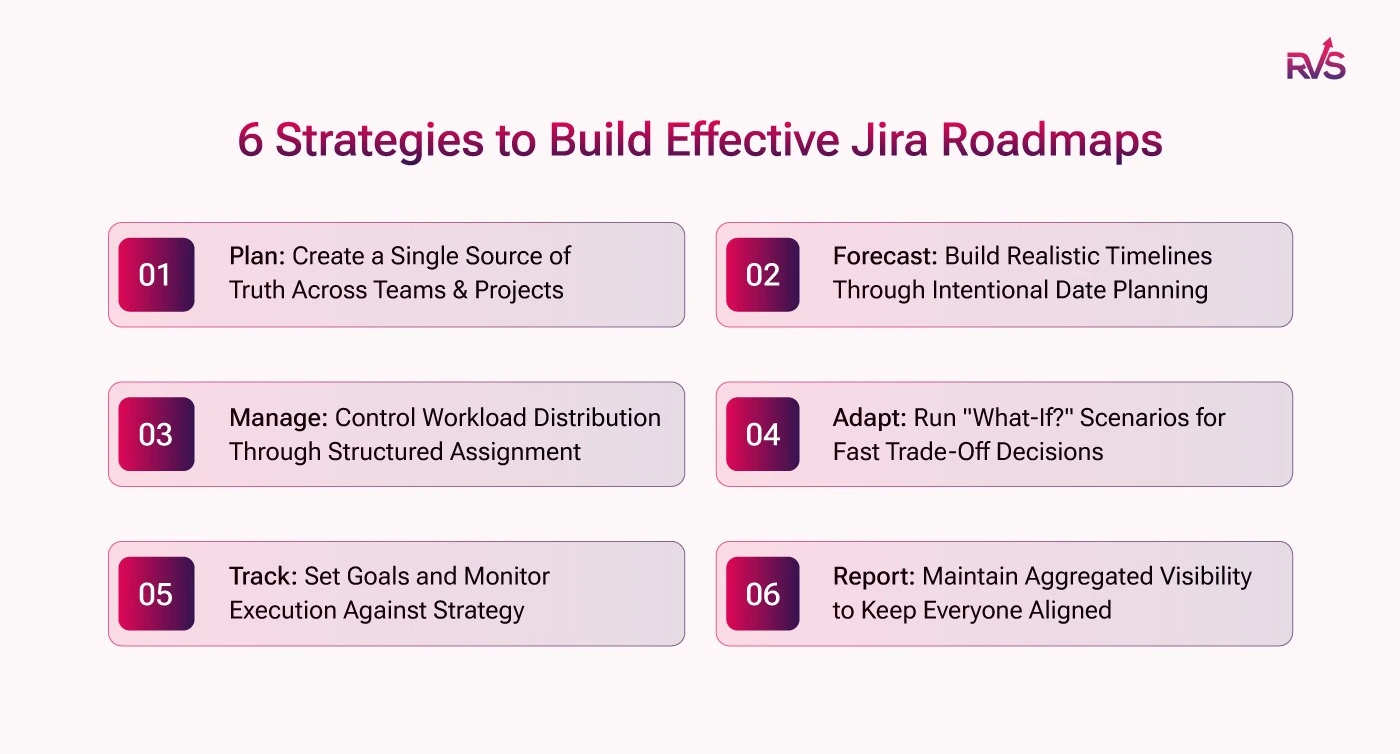
Here are six proven strategies to help your team build Jira roadmaps faster and keep them accurate with minimal ongoing effort.
Plan: Create a Single Source of Truth Across Teams & Projects
Jira alone becomes too granular when planning work for multiple teams across multiple projects, making it harder to see how initiatives track toward the bigger picture. Advanced Roadmaps fills this gap by pulling in relevant issue details to create a realistic, unified schedule.
Strategy:
Start by creating a Plan that consolidates all relevant Jira projects into one view
Roll up Epics into Initiatives to get a true cross-team, cross-project snapshot
Assign each team (Design, Engineering, QA, etc.) to their respective issues so ownership is crystal clear from day one
Impact: Your product manager gets one dashboard instead of juggling five separate Jira boards.
Forecast: Build Realistic Timelines Through Intentional Date Planning
Set delivery timelines through disciplined planning, making your forecasts more intentional and stakeholder-aligned.
Strategy:
Manually assign start and due dates to every Epic based on team input and historical delivery data
Use the last 3–5 sprints of actual velocity as your baseline when estimating how long work will take
Review and adjust dates at the start of every sprint to reflect real progress — not original assumptions
Impact: Stakeholders get commitment-ready delivery timelines built on real team history, not guesswork.
Manage: Control Workload Distribution Through Structured Assignment
Use deliberate issue assignment and sprint planning to prevent overload and bottlenecks across squads.
Strategy:
During sprint planning, count story points per team member to ensure no one is over-committed
Create a simple team workload table in Confluence alongside your roadmap to track who is assigned what
Define clear ownership per Epic in Jira so workload imbalances surface naturally during standups and planning rituals
Impact: Engineering leads can proactively redistribute work before a deadline slips — not after.
Adapt: Run "What-If?" Scenarios for Fast Trade-Off Decisions
Advanced Roadmaps enables fast prioritization and trade-off decisions, letting you instantly see the impact in your plan so you can answer "What if?" questions.
Strategy:
Use Scenarios to model competing priorities (e.g., "What if we delay Feature B to accelerate Feature A?")
Keep your main plan clean, use scenarios as sandboxes before committing any change to Jira
Present scenario comparisons during quarterly planning to align leadership on trade-offs with data, not opinions
Impact: You walk into executive reviews with answers, not just questions, dramatically reducing back-and-forth approval cycles.
Track: Set Goals and Monitor Execution Against Strategy
Advanced Roadmaps lets you set goals and track progress to make sure teams are executing on strategy, with everyone aligned to the same priorities.
Strategy:
Tie every Epic back to a strategic initiative or OKR, so progress is always contextual, not just operational
Use percentage complete on Epics as a health indicator during leadership syncs
Conduct a weekly walkthrough of the roadmap with delivery leads to manually flag at-risk items and update statuses before they become escalations
Impact: PMs can confidently answer "Are we on track?" at any point in the quarter, without pulling a manual status report.
Report: Maintain Aggregated Visibility to Keep Everyone Aligned
Advanced Roadmaps provides a single source of truth with aggregated visibility across teams, so you can keep everyone on the same page.
Strategy:
Create saved views tailored for different audiences, a quarterly view for leadership, a sprint view for delivery teams
Share roadmap links or export as PDF for async stakeholder updates, reducing unnecessary status meetings
Schedule a bi-weekly roadmap review (30 mins, cross-functional) to keep the plan trusted and current, a roadmap updated once a quarter is a roadmap no one believes in
Impact: One live URL replaces a dozen stale PowerPoint decks flying around in email threads.
What an Effective Jira Roadmap Actually Looks Like in 2026
Here is what separates a modern Jira Advanced Roadmap from a static planning document:
Every change made in Jira reflects in the Advanced Roadmap automatically, no exports, no copy-paste, no chasing updates.
Work is structured in a full hierarchy, so initiatives break down into epics, epics into stories, and stories into tasks. You can zoom in or zoom out depending on your audience.
Dependencies are visible at a glance, making it easy to spot which work is blocked, which is blocking, and what the downstream impact looks like if something slips.
Time estimates are grounded in actual hours logged by the team, rolling up from tasks through stories and epics, rather than assumptions made during planning.
Both technical teams and stakeholders can read the same Advanced Roadmap comfortably, without needing a separate version for each audience.
Bottlenecks surface by workflow status, not just by missed deadlines, giving teams a chance to course-correct before the damage is done.
The best Advanced Roadmaps communicate on their own. Getting to this level inside Jira takes either significant configuration effort or the right tooling. This is where RVS Softek's Agile Tools Plugin make the biggest difference.
How RVS Agile Tools Helps You Build Better Roadmaps
Agile Tools by RVS Softek is built for teams that rely heavily on Jira and need deeper visibility through agile reports without adding complexity or external tools. It turns Jira into a structured planning system by combining reporting, hierarchy, and real-time tracking in one place, so your roadmap stays accurate, connected, and easy to manage.
Here’s how each feature solves real roadmap challenges:
Epic Hierarchy and Links Hierarchy
Structure your Jira issues into clear multi-level hierarchies like Initiatives, Epics, Stories, and Sub-tasks. This removes the problem of flat issue lists and broken relationships. Teams and stakeholders can easily navigate work at any level, making your roadmap more structured and understandable.
Roll-Up for Time Estimates
Time estimates automatically roll up from sub-tasks to higher levels like stories, epics, and initiatives. Any update made by a developer reflects instantly across the hierarchy. This ensures your roadmap timelines are always based on real data, not outdated estimates.
Time Tracking
Track actual work logged against Jira issues and compare it with estimates in real time. This gives a true picture of progress instead of relying on manual updates. When your roadmap shows progress, it reflects real effort, building trust with stakeholders.
Time in Status Reports
Understand where work is getting delayed by tracking how long issues stay in each workflow stage. Whether it's review delays or UAT bottlenecks, you can spot issues early and adjust your roadmap before delays impact delivery.
Gantt Charts for Jira Cloud
Visualize your entire roadmap with a live Gantt chart that pulls data directly from Jira. It shows timelines, dependencies, and critical paths clearly. There’s no need for exports or manual updates; what you see is always aligned with your Jira data.
Key Benefits Your Team Gains
Adopting RVS Softek's Jira Agile Tools is not just about making roadmaps look better. It is about compressing the time between planning and delivery, and rebuilding trust in the planning process itself.
Trustworthy roadmaps, always up to date: Your Gantt charts and hierarchies reflect live Jira data, so stakeholders get answers instantly without constant PM check-ins.
Faster planning cycles: Roll-up estimates and connected timelines turn roadmap updates from hours into minutes, making planning more proactive than reactive.
Less context switching: Everything lives inside Jira, so your team doesn’t have to jump between multiple tools to understand progress.
Scales with your team: Whether it’s a single Scrum team or multiple cross-functional units, the structure grows with your planning needs.
Enterprise-grade features without the high cost: Access advanced capabilities like Gantt views, dependencies, and hierarchy without expensive enterprise tools.
Conclusion
The challenge with modern product planning is not a lack of data. It is a lack of coherence. Teams have plenty of Jira issues, sprint boards, and status updates, but still can't confidently answer: when will this ship?
Jira advanced roadmaps, when supported by the right tools, bring that clarity by connecting strategy directly to live Jira data and timelines. RVS Softek’s Jira Agile Tools make this seamless, enabling teams of any scale to plan confidently without manual effort.
With Jira advanced roadmaps, your roadmap is no longer static; it’s a live, reliable source of truth that evolves with your team’s work.
Advanced Roadmaps in Jira Software is a planning feature that helps teams manage work across multiple projects, visualize timelines, and align tasks with business goals in one unified view.
2. How do you build a quick roadmap in Jira?
Start by defining your hierarchy (initiatives, epics, stories), connect multiple Jira projects, set timelines, map dependencies, and use real-time data to track progress and adjust plans.
3. What are the key features of Jira Advanced Roadmaps?
Key features include timeline planning, dependency tracking, capacity planning, scenario modeling, and multi-project visibility, helping teams plan and execute work more effectively.
4. Why do teams struggle with Jira roadmaps?
Teams often face issues like a lack of hierarchy, poor visibility across projects, outdated estimates, and difficulty tracking dependencies, which leads to unreliable roadmap planning.
5. How can you improve roadmap accuracy in Jira?
Use real-time data from time tracking, roll-up estimates, and status reports. This ensures your roadmap reflects actual progress instead of assumptions or manual updates.
6. What tools can enhance Jira Advanced Roadmaps?
Tools like Agile Tools by RVS Softek enhance Jira with better hierarchy management, agile reports, time tracking, and Gantt charts for clearer and more accurate roadmap planning.
7. What is the best way to manage dependencies in Jira roadmaps?
Use issue linking and visualization tools like Gantt charts to map dependencies clearly. This helps identify blockers early and keeps your roadmap aligned across teams.
Recent Blogs
July 23, 2026
Jira Time in Status Report: Complete Guide for Project Managers







.webp)





